Page 166 of 214
North America
Game
Game Game
Game Replay
ReplayReplay
Replay
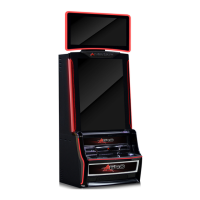
The game history screen displays information about the last 10 games played on the machine. You
can select which game to display.
Note:
Note: Note:
Note: The most recent game is numbered 1 and the oldest game is numbered 10.
1. To view information from other games select the arrowed cursor to move through each of
the games.
2. To display a replay of the currently selected game as it appeared to the player select the
REPLAY THIS GAME
REPLAY THIS GAMEREPLAY THIS GAME
REPLAY THIS GAME icon.
Note:
Note: Note:
Note: During the replay of the game no instructions are displayed on screen.
During the replay:
1. Press C
CC
CASHOUT
ASHOUTASHOUT
ASHOUT to enter the next stage of a particular game that is replayed (i.e. feature
game). Once in the feature game stage press C
CC
CASHOUT
ASHOUTASHOUT
ASHOUT to advance through the individual
“free- spin” games.
2. Pressing RULES
RULES RULES
RULES will scroll through the game rules page/s. Once all rules have been
scrolled through then RULES
RULESRULES
RULES will go back to the game replay screen.
3. Turn the AUDIT
AUDITAUDIT
AUDIT key to exit the replay screen back to the game history screen.
Displayed below is a screen capture of the game history screen as it appears to the operator,
followed by an explanation of the game history replay screen values.
Game History Page


 To Next Page