Page 71 of 214
North America
Hopper Test
Hopper TestHopper Test
Hopper Test
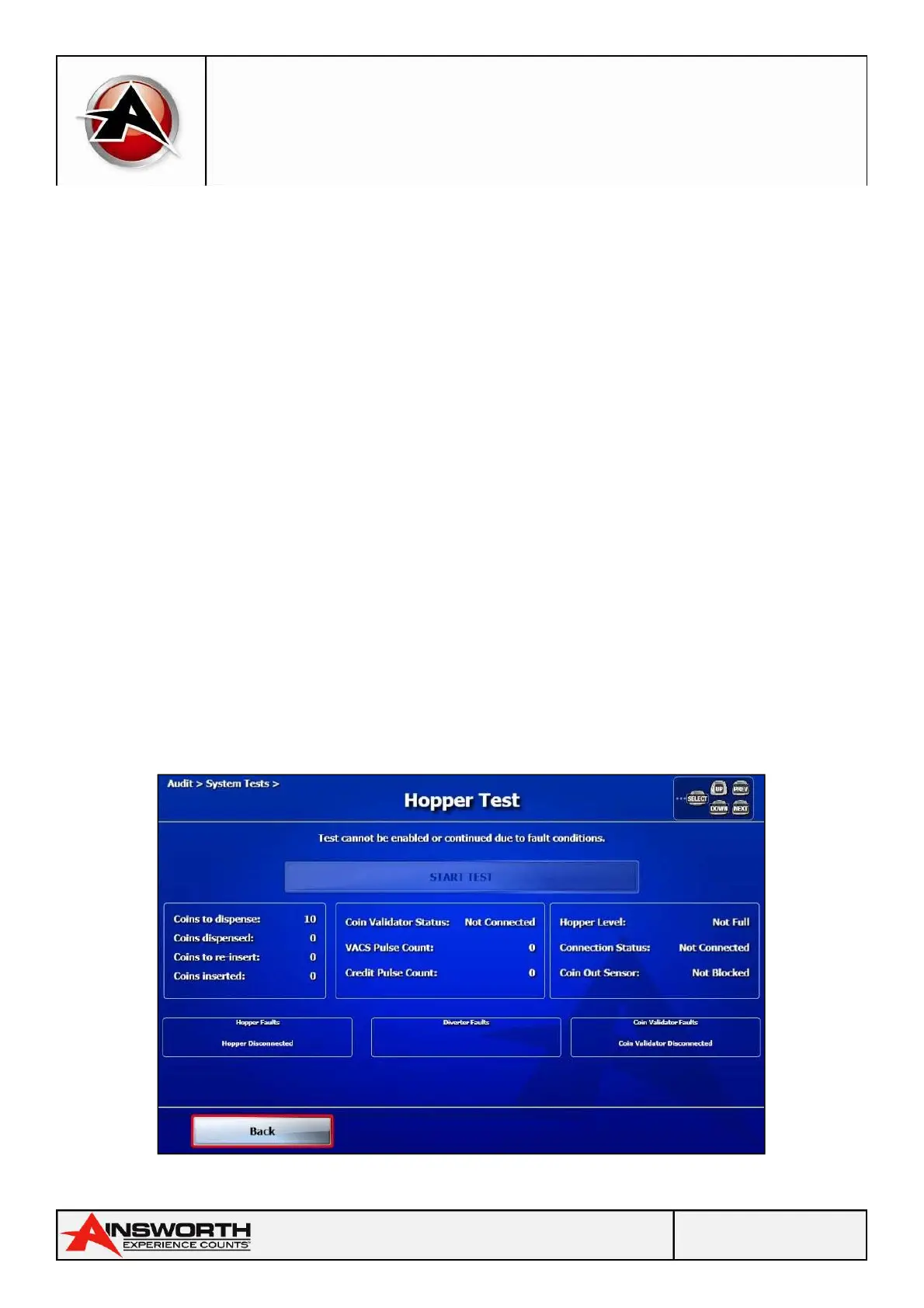
The hopper test is used to verify the correct operation of the hopper.
Note:
Note: Note:
Note: You must open the main door to initiate the hopper test, and then close it when prompted.
Note:
Note: Note:
Note: Once you have initiated the hopper test and dispensed coins, there is no way to exit the test
until you have reinserted the dispensed coins.
To start the hopper test:
1. Open the main door.
2. Verify that a minimum of ten coins can be dispensed.
3. Close the main door.
A highlighted message will prompt you to close the main door.
4. Select the Start Test
Start TestStart Test
Start Test icon to start the hopper test.
Ten coins are dispensed to the coin tray and the count is confirmed on the screen.
A highlighted message prompts you to re-insert the 10 coins. The hopper test screen shows the
number of “Coins to Re-insert” and “Coins Re-inserted” progressively.
5. Re-insert the 10 coins.
When you have reinserted all ten coins a highlighted message appears noting “HOPPER TEST
COMPLETE”.
6. Select the Back
BackBack
Back icon to exit the hopper test.
Hopper Test Screen


 To Next Page