LCD Display ControlsLCD Display Controls
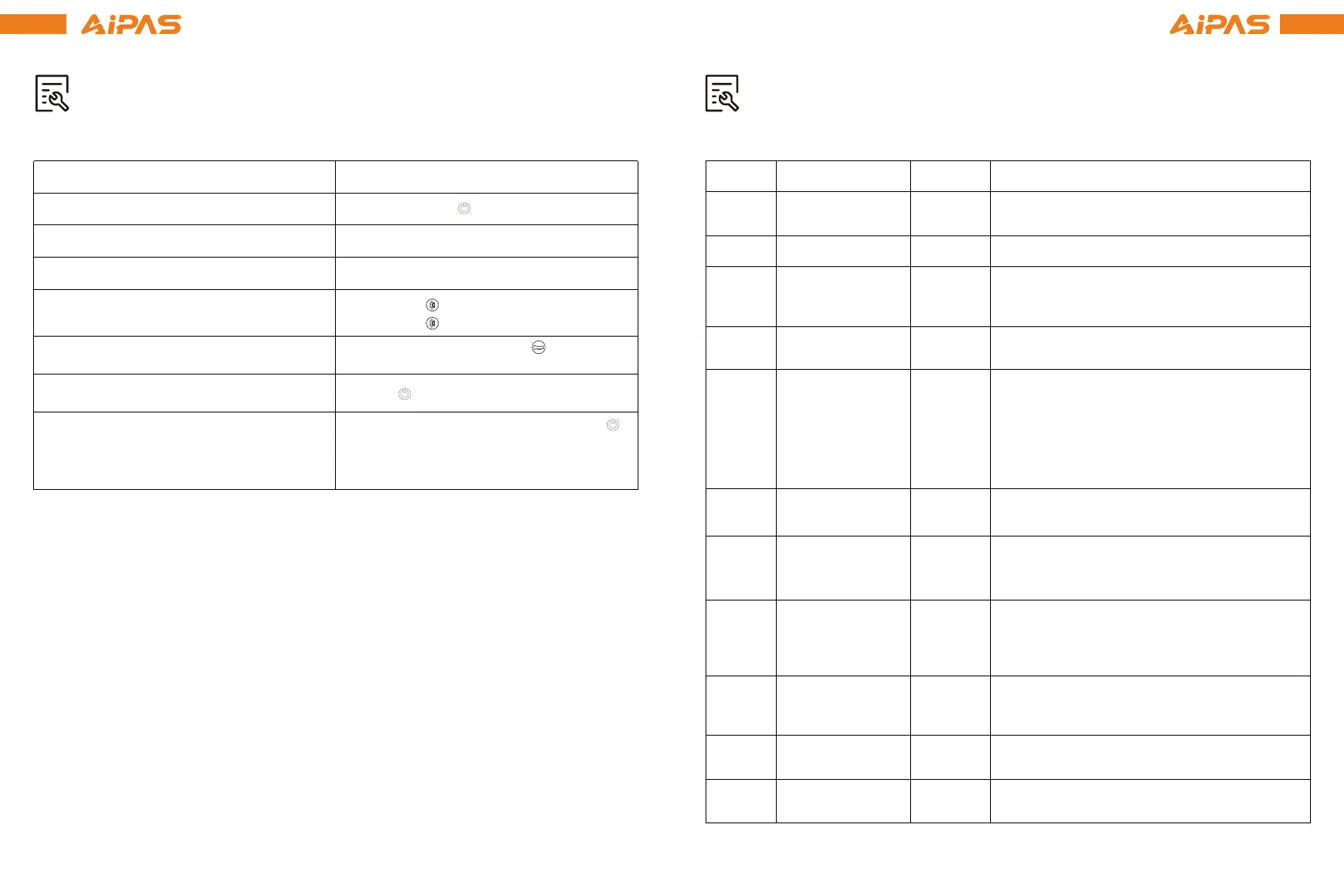
FunctionSetting Default Explanation
BrightnessP01 2
Backlight display brightness.The darkest
level is 1 and the brightest level is 3.
SleepP04 10
Tire SizeP06 26
Speed LimitP08 32
Distance UnitsP02 1 0:KM; 1: MILE
Operation Directions
22 23
To prevent serious injury or death, DO NOT change settings excluded from the table. Chang-
ing setting not listed in the following table may cause your bike to stop working properly. If
you need the default setting values of settings not listed, contact Aipas eBikes. DO NOT ride
your bicycle until the default settings have been restored.
Do not tamper with your bicycle. Tampering is defined as removing or replacing any original
equipment or modifying your bicycle in any way that may change its design and/or operation.
Such changes may seriously impair the handling, stability, and other aspects of the bicycle,
making it unsafe to ride. Tampering can void the warranty and render your bicycle non-com-
pliant with the applicable laws and regulations. Aipas eBikes is not responsible for any direct,
incidental, or consequential damages, including, without limitation, damages for personal
injury,property damage, or economic losses due to tampering.
LCD Display sleep timer. The default setting
will turn the display OFF after it has not
been used for 10 minutes.
Range is 0-100.The value represents the maximum
operating speed of your Aipas eBike in km/h. For
example,a value of 25 indicates the maximum
speed will not exceed 25 km/h. Drive speed is
maintained at this set value. Any value above 45
will fully unlock the bike’s speed, which equates to
up to 28mph. Margin of error: 3 km/h
Used to compute speed and distance
traveled.
Throttle Zero StartP09 0
0: Throttle active from standstill.
1: Throttle active only when already moving.
PAS SensitivityP11 3
PAS StrengthP12 3
Odometer ResetP16 N/A
CruiseP17 1
Mode ToggleP10 2
0: PAS Active, Throttle Inactive
1: PAS Inactive, Throttle Active
2: Both PAS and Throttle Active
When set to higher numbers,the motor will
come on stronger.Lower numbers will be
more gentle.
0: Cruise lnactive
1: Cruise Active
When set to higher numbers, it will take more
crank rotations for the motor to turn ON.
Lower numbers will take fewer crank
rotations to turn the motor ON.
To change display settings, hold the plus (+) and the minus (-) buttons simultaneously to enter
into the Settings Menu. Press the button to toggle between each numbered setting. To adjust
the value of each setting, click the plus (+) and the minus (-) buttons as needed.
There are 21 settings (P01-P21). You should only change the settings listed below.
NOTE: The trip meter, as well as maximum and average speed will reset when the bicycle is
powered OFF.
Turn the bicycle ON/OFF
Increase PAS Level
Decrease PAS Level
Press and hold button
Press plus (+) button
Press minus (-) button
Turn lights ON/OFF
Horn sound/stop
Press the button to turn on,
Press the button to turn off.
Toggle Odometer, Trip A, Voltage,Current,
Trip Timer (TM)
Max Speed and Average Speed
Press and hold the plus (+) button and )
button simultaneously to toggle between
the speed meter, max speed and average
speed.
Press the button, and the horn will
sound. Release it, and the horn will stop.
Press button
Press the (-) button for five seconds to
restore factory settings.


 To Next Page
 Loading...