1
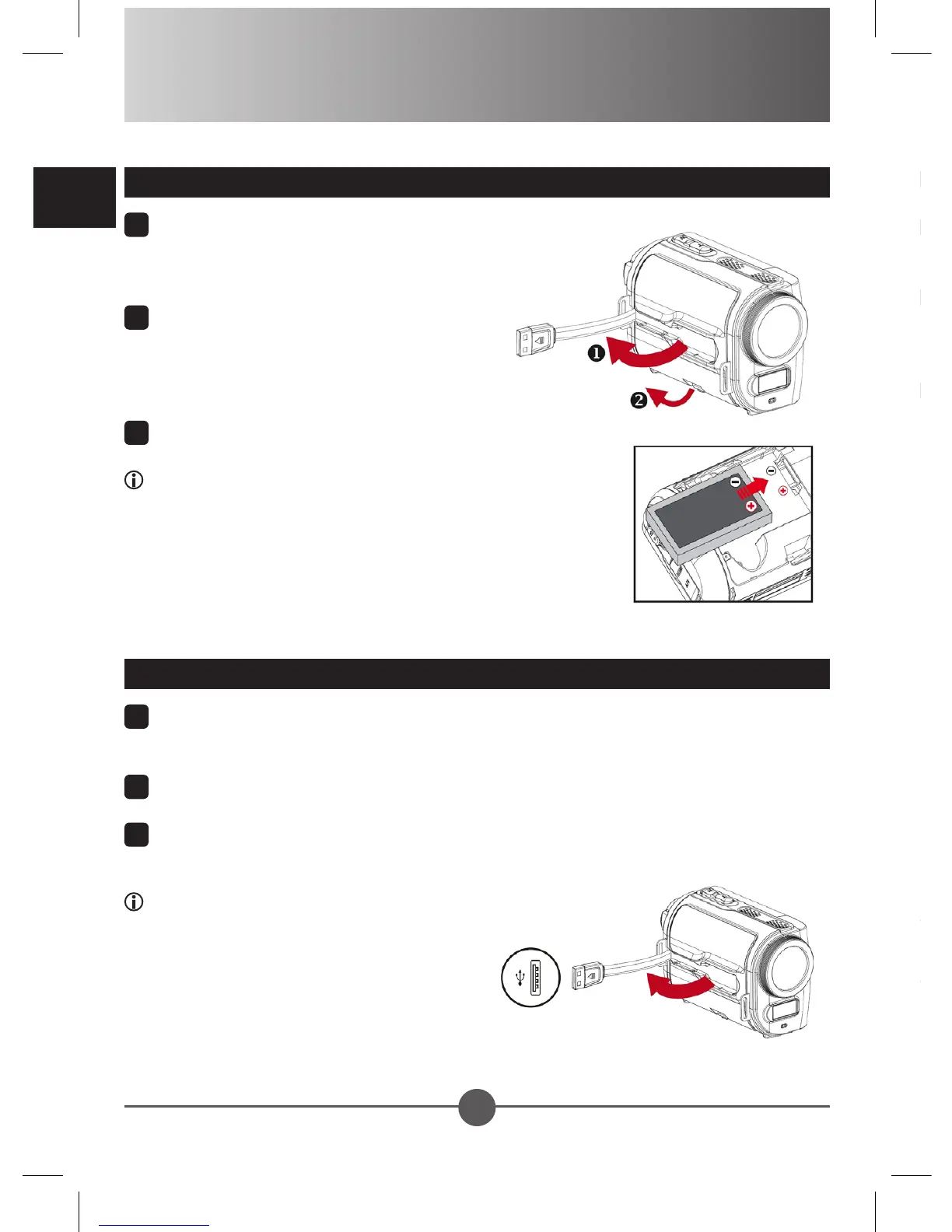
Detach the USB connector as indicated,
and then unfasten the battery cover to
remove the cover.
2
Place the accessory Li-Ion battery into
the compartment. Note that the metallic
contacts must be aligned with the
contacts in the compartment.
3
Replace the cover.
When using for the rst time, please fully charge the battery
for at least 8 hours.
Getting Started
Loading the battery
1
Lift the memory card cover to open it as indicated.
2
Insert the card as the direction of indication until it
reaches the end of the slot.
3
When the card is inserted successfully, the icon ( )
will appear on screen. To remove the card, push the
card to release it and then pull it out gently.
4
Put the cover back.
1
Detach the USB connector and plug it into a USB port on a powered PC. Make
sure the camcorder is powered off.
2
The charging LED turns red and the charge starts.
3
When the charging is interrupted or the battery pack is fully charged, the charging
LED will turn off.
When using a PC to charge the battery:
1) Do not power on the camcorder or the
charge will stop.
2) If necessary, use a USB extension
cable to extend the connection.
Charging the battery
If the power is not turned on after you have completed the above procedures, please
check the following have been done correctly: 1) The battery is correctly loaded; 2) The
loaded battery has enough power.
Please choose your local language before starting using the camcorder.







 To Next Page