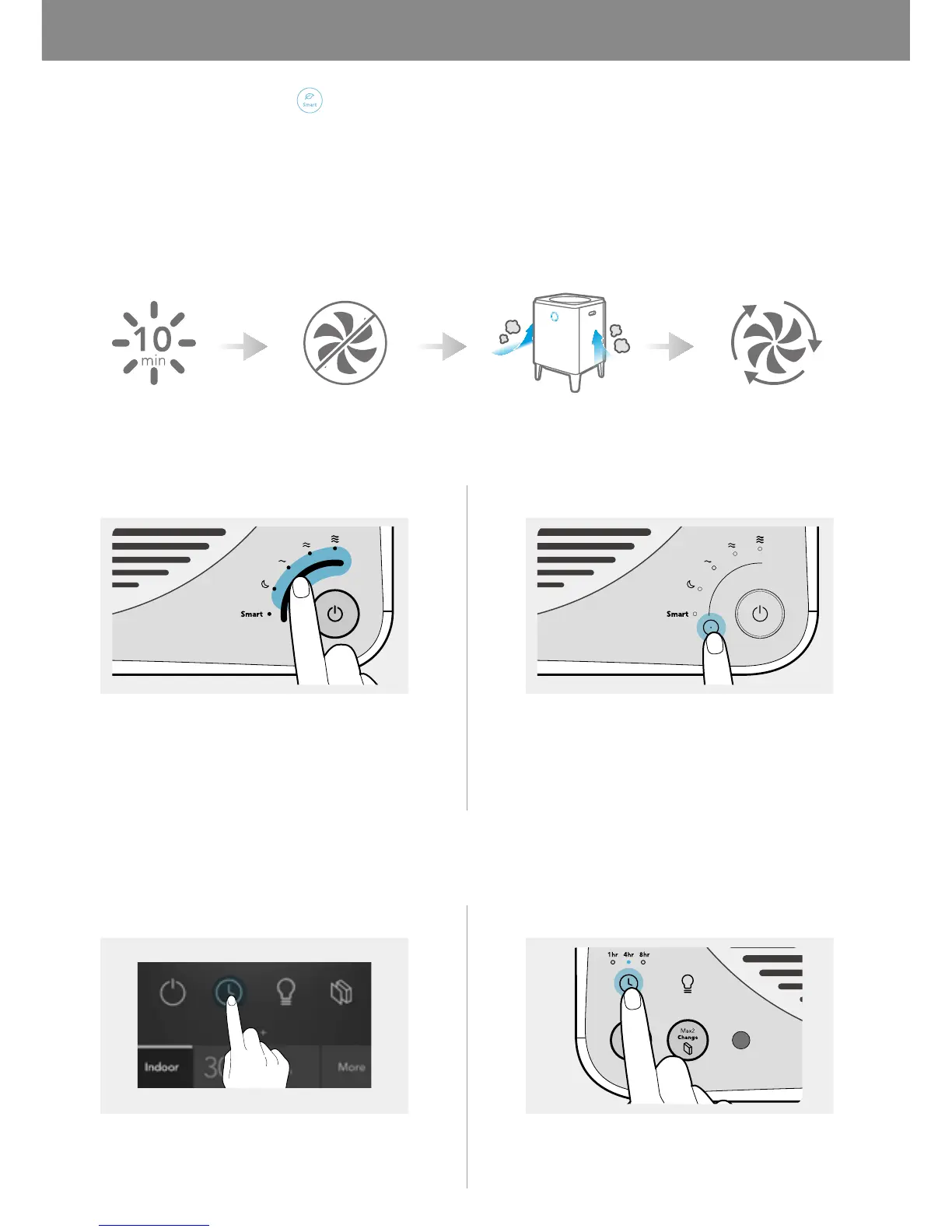
If the pollution level remains Good for more than 10 minutes when the product is set to Smart mode, the fan stops
automatically to conserve energy. If the product detects air pollution, the fan will automatically restart.
If the pollution level remains Good for more than 10 minutes in the smart mode, the fan stops automatically to save
energy. If the product detects air pollution, the fan will automatically restart. Also if the ECO mode maintains for 30
minutes, the fan will restart as well. If the pollution level remains Good for more than 10 minutes after restarting, the
ECO mode will be activated again.
Fresh Air Enter Eco Mode Detecting Air Pollution
You can adjust the air speed and select Sleep mode manually.
400S/400 300S/300
You can set the product to automatically turn off after an hour, 4 hours, or 8 hours. Use this feature to save energy
when you leave home or go to bed.
400S/300S 400/300
Exit Eco Mode



 To Next Page