6408 216th Street SW | Mountlake Terrace, WA 98043 USA
T +1.425.778.7728 F +1.425.778.7727 | www.SymetrixAudio.com
16
User’s Guide
AES Input
HomerLink is a data bus format designed by Symetrix which allows
4monobidirectionalAES-3digitalaudiochannelstobetransmitted
between devices up to 100 meters apart over standard CAT-5 cable.
HomerLink outputs (Pins 1, 2, 4 and 5) are exact copies of the AES
OUTXLRjacksontherearofthe6200.Thecontentofthesepins
followsthecontentoftheXLRjacksasconfiguredintheprevious
sectionunderAESOUTMODE.
AES audio or clock input.
The HomerLink sync cable is the only manner in which the 6200 can
receive an AES digital input or sync to an external AES digital clock.
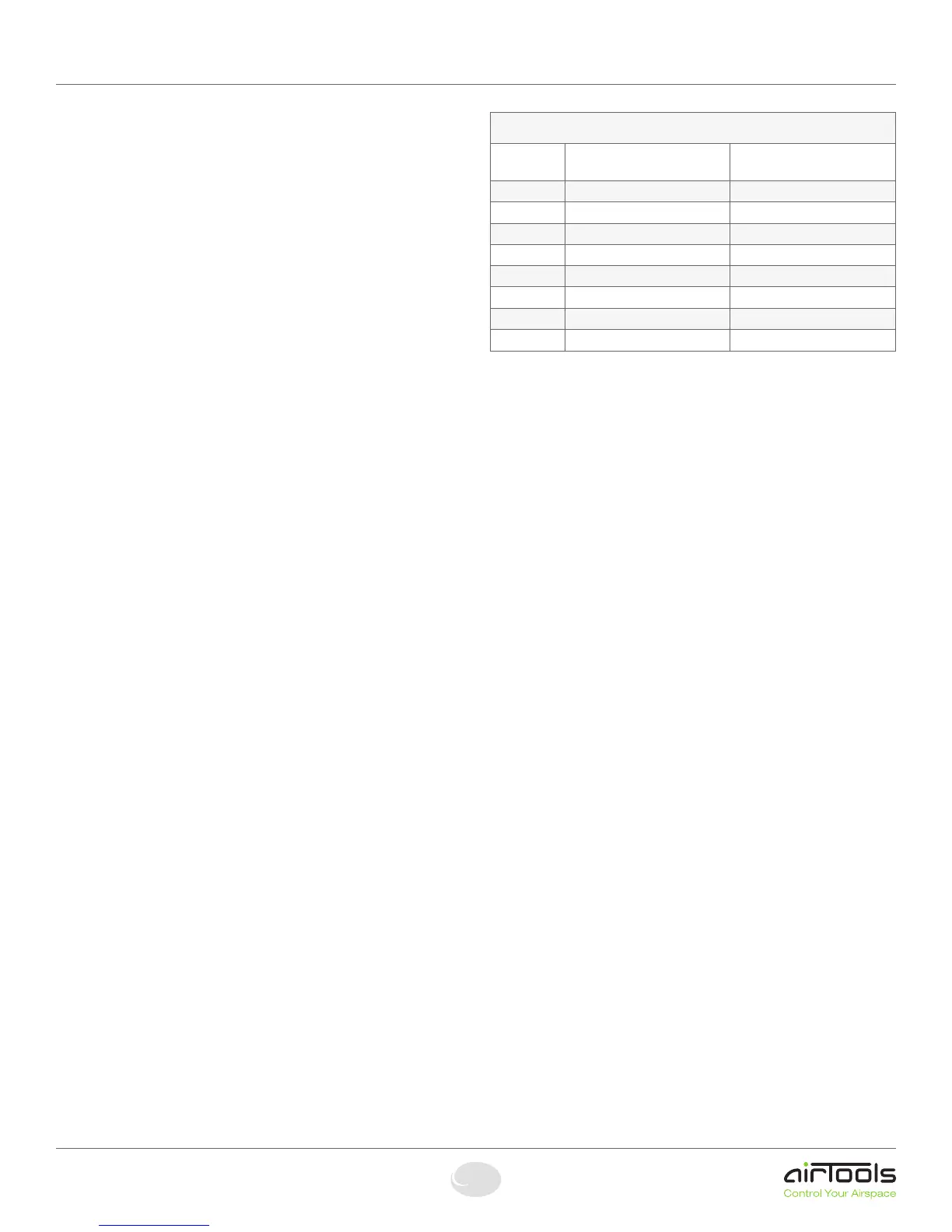
The pinout provided below can be used to design a custom breakout
boxwithstandardXLRconnectors.
Enabling AES Input
These steps walk you through setting channel 1’s input source to AES.
1. Press the HOME button to ensure that we are starting from the top.
2. Press the NEXT button once.
3. Thedisplayshouldread“SectiontoEdit,-Channel1Menu-”.
4. Press the NEXT button three times and the display should read “Input
Signal Source, ANALOG”.
6. Turn the ADJUST knob clockwise until the menu reads “Input Signal
Source, DIGITAL”.
NOTE: The above steps assume you are setting Channel 1’s input
source. The steps are similar for Channel 2.
NOTE 2:IncomingAESaudioorclockmustbe48kHz+/-100ppm.
See the Performace Data section for more information.
Enabling AES Clock Sync
The6200willautomaticallyclocktoavalidAESinputsource(48
kHz+/-100ppm,AES-3or-11)whenoneispresentateitherofthe
HomerLink inputs. Symetrix has available for purchase a HomerLink
synccable,partnumber810HLSYwhichprovidesaneasywaytoget
AES digital input signal or clock source into the 6200.
NOTE:Whenthe6200islockedtoadigitalinputsignalorclock
source, a “D” character will appear in the lower right side of the “In
LVL”and“OutLVL”menusaccessedbypressingtheHOMEbutton
once then turning the ADJUST knob clockwise once (for “In LVL”) or
twice (for “Out LVL”).
TC89/TC90 Time Code In
(ESE)TC89orTC90timecodecanbefedtothe6200inordertodrive
thereal-timeclockandEventManager.Theformatandpresenceis
automaticallydetected.SimplyconnecttheoutputofyourTC89or
TC90masterclockintothe6200’sTC89/TC90TIMECODEINport.
Refer to the help content within the 6200 Designer application for more
informationontheEventManager.
NOTE:WhenavalidTC89orTC90sourceisconnectedtothe6200,
a “Tc” character will appear in the upper right side of the “In LVL” and
“OutLVL”menusaccessedbypressingtheHOMEbuttononcethen
turning the ADJUST knob clockwise once (for “In LVL”) or twice (for
“Out LVL”).
Moreinformation,compatibleproductsandsupportfortheTC89and
TC90timecodeformatscanbefoundat:
www.ese-web.com.
TIME/UDP (Time Protocol)
The6200implementstheTimeProtocol(RFC-868)viaUDP.Thisis
nottobeconfusedwiththe“NetworkTimeProtocol”(RFC-1305),
alsocalled“NTP”.Tosynchronizethe6200,youwillneedtoconnect
the 6200 to a network using the Ethernet port and correctly enter
theIPAddress,SubnetMaskandGatewayIPAddress.Seethe
Ethernet Connection section for more details. You will also need the
IP address of a server that supports the Time Protocol via UDP and
theabilitytoconnecttoitviaUDPport37overtheinternetortoa
local server providing the Time Protocol service. This may have to be
allowed through a firewall when using an external server. If you have
any questions regarding the integration of the 6200 into your network,
consult your friendly IT/IS personnel or your network hardware’s
documentation.
MoreinformationandalistofpublicserversintheUScanbefoundat:
http://www.boulder.nist.gov/timefreq/service/time-servers.html
orbysearchingforthe“NISTInternetTimeService”.
AESInputandTC89andTC90TimecodeIn
6200 HomerLink Pinout
Pin# EIA/TIA 568B
Color Scheme
DETAILS
1 White-Orange AES-1 (1L) Out
2 Orange AES-2 (1R) Out
3 White-Green AES-1 (1L) In
4 Blue AES-1 (1L) Out
5 White-Blue AES-2 (1R) Out
6 Green AES-2 (1R) In
7 White-Brown Terminated (100 Ohm)
8 Brown
Terminated (100 Ohm)


 To Next Page
 Loading...