8
EN
THERMOSTAT INSTALLATION
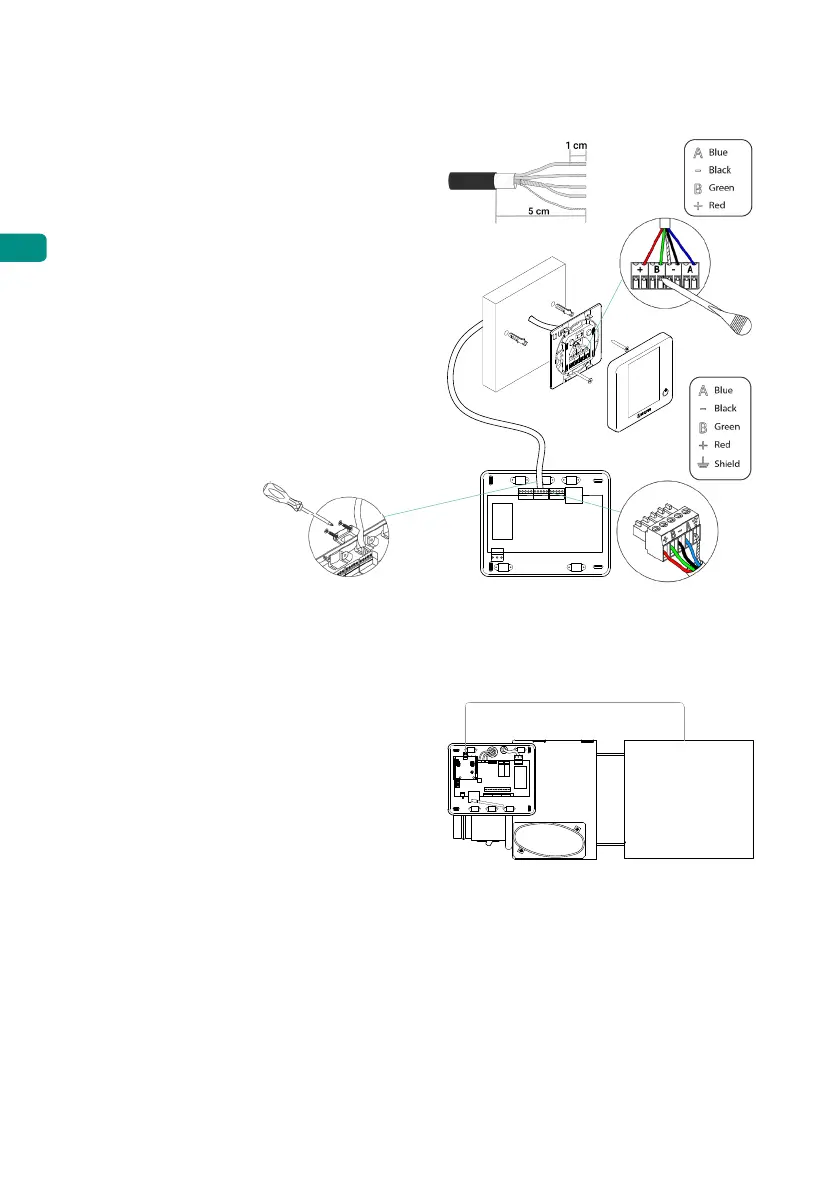
1. Remove the back of the thermostat.
2. Fix the back of the thermostat to the
wall.
3. Connect the main control board to any
of the three terminals AZ1, AZ2 o AZ3.
Fix the cables using the main control
board turrets.
If your thermostat is a wireless
thermostat, insert the CR2450 button
battery.
4. Place the display over the fixed support.
5. Place the anti-vandalism rods (optional)
to better hold the thermostat in place.
AZ1-AZ2-AZ3AZ1-AZ2-AZ3
CONNECTION TO THE INDOOR UNIT
Follow the instructions on the gateway's
technical data sheet. Installation of the AC
unit's thermostat is recommended.
D3
Indoor
unit
OTHER PERIPHERALS
Follow the instructions on their technical data sheet.
Important: For elements with external power supply at 110/230 VAC, it is only necessary to
connect poles "A" and "B" of the bus for communications.


 To Next Page