ColorBox In-Line Color and HDR/SDR Transform v1.0 46 www.aja.com
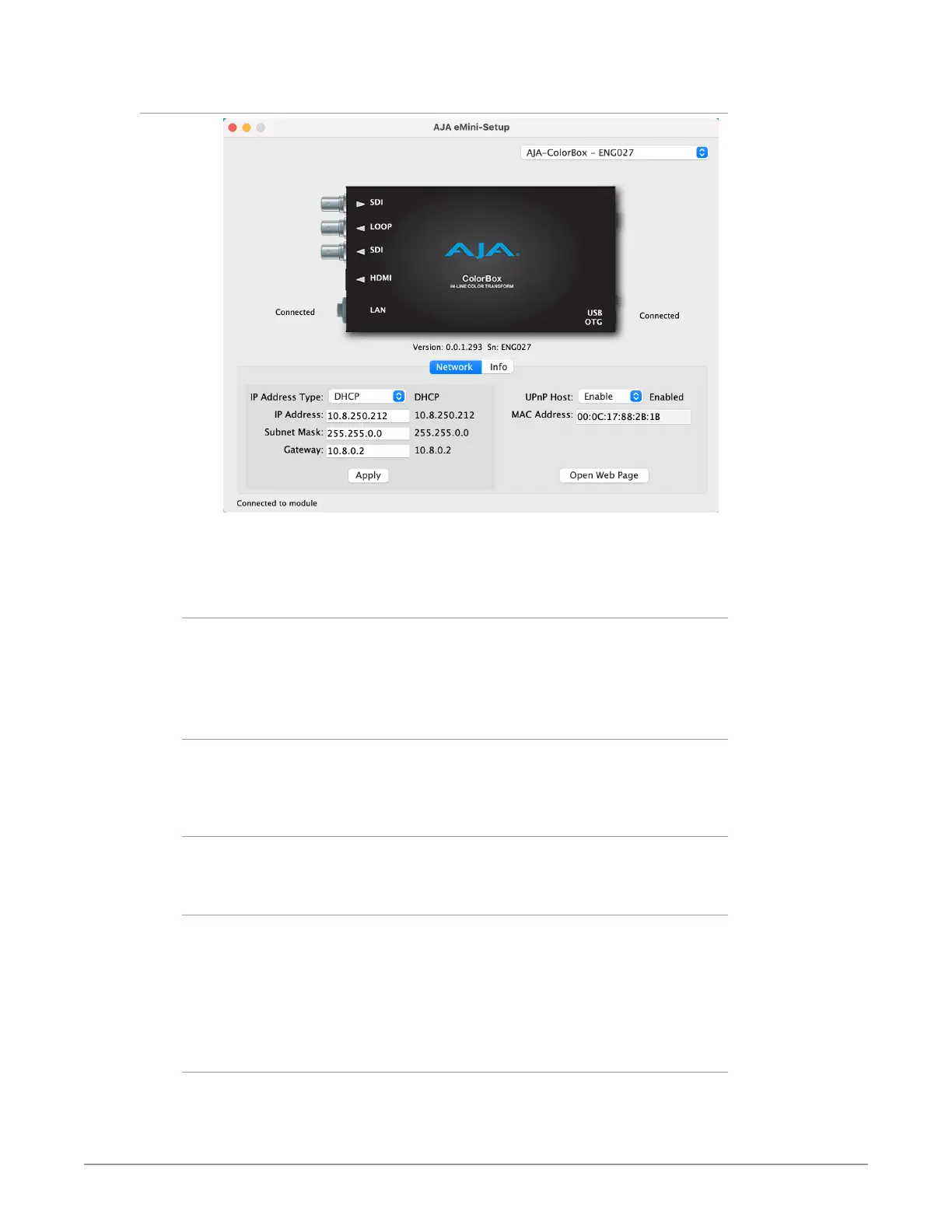
Network Tab Screen
This tab lets you change the network setup on the connected AJA device. You
must click the Apply button to initiate any IP address changes.
IP Address Type
Choose from:
• DHCP
• Static IP Address.
IP Address
The current IP address is displayed when an IP Address Type of Static is selected.
A different static IP address can be entered.
Subnet Mask
The current Subnet Mask is displayed. A different netmask can be entered.
Gateway
The current Gateway address is displayed. A different IP address can be entered.
If your ColorBox needs to communicate to servers on another LAN or WAN, you
have to enter the address of the computer/router that is making that external
connection. If all of your devices, and the systems they need to talk to, are on a
single LAN, then you can enter any unused LAN address as the Gateway here.
UPnP Host
Select Enable or Disable to control whether the AJA device makes itself visible
for Windows network browsing.


 To Next Page