EasyManua.ls Logo

Akai AX80 - Adjustment Procedure for Voice PCB; Preparation for the Adjustment; Offset Adjustment (Sawtooth Wave Level DCO-2)

Akai AX80
18 pages
To Next Page IconTo Next Page
To Previous Page IconTo Previous Page
Loading...
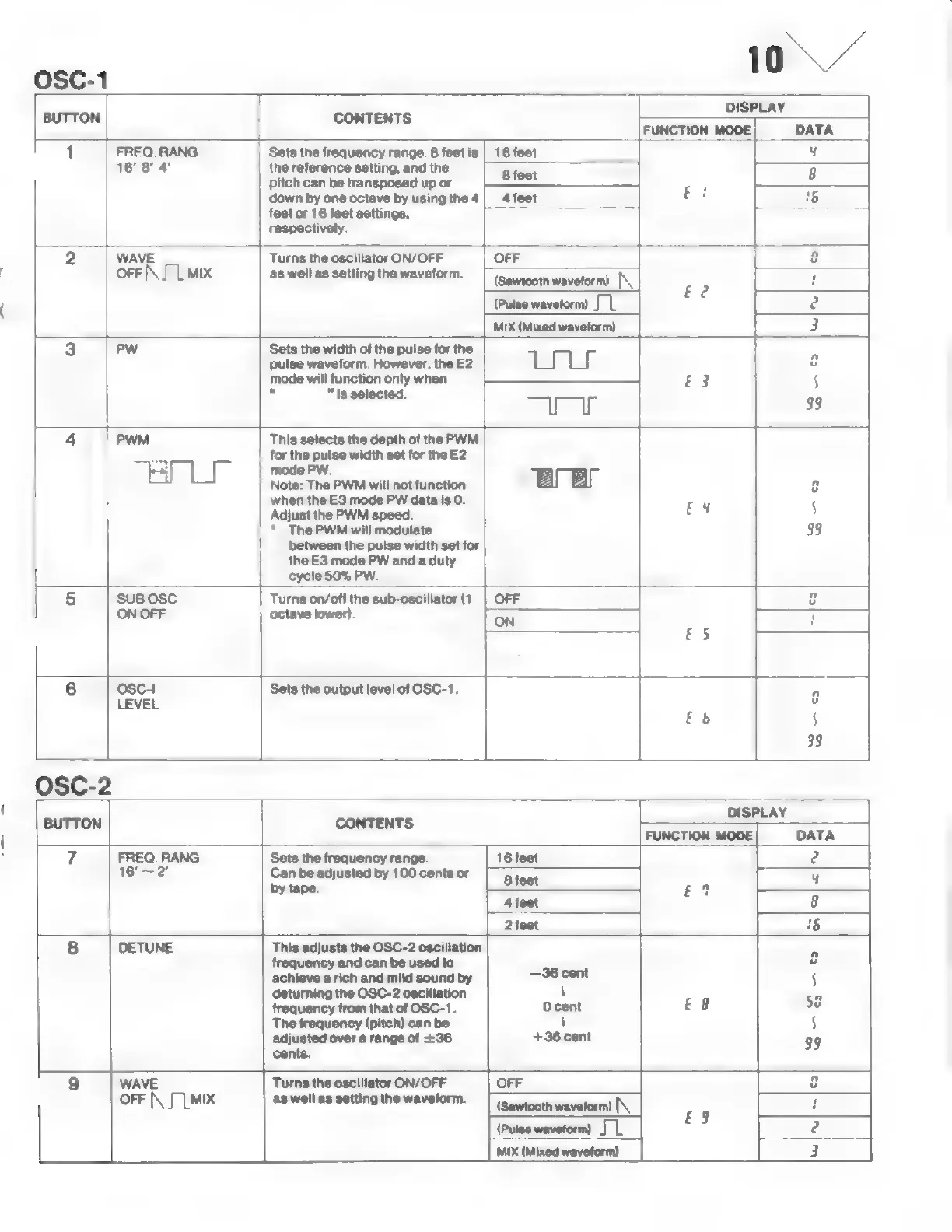
OSC-1
Sets
the
frequency
range.
8
feet
is
the
reference
setting,
and
the
pitch
can
be
transposed
up
or
down
by
one
octave
by
using
the
4
feetor
16
feet
settings,
respectively.
16'
8'
4'
Turns
the
oscillator
ON/OFF
as
well
as
setting
the
waveform.
Sets
the
width
of
the
pulse
for
the
pulse
waveform.
However,
the
E2
mode
will
function
only
when
=
"is
selected.
This
selects
the
depth
of
the
PWM
ag
for
the
pulse width
set
for
the
E2
E
|
mode
PW.
Note:
The
PWM
will
not
function
when
the
E3
mode
PW
data
is O.
Adjust
the
PWM
speed.
*
ThePWM
will
modulate
between
the
pulse
width
set
for
the
E3
mode
PW
and
a
duty
cycle
50%
PW.
Turns
on/off
the
sub-oscillator
(1
octave
1
Sets
the
output
level
of
OSC-1.
CONTENTS
Sets
the
frequency
range.
Can
be
adjusted
by
100
cents
or
by
tape.
This
adjusts
the
OSC-2
cong
T
frequency
and
can
be
used
to
achieve
a
rich
and
mild
sound
by
deturning
the
OSC-2
oscillation
frequency
from
that
of
OSC-1.
The
frequency
(pitch)
can
be
adjusted
over
a
range
of
+36
cents.
Turns
the
oscillator
ON/OFF
ыалы
|
(Pulse
waveform)
||
|
waveform)
Tee
ll
MIX
|
MIX
(Mixed
waveform)
|
waveform)

Other manuals for Akai AX80

Related product manuals