EasyManua.ls Logo

Akai CD-57 - Front Side

Akai CD-57
24 pages
Print Icon
To Next Page IconTo Next Page
To Previous Page IconTo Previous Page
Loading...
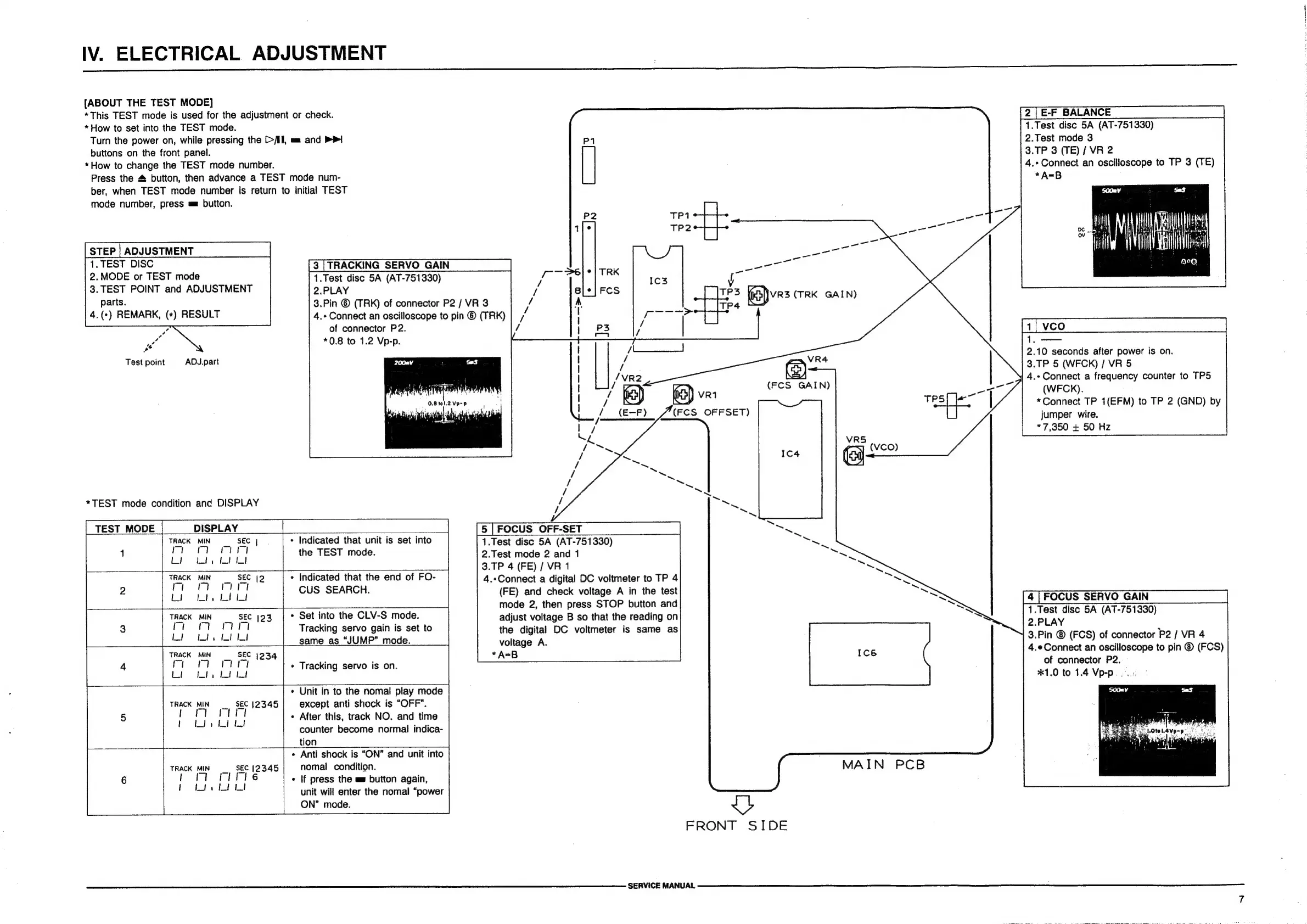
IV.
ELECTRICAL
ADJUSTMENT
{ABOUT
THE
TEST
MODE]
*This
TEST
mode
is
used
for
the
adjustment
or
check.
*
How
to
set
into
the
TEST
mode.
Turn
the
power
on,
while
pressing
the
[>/II,
aa
and
>>|
buttons
on
the
front
panel.
*How
to
change
the
TEST
mode
number.
Press
the
4
button,
then
advance
a
TEST
mode
num-
ber,
when
TEST
mode
number
is
return
to
initial
TEST
mode
number,
press
mm
button.
STEP
|
ADJUSTMENT
1.
TEST
DISC
2.
MODE
or
TEST
mode
3.
TEST
POINT
and
ADJUSTMENT
parts.
4.(*)
REMARK,
(*)
RESULT
¢
4,
o
Test
point
ADJ.part
*TEST
mode
condition
and
DISPLAY
TEST
MODE
DISPLAY
2.PLAY
of
connector
P2.
*0.8
to
1.2
Vp-p.
TRACK
MIN
SEC
|
1
arom
Lb
lute
I
ft
¢
Indicated
that
unit
is
set
into
the
TEST
mode.
[3
|
TRACKING
SERVO
GAIN
1.Test
disc
5A
(AT-751330)
3.Pin
©
(TRK)
of
connector
P2
/
VR
3
4.+
Connect
an
oscilloscope
to
pin
©
(TRK)
TRACK
MIN
SEC
|2
raoord
Ft
rt
Lio
ity
Lit
¢
Indicated
that
the
end
of
FO-
CUS
SEARCH.
TRACK
MIN
Bee
SEC
(23
rior
mary
Lio
wt.
Ltt
*
Set
into
the
CLV-S
mode.
Tracking
servo
gain
is
set
to
_,
SEC
1234
rir
Cio
ita
Lo
fot
|
Track
MIN
mt
|__same
as
“JUMP”
mode.
|
*
Tracking
servo
is
on.
*
Unit
in
to
the
nomal
play
mode
except
anti
shock
is
“OFF”.
«
After
this,
track
NO.
and
time
counter
become
normal
indica-
tion
¢
Anti
shock
is
“ON”
and
unit
into
nomal
condition.
¢
If
press
the
a
button
again,
unit
will
enter
the
nomal
“power
ON”
mode.
1.Test
disc
5A
(AT-751330)
2.Test
mode
3
3.TP
3
(TE)
/
VR
2
4.«Connect
an
oscilloscope
to
TP
3
(TE)
aA
eonN
fa)ves
(TRK
GAIN)
TP4
2.10
seconds
after
power
is
on.
3.TP
5
(WFCK)
/
VR
5
4.*
Connect
a
frequency
counter
to
TP5
(WFCK).
*Connect
TP
1(EFM)
to
TP
2
(GND)
by
jumper
wire.
*7,350
+
50
Hz
ea
VR4
(FCS
GAIN)
(FCS
OFFSET)
|5
|
FOCUS
OFF-SET
1.Test
disc
5A
(AT-751330)
2.Test
mode
2
and
1
3.TP
4
(FE)
/
VR
1
4.*Connect
a
digital
DC
voltmeter
to
TP
4
(FE)
and
check
voltage
A
in
the
test
mode
2,
then
press
STOP
button
and
adjust
voltage
B
so
that
the
reading
on
the
digital
DC
voltmeter
is
same
as
voltage
A.
*A=B
FOCUS
SERVO
GAIN
1.Test
disc
5A
(AT-751330)
2.PLAY
3.Pin
®
(FCS)
of
connector
P2
/
VR
4
4.eConnect
an
oscilloscope
to
pin
©
(FCS)
of
connector
P2.
*1.0
to
1.4
Vp-p...
MAIN
PCB
Vy
FRONT
SIDE
SERVICE
MANUAL

Related product manuals