Part 3: Recording a Sequence with the MPC
Recording a Drum Track:
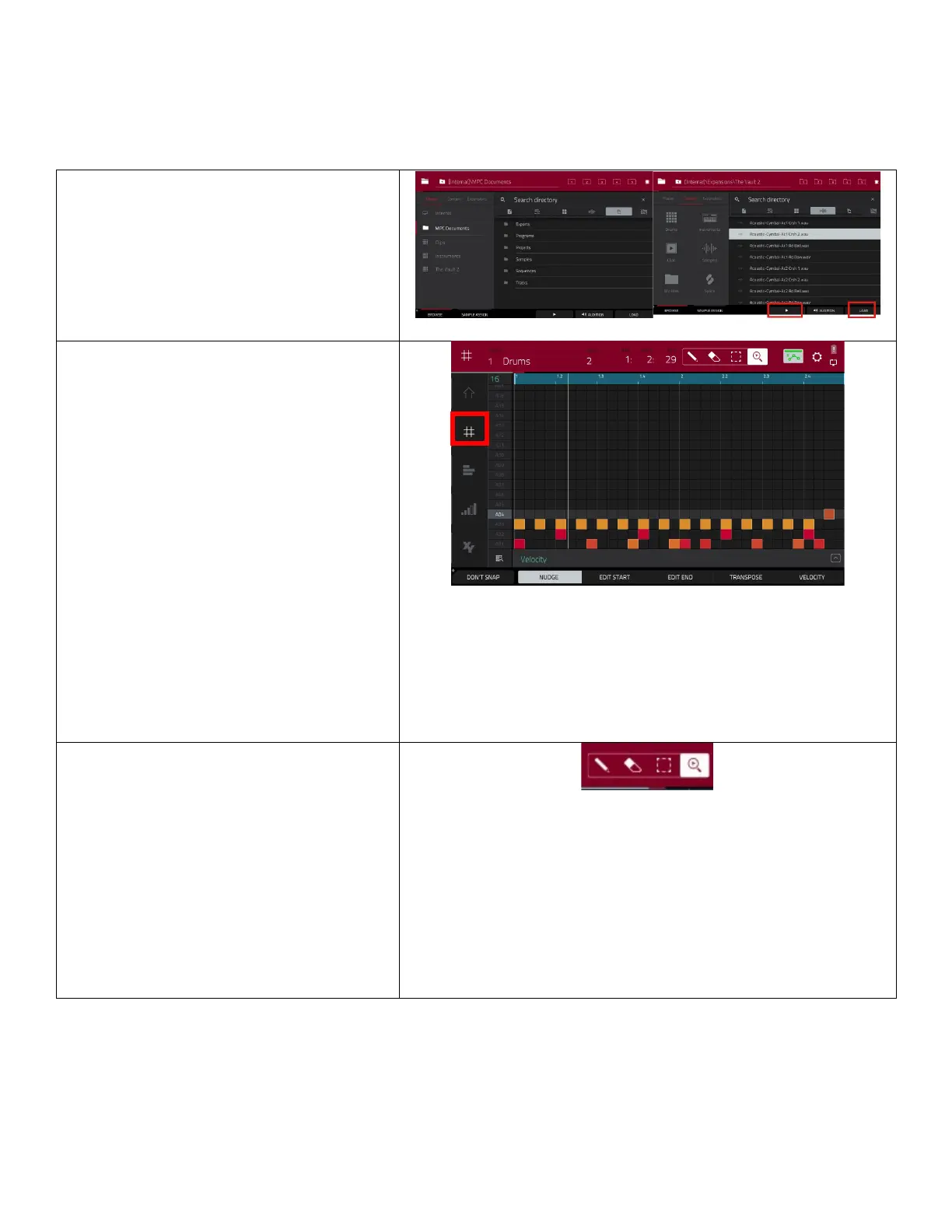
On the buons below the screen hit
Shi+Menu/browse
• Scroll through or search for different
drum kits.
• Use the
buon at the boom to
hear a kit sample.
• Press
to load that drum kit to your
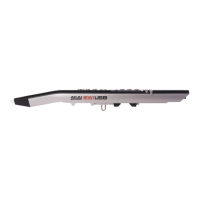
• Click on the 4 intersecng lines on the
side bar to enter
• Press the
3 mes at your
preferred tempo to set the bpm.
• Press the
to record-arm the
sequence.
• Press the
to start the
actual recording. You will hear the
count-in for one measure before the
recording starts.
• You can add more drum parts to this
track, so don’t feel the need to get
everything in one take. Use the
buon instead of record to
add to the track instead of overwring
what was previously recorded.
Overdub lets you record addional
note events over the exisng
While in grid mode, the colorful dashes
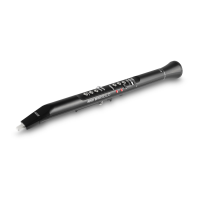
represent notes. Use these tools in grid view to
edit your drum track:
• The
icon adds notes.
• The
deletes notes.
• The
allows you to select a
single note or a group of notes and
move them up or down to change the
sound or le or right to change the
rhythm.
• The
allows you to


 To Next Page