17 18
AKASO camera
Screenshot
Alarm
Speak
Playback
HD
2020-04-20 13:51:48
Record
Cloud storage
Signal: 91%
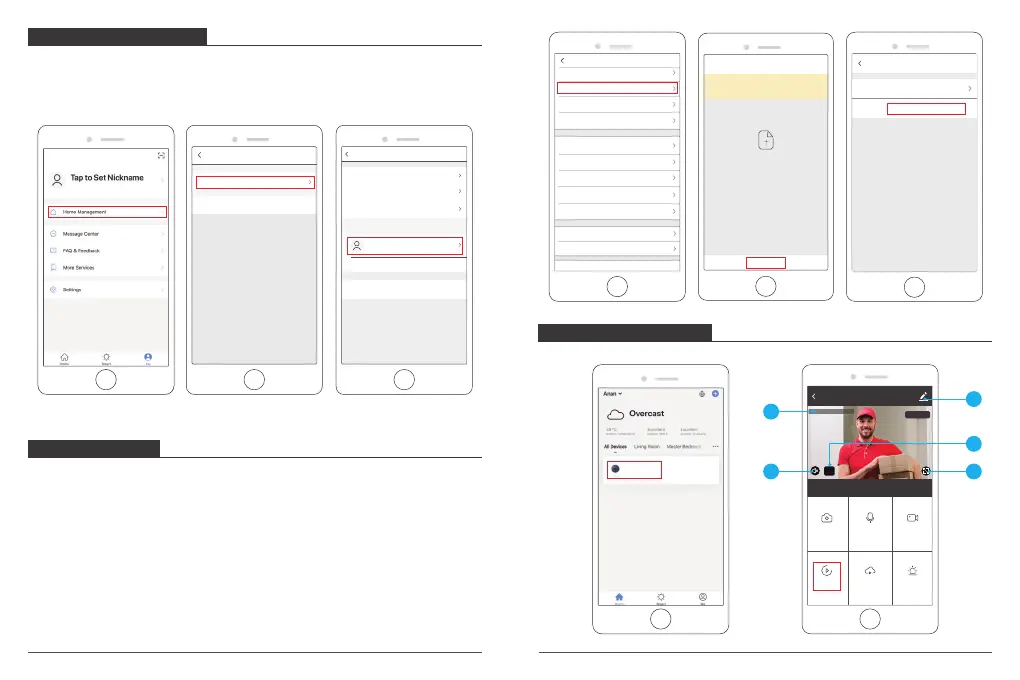
SHARE DEVICES
One camera can only be added to one account, and the account can only be set in
by one phone. If anyone need to view the camera, the camera can be shared
unlimited times.
① Enter into the more setting, click “Share Device” to set, click “Add Sharing” to
select the region and input the account (the account must be registered in
“Smart Life” app successfully in advance) you want to share, then click complete,
the camera is shared to others successfully.
② The account which have been shared will get a message on “Smart Life” app,
please confirm and agree to this sharing request, then the others also can live
view and do some settings.
LIVE VIEW INTERFACE
Click camera icon to enter into the Live View Interface, see following:
1
5
4
2
3
HOME MANAGEMENT
You (Administrator) can add your family members into a home group, so that they
not only can see the live view of the camera, but also can operate most functions of
the camera. You can also set your family members as administrator.
Please see the below pictures:
Home Management
Anan
Add Home
Home Settings
Home Name Anan
Anan
Home Location
Room Management 1 rooms
Shenzhen Shenyi Vehi...
Remove Family
Add Member
Home Member
Region United States of Amera +1
Account Please enter your account
Settings
Device Name IPC
Share Device
Device information
Use Echo
Basic Feature Settings
Decibel Detection Settings Off
Storage Settings
FAQ & Feedback
Motion Detection Off
Purchase VAS
Firmware Information
Remove Device
Device SharingDone
AIf a permanent resident in your home has an account, we
recommend that you set the account as a family member and
share all your family devices and "Tap-To-Run" Scene with the
family member. Home Settings
Add Sharing
Device is no shared, add an account to share it
AKASO camera



 To Next Page