SPECIFICATION
Image sensor
Min.
illumination
Lens
Angle of view
Day & night
Video
compression
Operating
temperature
Audio
compression
Image
resolution
1/2.7 CMOS Sensor
1080P(1920*1080)
G.711
H.264
Auto IR-CUT filter
130 degree
3.6mm
0.1Lux(IR LED On)/F 1.2
Image setting
Wireless
Security
On-board
storage
Power supply
Power
consumption
IR distance
Brightness, contrast,
chroma, saturation
Wi-Fi, 802.11 b/g/n
User authentication,
software encryption
Built-in MicroSD Card
slot, up to 128GB
- 68 °F to 122 °F
(- 20 °C to 50 °C)
DC 12V / 1A
5W~10W
Night visibility
up to 20m
21
22
⑩ FAQ & Feedback: Write your feedback of this product.
Enter into the more setting, click “Feedback” to set.
⑪ Firmware Info.: Check for the firmware update.
Enter into the more setting, click “Firmware Info” to set.
⑫ Remove Device: Remove devices from this AP
Note: After the device is deleted, the cloud storage service will be automatically
released. Please consider carefully.
If you need to add the camera by another account or return the product, please
delete the camera in the APP. Enter into the more setting, click “Remove Device”.
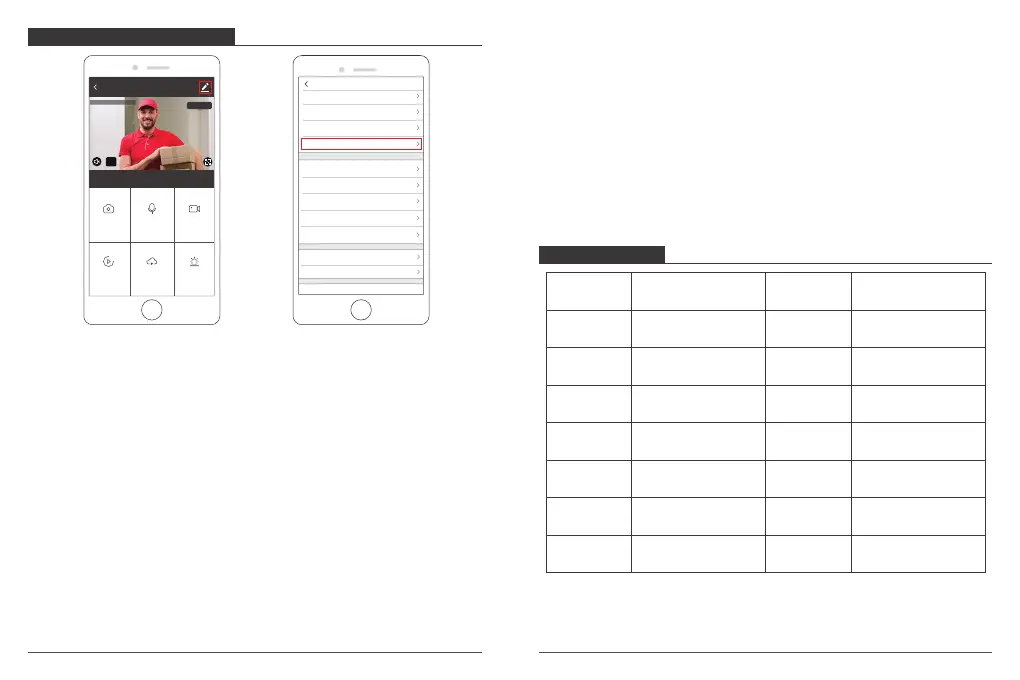
MORE SETTING INTERFACE
① Device Name: You can rename and modify the device name.
Enter into the more setting, click “Device Name” to set.
② Share Device: Share the device with your family/friends.
③ Device information: The owner ID, IP Address, Device ID, Device time zone, Wi-Fi
signal strength. Enter into the more setting, click “Device Info” to set.
④ Use Echo: How to connect your device to Amazon Alexa.
⑤ Basic Feature Settings: Turn On/Off indicator light, flip the video; turn On/Off
time watermark selection.
Enter into the more setting, click “Basic Feature Settings” to set.
⑥ Decibel Detection Settings: Turn On/Off sound detection alarm. When the sound
is over 60 decibels, the alarm will activate.
Enter into the more setting, click “Sound Detection Settings” to set.
⑦ Motion Detection Settings: Turn On/Off motion detection alarm and the
selection of the sensitivity.
⑧ Storage Settings: Show SD Card information and format SD Card.
⑨ Purchase VAS: Save the video flips on cloud to avoid the loss from card.
Enter into the more setting, click “Cloud Storage” to set.
Settings
Device Name IPC
Share Device
Device information
Use Echo
Basic Feature Settings
Decibel Detection Settings Off
Storage Settings
FAQ & Feedback
Motion Detection Off
Purchase VAS
Firmware Information
Remove Device
AKASO camera
Screenshot
Alarm
Speak
Playback
HD
2020-04-20 13:51:48
Record
Cloud storage
Signal: 91%



 To Next Page