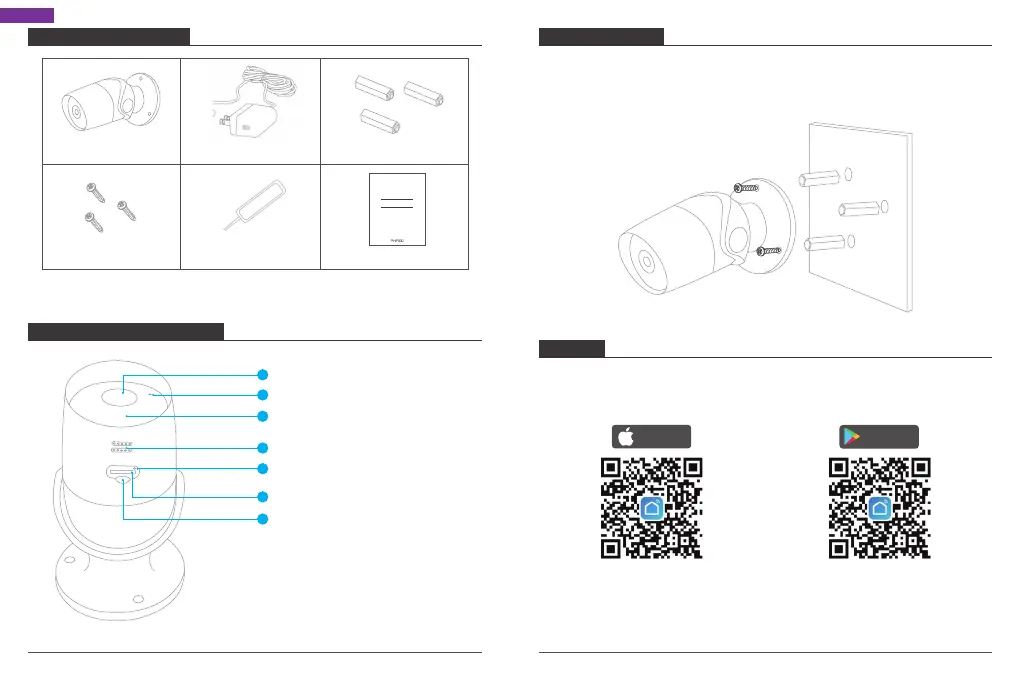
INSTALLATION
1. Drill 3 holes through the holes on the wall/ceiling.
2. Open the accessories bag and take out the expansion bolt, and insert it into the
holes.
3. Tighten the 3 screws to fix the device on the installation surface (wall or ceiling).
01 02
English
Lens
Microphone
IR LED
Speaker
Reset(Under the rubber plug)
SD Card Slot(Under the rubber plug)
Rubber Plug
WHAT’S IN THE BOX
CAMERA INTRODUCTION
Mounting Screws
Expansion BoltPower AdapterB60 Wireless Camera
3
2
6
5
1
4
7
Reset Pin Quick Start Guide
Quick Start Guide
AKASO B60 Wi-Fi Camera
SET-UP
1. Install Smart Life App
Search for "Smart Life" app in App Store/Google play, or scan the QR code below to
download.
Download the app from
App Store
Download the App from
Google Play
Download on the
App Store
GET IT ON
Google Play



 To Next Page