03 04
2. Get a New Account
If you already have an account for Smart Life, please log in your account and skip to
step 4.
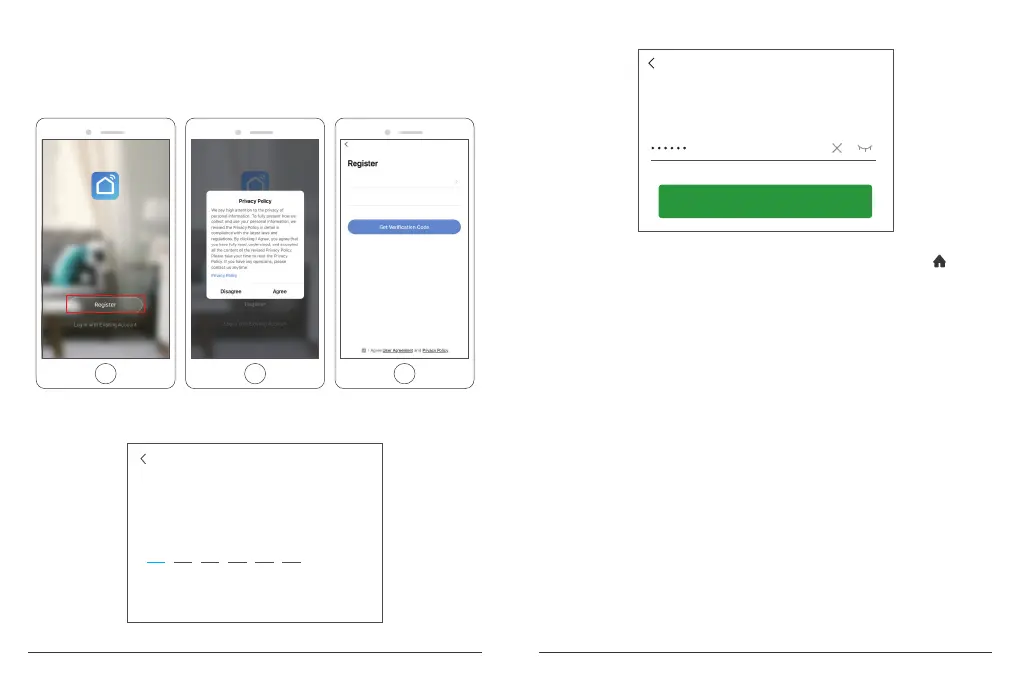
① Open “Smart Life” app to click “Register → Agree”. Choose country/region, fill in
the email address.
United States of America
Email
② Fill in email address, a verification code will be sent, please get it and fill it in.
Enter Verification Code
③ Then set password, click “Done”.
Set Password
Done
④ After registering the account, you need to add home information, click “(at the
left bottom)”, enter the "Home Management", click "Add Home" and fill in Home
name, location, add rooms, then click “Save” to add successfully.
Note:
• Email address should be valid.
• The length of password must be within 6-20 characters, no special characters
included.
• Please choose the same country in register and login.
• If you forgot the password, click “Forget Password” to reset it.



 To Next Page