05 06
30cm ~ 100cm
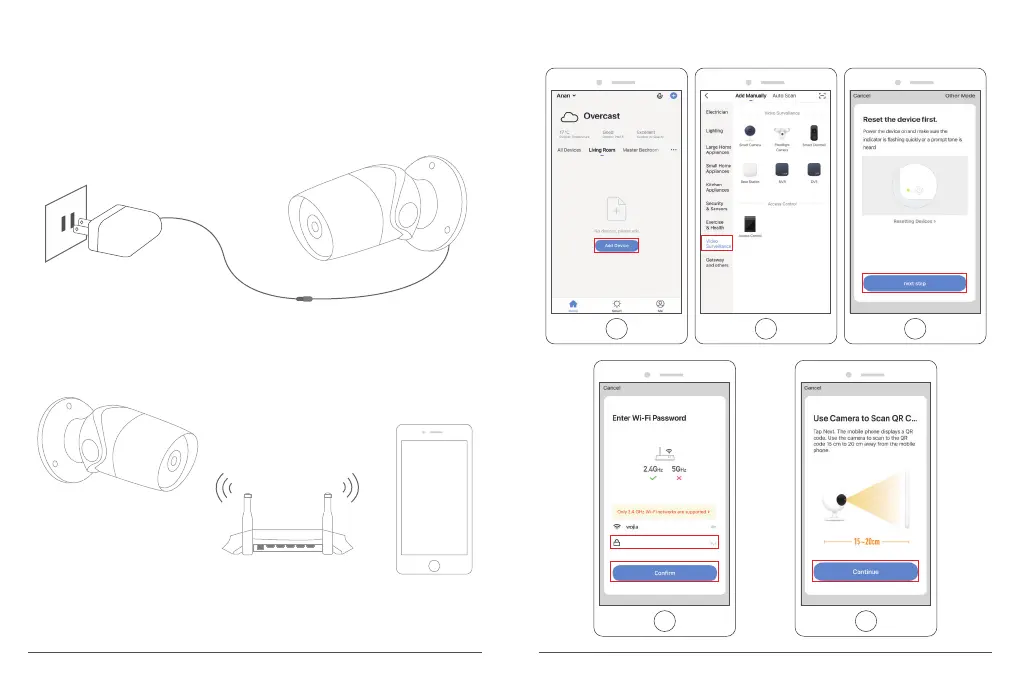
3. Plug In Your Camera
① Connect the micro USB connector of USB power cable to the power port of the
camera.
② Plug the USB-A connector of power cable into the power adapter.
③ Plug the power adapter into a wall outlet and wait for the red indicator light
blinking, you will hear a tone.
Note: If the red indicator light does not blink, please reset it or power it on again.
4. Add Your Camera
① Follow the on-screen instructions to finish the setup to connect your Wi-Fi
network.
Router SmartPhone
B60 Wi-Fi Camera
② Choose Room, click “Add Device → Video Surveillance → Smart Camera → next
step → Enter Wi-Fi Password → Confirm → Continue”.



 To Next Page