19 20
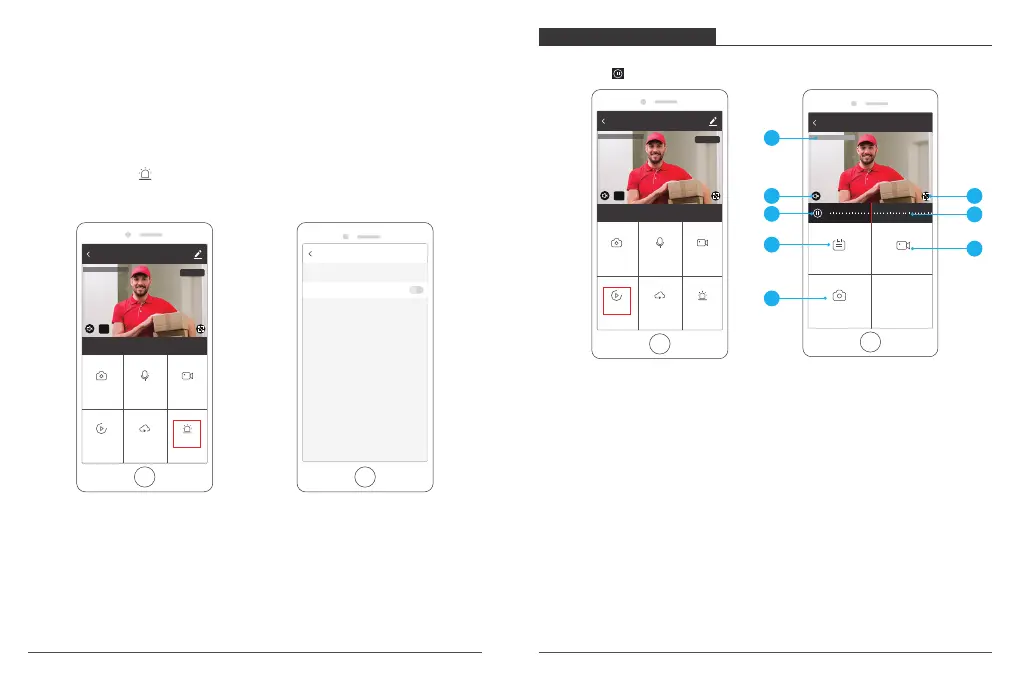
1. Alarm: Turn On/Off the motion detection alarm and select the sensitivity,
Low/Medium/High for optional.
① Click “Alarm” icon to enter into the Motion Detection Settings.
② Turn on “Motion Detection Alarm” and select the level of sensitivity “Low/Medium
/High” for optional.
① Setting: Enter into the more setting.
② Camera Date and Time: The date and time of live image.
③ Sound On/Off Option: Turn On/Off the sound.
④ SD/HD Option: Switch HD/SD image.
⑤ Full Screen Button: Press it to enter into the full screen viewing.
Motion Detection
Motion Detection Alarm
2. Speaker: Press it to talk with your family via camera on phone.
3. Direction: Press direction buttons, you can do pan/tilt to adjust the viewing angle
of camera.
4. Record: Click it to Start/Stop recording manually. The video flips will save on your
phone.
5. Screenshot: Click it to make snapshot and pictures will be saved in mobile phone.
6. Cloud Storage: Save the video flips on cloud to avoid the loss from card.
7. Photo album: Preview the screenhot saved in the phone
PLAYBACK INTERFACE
Click ”Playback → Calendar for select the date”, slide the time bar to playback the
videos, press to Play/Pause.
2018-09-03 13:51:48
22:00
23:00 0:00 1:00
2:00
2:00
Date Record
Screenshot
Replay
3
7
5
1
2
4
6
8
1. Playback Date and Time: The date and time of video recording for playback.
2. Sound On/Off Option: Turn On/Off the sound.
3. Full Screen Button: Press it to enter into the full screen viewing.
4. Play/Pause Button: Pause or start playback video recording.
5. The time table: The time in grey color is with video recordings. You can drag the
time table to the exact time that you want to see.
6. Date: Select date for playback, you will see the date in black color with video
recordings, grey color without video recordings.
7. Record: Click it to start recording manually and save on Mobile.
8. Screenshot: Click it to make snapshot and pictures will be saved in mobile phone.
AKASO camera
Screenshot
Alarm
Speak
Playback
HD
2020-04-20 13:51:48
Record
Cloud storage
Signal: 91%
AKASO camera
Screenshot
Alarm
Speak
Playback
HD
2020-04-20 13:51:48
Record
Cloud storage
Signal: 91%



 To Next Page