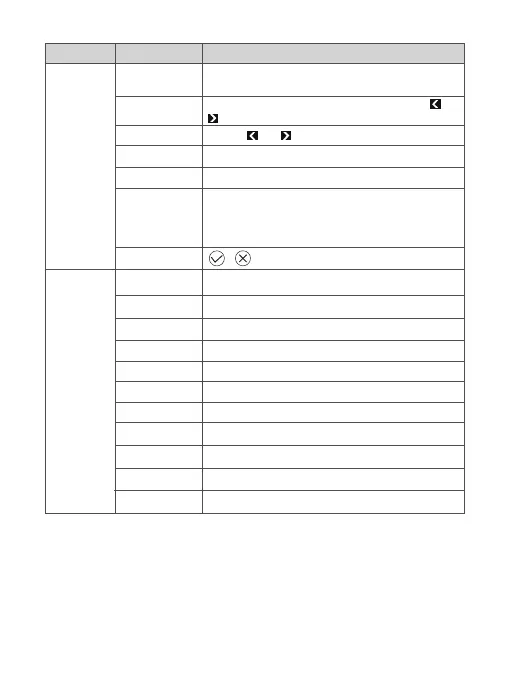
Language
Set time
Volume
Firmware Version
Firmware Upgrade
USB connection
Reset All
Brightness
Projection Mode
Projection Location
Auto V Keystone
V.Keystone
Auto V.angle.init
H.Keystone
Aspect Ratio
Digital Zoom
Color Temperature
Wall Color
From -40 to 40
From -32 to 32
From -25 to 25
Auto/L.Box/16:9/4:3/Full
From 1.0 to 1.8
Normal/Warm/Cold
White/Dark Green/Pink/Light Blue/Light Yellow
On/Off
Front/Rear
Desktop/Ceiling
1/2/3/4/5/6/7
HT********V1
USB/OTA
English/Deutsch/Español/Français/Italiano/
简体中文/日本語, etc.
Use the and buttons to adjust the volume
Date: YY / MM / DD; Time: HH, MM (Use the the ,
and OK buttons for Date Time Selection)
Connect the projector and your computer with a USB
cable male to male, then you can access the memory
of the memory Card/U-disk inserted in the projector.
/
Management
Image
Settings Function Specifications
11


 To Next Page