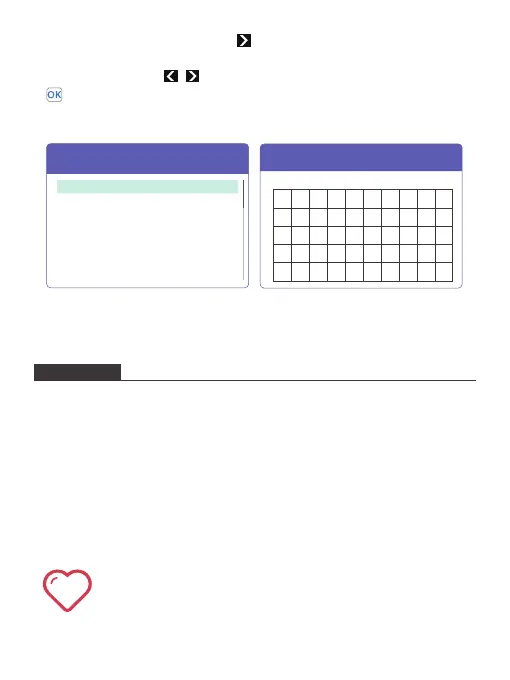
4. In the Network interface, press the button to choose the Wifi you want to
connect to, then press the OK button to confirm and enter the password
interface. Use the the , and OK buttons to enter the password. Then select
on the interface, press the OK button to confirm and complete the password
input. The system will automatically return to the settings interface after
successful connection.
Network Interface Password Interface
1. Please do not disassembly and change any parts of the projector privately.
Please find the professional personnel for machine maintenance.
2. Please do not use the projector on blanket, pillow and other soft materials to
keep the normal heat dissipation of the machine.
3. Please do not look directly into the lens to avoid the strong light hurt your eyes.
4. Please do not use the projector near the river, or in high temperature or highly
dust polluted environment.
5. Please do not put any heavy things on the projector.
6. Please use the original power adapter to charge the projector.
SECURITY
Attention: when projector is working, please do not look directly into
the lens, the strong light will flash your eyes and cause slight pain if
your eyes are close to the lens. Children should use the projector
under the supervision of adults.
****
****
****
****
Boutique
TS-W
U10C022DA
C&S Home
Wifi
Springfield
****
Wifi
SSID: Springfield PWD: 00000001
0
q
a
z
[
w
s
x
]
e
d
c
\
r
f
v
/
t
g
b
-
y
h
n
=
u
j
m
,
i
k
;
.
o
l
Shift
Forget
p
‘
Del
OK
1 2 3 4 5 6 7 8 9
12


 To Next Page