EasyManua.ls Logo

Akeeyo AKY-710S - About Memory Cards Kkk [E-10]

Akeeyo AKY-710S
80 pages
Print Icon
To Next Page IconTo Next Page
To Previous Page IconTo Previous Page
Loading...
About
Memory
cards
How
to
install
Memory
card:
The
Memory
card
has
already
been
inserted
into
the
main
unit.
1.
Open
the
back
cover
and
check
if
the
Memory
card
is
inserted
correctly
into
the
slot.
2.Gently
press
and
hold
until
the
Memory
card
is
locked
in
the
slot.
3.
Close
the
rear
cover
and
make
sure
it
is
locked
tightly
and
cannot
be
opened
accidentally
while
driving.
4.
Turn
on
the
power
and
check
if
the
device
can
read
the
Memory
card
normally.
How
to
remove
Memory
card:
1.
Turn
off
the
power
of
the
main
unit.
2.Open
the
rear
cover.
Gently
push
the
Memory
card
until
it
pops
out
of
the
slot.
Be
careful
not
to
damage
the
Memory
card
or
slot.
3.
Carefully
remove
the
Memory
card
and
store
it
safely
or
return
it
to
its
original
packaging.
please
note:
Please
keep
the
area
around
the
Memory
card
slot
clean
to
prevent
dust
and
foreign
objects
from
entering
the
slot
to
ensure
normal
use.
Connecting
the
waterproof
charging
cable
and
GPS
charging
cable
(sold
separately)
Steps
:
1.Prepare
accessories
such
as
AKY-7
108S,
waterproof
charging
cable
(supplied).
GPS
charging
cable
(sold
separately).
locking
screws
and
screwdriver.
2.Open
the
rear
cover
of
AKY-710S
and
align
the
screw
holes
with
the
charging
port.
3.
Insert
the
waterproof
charging
cable
into
the
charging
port
of
the
device,
making
sure
that
the
charging
port
and
the
charging
cable
socket
are
perfectly
aligned.
4.
Plug
the
other
end
of
the
charging
cable
into
the
mobile
power
supply,
check
that
the
connection
is
good,
and
then
start
charging.
5.
Use
the
attached
screws
and
screwdriver
to
securely
tighten
the
waterproof
charging
cable
and
GPS
cable
to
the
AKY-7108.
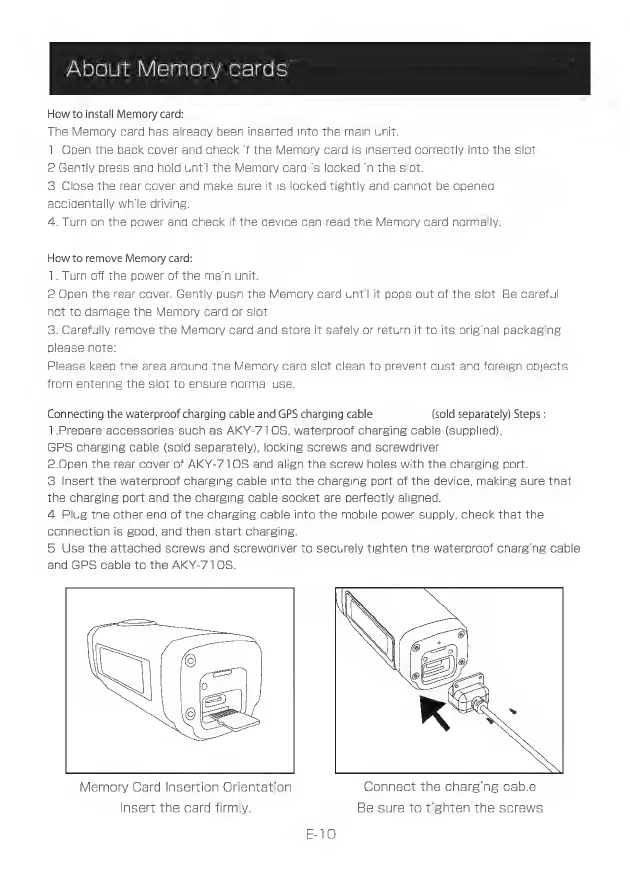
Memory
Card
Insertion
Orientation
Connect
the
charging
cable
Insert
the
card
firmly.
Be
sure
to
tighten
the
screws