EasyManua.ls Logo

Akeeyo AKY-710S - Basic Operations

Akeeyo AKY-710S
80 pages
Print Icon
To Next Page IconTo Next Page
To Previous Page IconTo Previous Page
Loading...
Basic
Operations
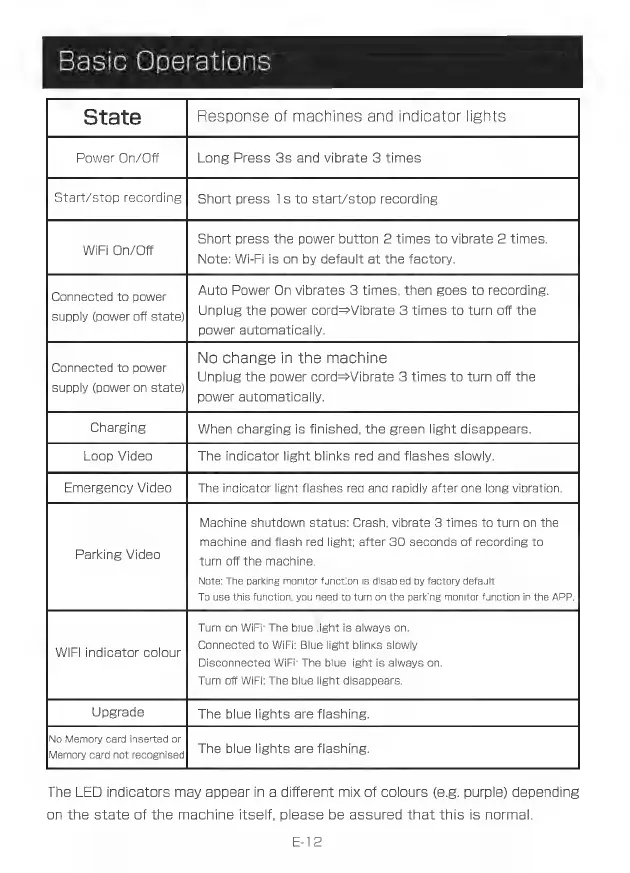
State
Response
of
machines
and
indicator
lights
Power
On/Off
Long
Press
3s
and
vibrate
3
times
Short
press
1s
to
start/stop
recording
Short
press
the
power
button
2
times
to
vibrate
2
times.
WIRI
OnOff
Note:
Wi-Fi
is
on
by
default
at
the
factory.
Auto
Power
On
vibrates
3
times,
then
goes
to
recording.
Unplug
the
power
cord=Vibrate
3
times
to
turn
off
the
power
automatically.
Connected
to
power
supply
(power
off
state)
No
change
in
the
machine
Connected
to
power
: :
H
Unplug
the
power
cord-Vibrate
3
times
to
turn
off
the
supply
(power
on
state)
power
automatically.
Charging
When
charging
is
finished,
the
green
light
disappears.
Loop
Video
The
indicator
light
blinks
red
and
flashes
slowly.
Emergency
Video
The
indicator
light
flashes
red
and
rapidly
after
one
long
vibration.
Machine
shutdown
status:
Crash,
vibrate
3
times
to
turn
on
the
machine
and
flash
red
light;
after
3O
seconds
of
recording
to
turn
off
the
machine.
Note:
The
parking
monitor
function
is
disabled
by
factory
default.
To
use
this
function,
you
need
to
turn
on
the
parking
monitor
function
in
the
APP.
Parking
Video
Turn
on
WiFi:
The
blue
light
is
always
on.
Connected
to
WiFi:
Blue
light
blinks
slowly.
Disconnected
WiFi:
The
blue
light
is
always
on
Turn
off
WiFi:
The
blue
light
disappears.
Upgrade
The
blue
lights
are
flashing.
No
Memory
card
inserted
or
" .
Memary
card
not
recognised
The
blue
lights
are
flashing.
The
LED
indicators
may
appear
in
a
different
mix
of
colours
(e.g.
purple)
depending
on
the
state
of
the
machine
itself,
please
be
assured
that
this
is
normal.
WIFI
indicator
colour
E-12