EasyManua.ls Logo

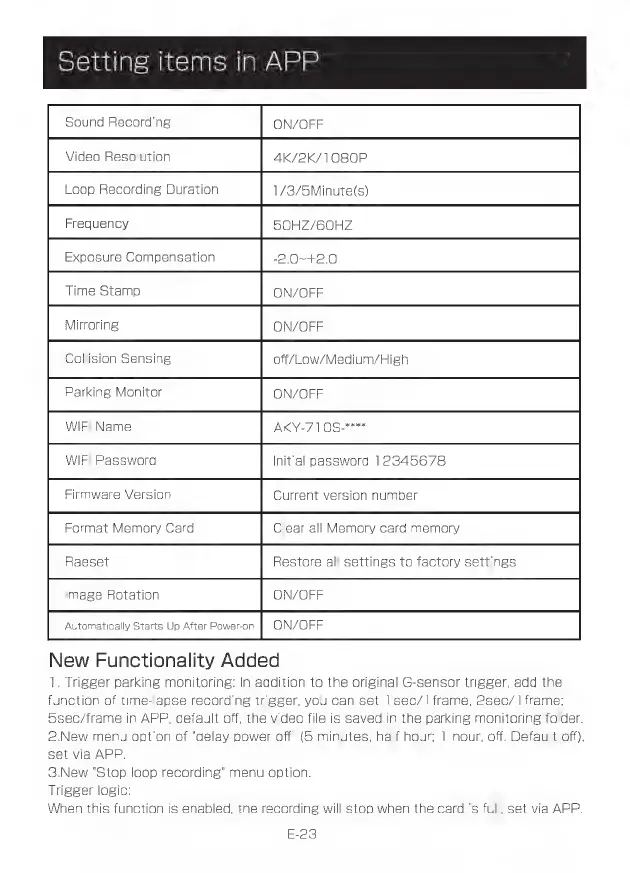
Akeeyo AKY-710S - Setting Items in APP S Emet [E-23]

Akeeyo AKY-710S
80 pages
Print Icon
To Next Page IconTo Next Page
To Previous Page IconTo Previous Page
Loading...
Setting
items
in
APP
Sound
Recording
ON/OFF
Loop
Recording
Duration
1/3/5Minute(s)
Video
Resolution
4K/
K/1080P
Frequency
50HZ/60HZ
Exposure
Compensation
-2.0~+2.0
ET
E
Mirroring
A
/OFF
ON/OFF
ff/Low/Medium/High
/OFF
Y-7108-""*
Automatically
Starts
Up
After
Power-on
O
New
Functionality
Added
1.
Trigger
parking
monitoring:
In
addi
ON/OFF
ion
to
the
original
G-sensor
trigger,
add
the
function
of
time-lapse
recording
trigger,
you
can
set
1sec/1frame:
2sec/1
frame;
5sec/frame
in
APP,
default
off,
the
video
file
is
saved
in
the
parking
monitoring
folder.
2.New
menu
option
of
"delay
power
off'
(5
minutes;
half
hour;
1
hour;
off.
Default
off),
set
via
APP.
3.New
"Stop
loop
recording"
menu
option.
Trigger
logic:
When
this
function
is
enabled,
the
recording
will
stop
when
the
card
is
full,
set
via
APP.
E-23