EasyManua.ls Logo

Akeeyo AKY-710S - Troubleshooting Steps

Akeeyo AKY-710S
80 pages
Print Icon
To Next Page IconTo Next Page
To Previous Page IconTo Previous Page
Loading...
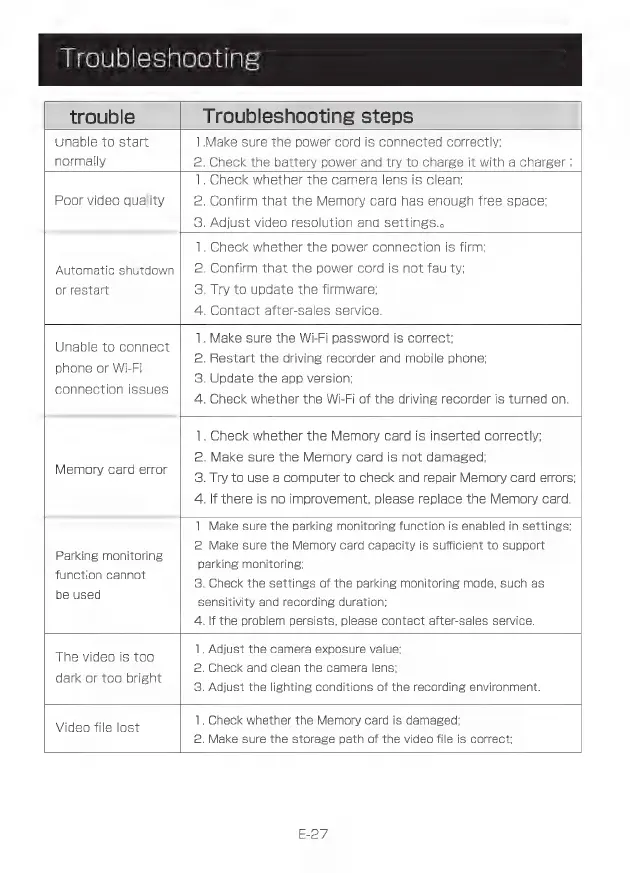
Troubleshooting
trouble
Troubleshooting
steps
Unable
to
start
1.Make
sure
the
power
cord
is
connected
correctly:
normally
2.
Check
the
battery
power
and
try
to
charge
it
with
a
charger
:
1.
Check
whether
the
camera
lens
is
clean;
Poor
video
quality
2.
Confirm
that
the
Memory
card
has
enough
free
space;
3.
Adjust
video
resolution
and
settings.
1.
Check
whether
the
power
connection
is
firm:
Automatic
shutdown
|
2.
Confirm
that
the
power
cord
is
not
faulty:
or
restart
3.
Try
to
update
the
firmware;
4.
Contact
after-sales
service.
1.
Make
sure
the
Wi-Fi
password
is
correct;
Unable
to
connect
ine
-
2.
Restart
the
driving
recorder
and
mobile
phone:
phone
or
Wi-Fi
:
Mu
3.
Update
the
app
version:
connection
issues
Y
-
4.
Check
whether
the
Wi-Fi
of
the
driving
recorder
is
turned
on.
Memory
card
error
1.
Check
whether
the
Memory
card
is
inserted
correctly:
2.
Make
sure
the
Memory
card
is
not
damaged;
3.
Try
to
use
a
computer
to
check
and
repair
Memory
card
errors;
4.
If
there
is
no
improvement,
please
replace
the
Memory
card.
Parking
monitoring
function
cannot
be
used
1.
Make
sure
the
parking
monitoring
function
is
enabled
in
settings:
2.
Make
sure
the
Memory
card
capacity
is
sufficient
to
support
parking
monitoring;
3.
Check
the
settings
of
the
parking
monitoring
mode,
such
as
sensitivity
and
recording
duration:
4.
If
the
problem
persists,
please
contact
after-sales
service.
The
video
is
too
dark
or
too
bright
1.
Adjust
the
camera
exposure
value;
2.
Check
and
clean
the
camera
lens;
3.
Adjust
the
lighting
conditions
of
the
recording
environment.
Video
file
lost
1.
Check
whether
the
Memory
card
is
damaged:
2.
Make
sure
the
storage
path
of
the
video
file
is
correct;
E-27