EasyManua.ls Logo

Akeeyo AKY-710S - Page 27

Akeeyo AKY-710S
80 pages
Print Icon
To Next Page IconTo Next Page
To Previous Page IconTo Previous Page
Loading...
Version
Update
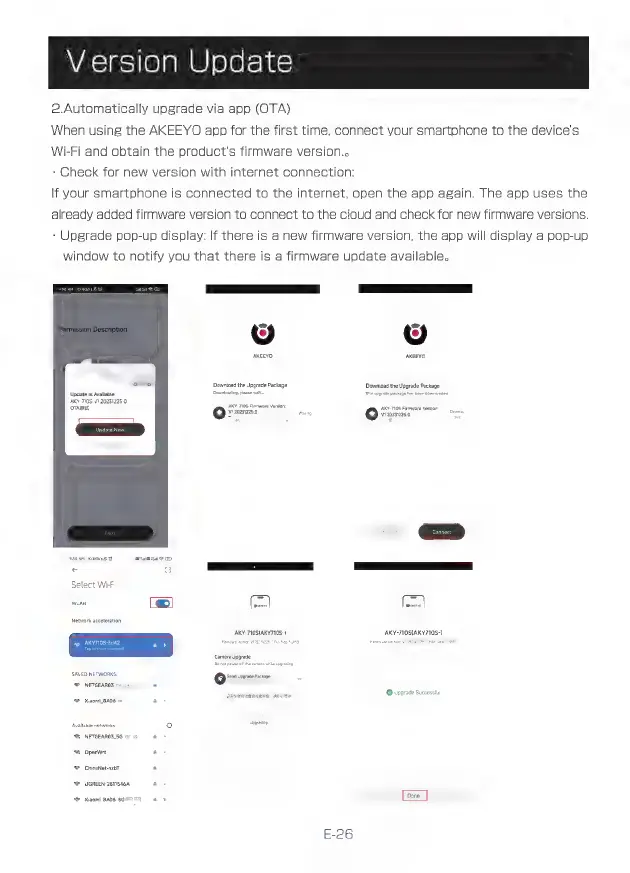
2.Automatically
upgrade
via
app
(OTA)
When
using
the
AKEEYO
app
for
the
first
time,
connect
your
smartphone
to
the
device's
Wi-Fi
and
obtain
the
product's
firmware
version..
-
Check
for
new
version
with
internet
connection:
If
your
smartphone
is
connected
to
the
internet,
open
the
app
again.
The
app
uses
the
already
added
firmware
version
to
connect
to
the
cloud
and
check
for
new
firmware
versions.
-
Upgrade
pop-up
display:
If
there
is
a
new
firmware
version,
the
app
will
display
a
pop-up
window
to
notify
you
that
there
is
a
firmware
update
available.
-
=。
Q9
o9
aketo
m
Download
the
Upgrade
Package
Download
the
Upgrade
Package.
Update
is
Available
Downizadng
pl
=
AKY-7105
VI20251225.0
AKY0S
Fi
i
ve
Version:
SUN
[*]
izo2a2sn
[TS
SS
Select
Wi-Fi
Network
acceleration
SAVED
NETWORKS
AKY-TIOSUAKYTIOS-)
Y-TIOS(AKY7108-)
NETGEAROS
©
Upgrade
Successtul
9
XiaomL8A06
Avail
o
*
E
^&
opem
à
^
ChinaNet-nzbT
a
^
UGREEN-2811546A
a
<=
Naomi
BA06
SG
a
Done
E-26