EasyManua.ls Logo

Akeeyo AKY-710S - Version Update

Akeeyo AKY-710S
80 pages
Print Icon
To Next Page IconTo Next Page
To Previous Page IconTo Previous Page
Loading...
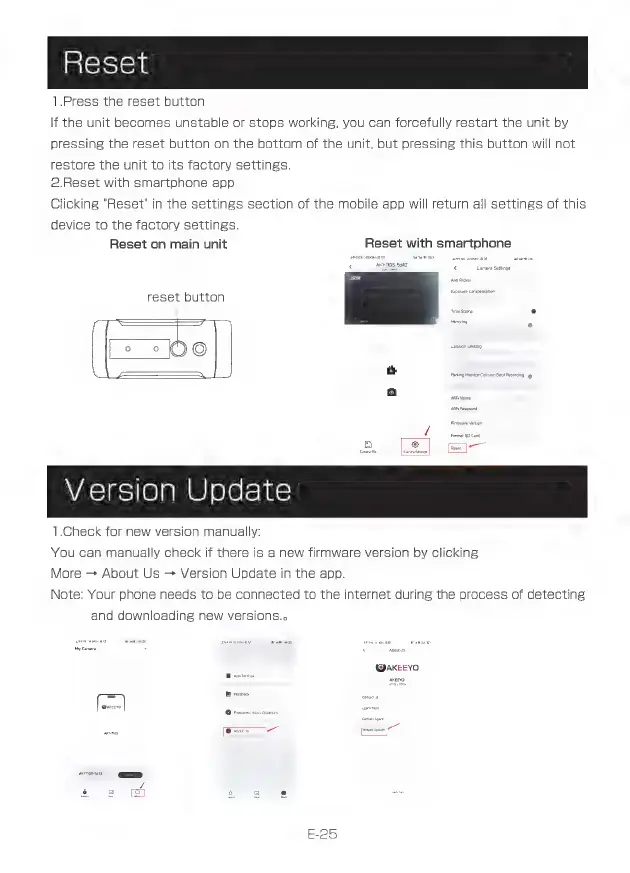
Reset
1.Press
the
reset
button
If
the
unit
becomes
unstable
or
stops
working,
you
can
forcefully
restart
the
unit
by
pressing
the
reset
button
on
the
bottom
of
the
unit,
but
pressing
this
button
will
not
restore
the
unit
to
its
factory
settings.
2.Reset
with
smartphone
app
Clicking
"Reset"
in
the
settings
section
of
the
mobile
app
will
return
all
settings
of
this
device
to
the
factory
settings.
Reset
on
main
unit
Reset
with
smartphone
reset
button
[=
=e
-
Version
Update
1.Check
for
new
version
manually:
You
can
manually
check
if
there
is
a
new
firmware
version
by
clicking
More
-
About
Us
>
Version
Update
in
the
app.
Note:
Your
phone
needs
to
be
connected
to
the
internet
during
the
process
of
detecting
and
downloading
new
versions.»
AKEEYO
E-25