EasyManua.ls Logo

AKG WMS 400 - User Manual

AKG WMS 400
5 pages
Print Icon
To Next Page IconTo Next Page
Loading...
3-9 cm
HT 400
OFF -> MUTE
10 sec. time to transmit
FIRST/SINGLE CHANNEL.
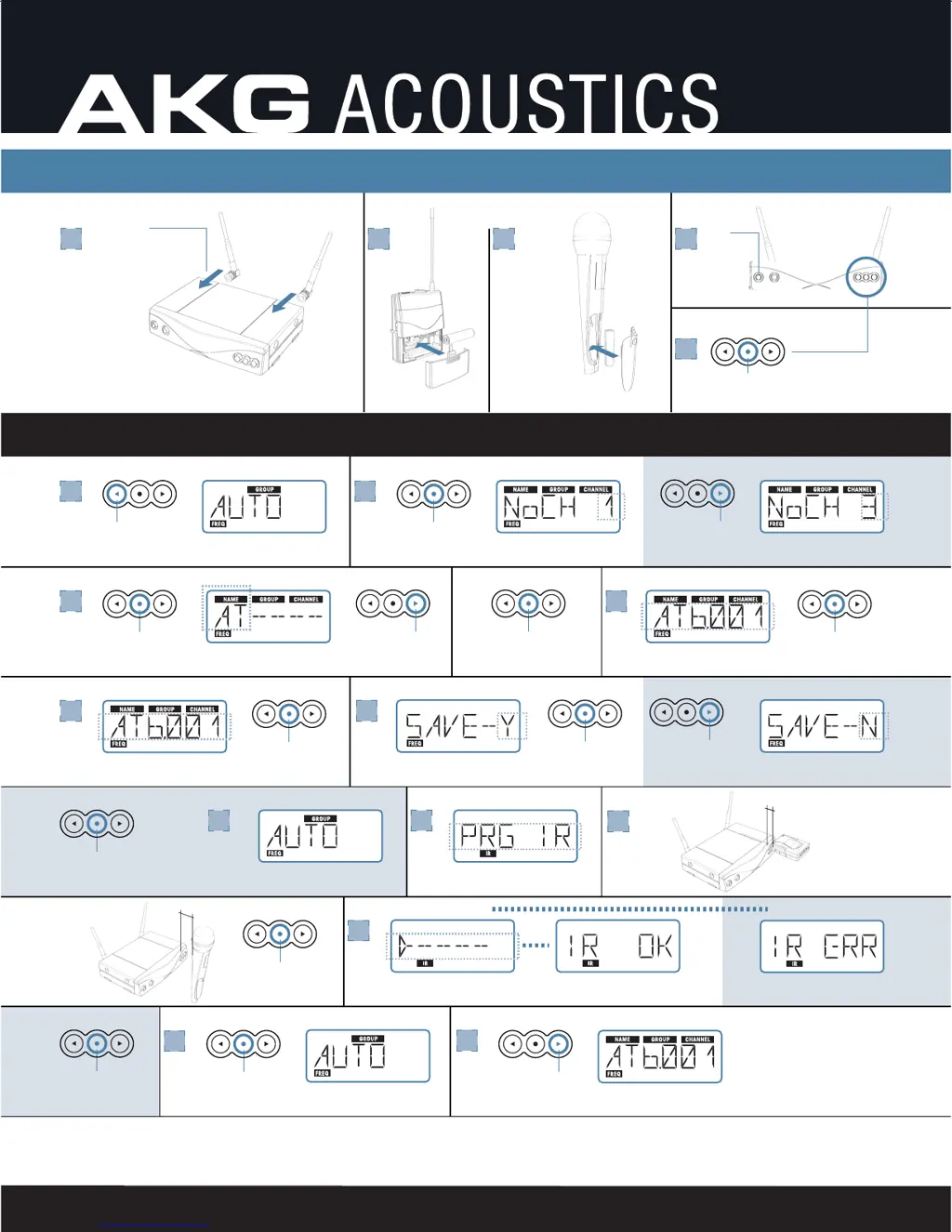
WMS 400 Quick guide to build a channel
POWER
DC IN
12V 500mA
3
ON
4
UNLOCK 3 SEC.
1
2 a2 a 2 a2 b
>>> PERFORMANCE
5
SELECT GROUP
6
NUMBER OF
CHANNELS
2x
SELECT NAME OF COUNTRY *
AT, BE, CH, D1-5, DN, U1, U2, GB, IS,
LI, LU, PT, SE
7
OK
3-9 cm
12
PT 400
OFF -> MUTE
10 sec. time to transmit
ALTERNATIVE
8
OK
13
14
OK
15
DISPLAYS SELECTED CHANNEL 1...12
ALTERNATIVE
ALTERNATIVE
* AT - AUSTRIA, BE - BELGIUM, CH - SWITZERLAND, D1-5 - GERMANY, DN - DENMARK, U1 - UHF CHANNEL SHARED, U2 - UHF CHANNEL SHARED, GB - UNITED KINGDOM, IS - ISLAND,
LI - LIECHTENSTEIN, LU - LUXEMBURG, PT - PORTUGAL, SE - SWEDEN PLEASE CHECK YOUR LOCAL DEALER TO FULFIL REGULATION NEEDS!
e.g. 3x
1 -13x OK
10
NO
OK
9
OK
2x
RETRY 2x
>>>>> 5 11
OK
OK

Other manuals for AKG WMS 400

Questions and Answers

  • A
    Alexander PowellAug 20, 2025
    Why does my AKG Microphone system have noise and crackling?
    • M
      matthew98Aug 21, 2025
      If you experience noise, crackling, or unwanted signals with your AKG Microphone system, try the following: * Relocate the receiver or antennas to a different position. * Identify and switch off any interfering sources such as other wireless systems, TV, radio, CB radios, or defective electrical appliances. Alternatively, tune the transmitter and receiver to a different frequency. Have your electrical installation checked for defects.
  • B
    Brian GomezAug 23, 2025
    What to do if my AKG Microphone system has distortion?
    • A
      Andre MartinezAug 23, 2025
      If your AKG Microphone system is experiencing distortion, it could be due to a couple of reasons: 1. The GAIN control on the transmitter might be set too high or too low. Adjust the GAIN setting until the distortion stops. 2. There might be interference from other wireless systems, TV, radio, CB radios, or defective electrical appliances or installations. Try switching off these interference sources or defective appliances. You can also tune the transmitter and receiver to a different frequency or have your electrical installation checked.
  • M
    marcbyrdAug 26, 2025
    How to prevent dropouts in AKG WMS 400?
    • S
      susanthompsonAug 26, 2025
      If you are experiencing momentary loss of sound ("dropouts") at some points within the performance area using your AKG Microphone system, relocate the receiver or antennas. If dead spots persist, mark and avoid them.
  • A
    annehoffmanAug 28, 2025
    What does ERR.>SYS< mean on AKG Microphone system?
    • J
      Jamie WagnerAug 28, 2025
      When your AKG Microphone system displays 'ERR.>SYS
  • S
    Steve CrawfordAug 31, 2025
    What does ERR.>PRE< mean on AKG WMS 400?
    • C
      Carrie MckinneyAug 31, 2025
      When your AKG Microphone system displays 'ERR.>PRE
  • D
    deleonchristopherSep 2, 2025
    What does ERR.>TXBand mean on AKG WMS 400?
    • N
      Nicholas BensonSep 2, 2025
      If your AKG Microphone system displays 'ERR.>TXBand', it means that the transmitter frequency band is not identical with the receiver frequency band or the RF output is too high/low. Use a transmitter with the same frequency band as the receiver or use a transmitter with lower/higher RF output.
  • J
    Jesus LucasSep 4, 2025
    What does ERR.>USR< mean on AKG WMS 400?
    • S
      Shelley JimenezSep 4, 2025
      If your AKG Microphone system displays 'ERR.>USR
  • K
    Kevin GarciaSep 7, 2025
    What does ERR.>RF< mean on AKG WMS 400?
    • M
      Michele HarrisSep 7, 2025
      If your AKG Microphone system displays 'ERR.>RF
  • M
    markstanleySep 9, 2025
    What does ERR.>IR< mean on AKG Microphone system?
    • J
      jmontgomerySep 10, 2025
      If your AKG Microphone system displays 'ERR.>IR
  • N
    Nichole BeckerSep 12, 2025
    What does >-h< mean on AKG WMS 400 Microphone system?
    • C
      christinapachecoSep 12, 2025
      If your AKG Microphone system displays '> -h

Summary

First;Single Channel Setup

Select Auto Group and Channel

Selects automatic group and number of channels for clean frequencies.

Select Country and Name Presets

Chooses country code and group for specific presets.

Save Settings

Saves the current configuration or reverts if not satisfied.

Program IR and Retry

Programs transmitter to receiver via IR and handles retries.

Next;Multi Channel Setup

Select Channels and Groups

Configures sequential channels and groups for multiple systems.

Save and Program IR

Saves multi-channel settings and programs transmitters via IR.

Optimize System Performance

Adjusts gain settings for optimal transmitter and receiver performance.

System Gain Optimization

HT Gain Adjustment

Configures gain for HT400/C and HT400/D transmitters.

PT Gain Adjustment

Sets gain for PT400 transmitters based on microphone quality.

Country Code Information

Understanding Preset Representation

Explains how country codes, group, and channel are displayed.

US Preset Recommendations

Recommends setting country code to US for optimal US operation.

AKG WMS 400 Specifications

General IconGeneral
BrandAKG
ModelWMS 400
CategoryMicrophone system
LanguageEnglish

Related product manuals