D146H002 Ed.02
7.1.2.- Changing the operating parameters
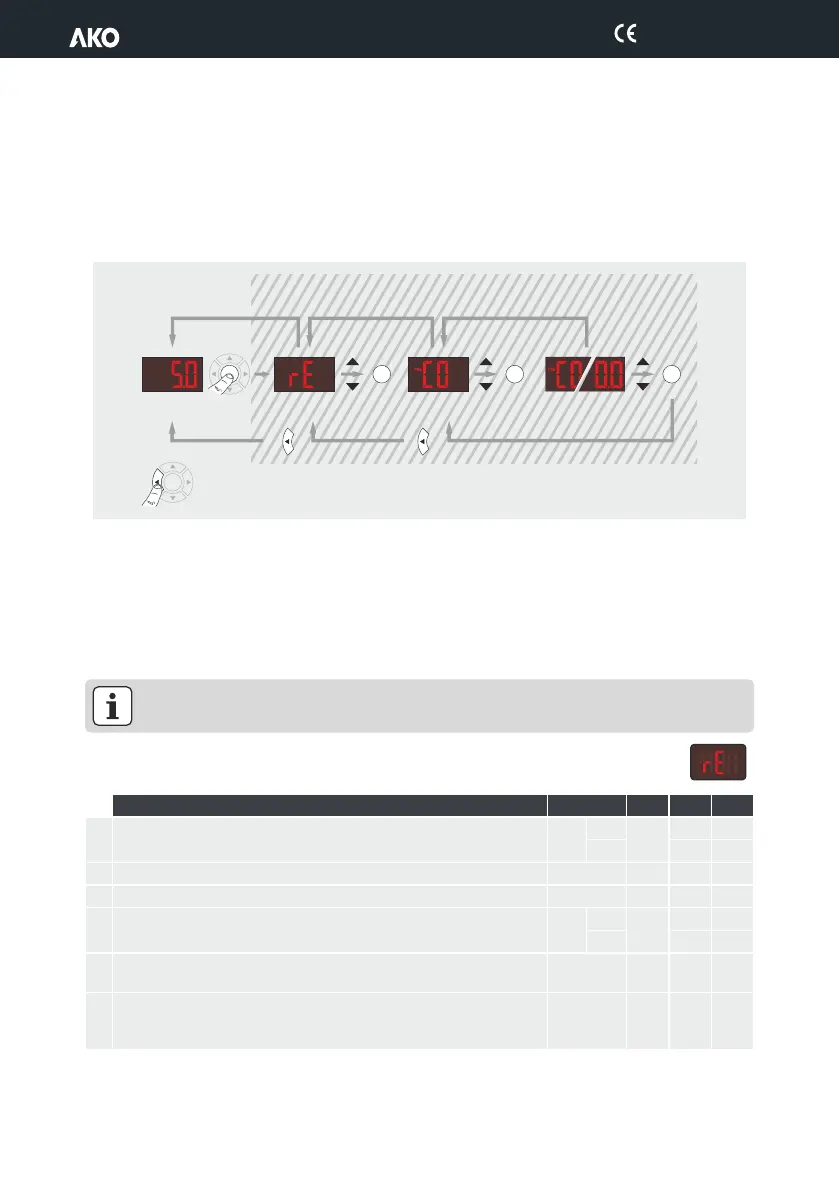
Press the SET button for 10 seconds or until "PrG" appears on the screen.
After 20 seconds with no key being pressed, the equipment will return to the previous level. If you are on level 3,
the changes will not be saved.
OKOK
20"
PROGRAMMING
SET
SET
SET
OK
10"
20"
20"
Back up one level
without saving changes
SET SET SET
Temperature
Indication
Level 1
Menus
Level 2
Parameters
Level 3
Values
Change
menu
Change
parameters
Change
value
7.1.3.- Parameters
The unit's operation parameters are organized into groups or families according to their function.
The def. column shows factory-set default parameters. Those marked with an are variable depending on the
*
applicatio
Level 1.- Regulation and Control
n chosen in the wizard (see section 3.1). Temperature values are expressed in ºC. (Equivalent temperature
in ºF)
IMPORTANT: The available parameters in each piece of equipment depend on the functionalities it
includes, as such, it is possible that some parameters do not appear in your equipment.
Temperature Adjustment (Set Point)
(limits depending on probe type) (Page 10)
Calibrating probe 1 (Offset) (Page 8)
Probe 1 differential (Histeresis) (Page 10)
Upper blocking of the set point (Page 8)
(cannot be set above this value)
Lower blocking of the set point
(cannot be set below this value)
(Page 8)
Type of delay for protection of the compressor (Page 11):
0=OFF/ON (since the last disconnection);
1=OFF-ON/ON-OFF (since the last shut-down /start-up)
Level 2
24


 To Next Page