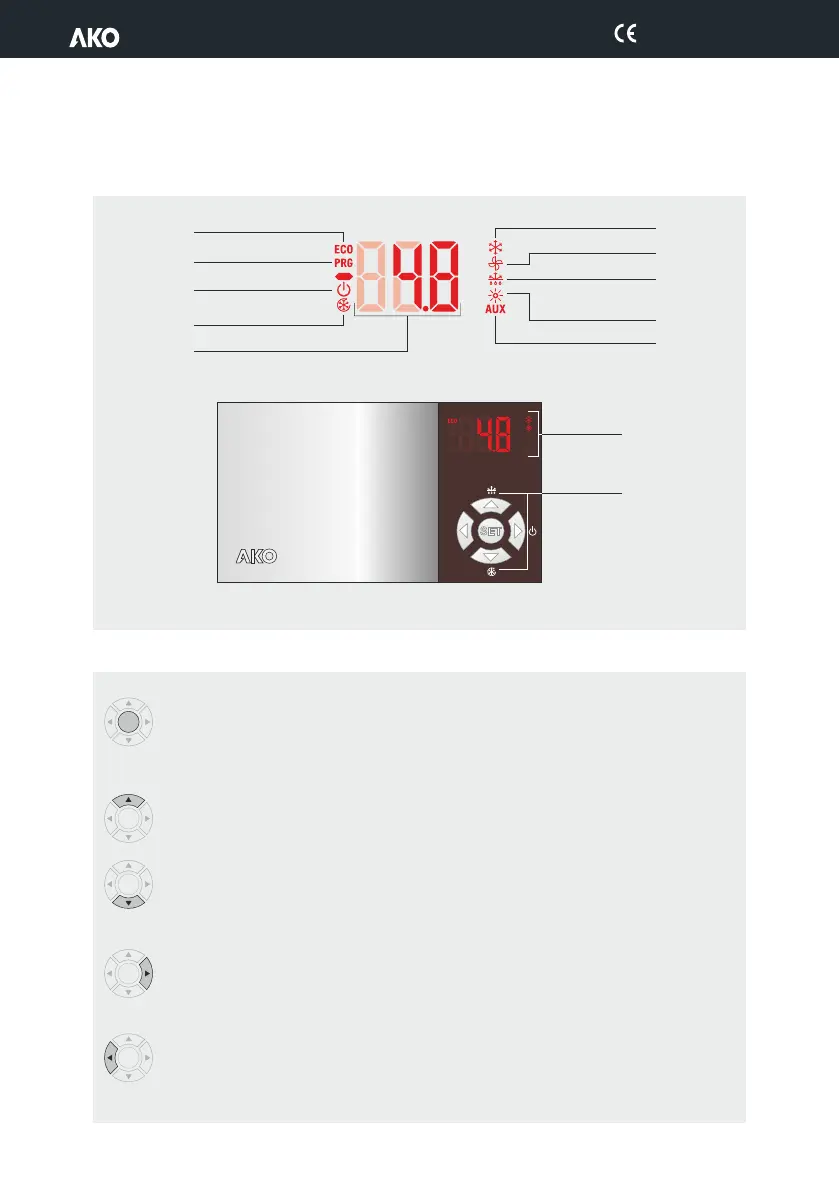
Flashing lights indicate that the function in question should be activated by temperature, but is not due
to a conflicting timing or protection parameter.
2.1.- Keypad functions
2.- Description
ECO mode active
Program Mode
Standby active
Temperature
Fast freezing mode
active
FAN relay active
DEF relay energised
Cold room light active /
RES relay active 2
AUX relay active
COOL relay active
1
1
:In AKO-D1461x / D1462x, if P0=0
2
:In AKO-D1461x / D1462x, if P0=1
Keyboard
Display
SET
SET
SET
SET
SET
Press for 5 seconds, allows changing the set point (SP).
Pressing for 10 seconds goes to the programming menu.
In the programming menu, go to the level displayed or accept the new value while setting a
parameter.
Press for 5 seconds to start/stop Defrost mode.
In the programming menu, allows you to scroll through the various levels or, during the setting of a
parameter, to change the value.
Press for 5 seconds to start/stop Fast Freezing mode (rapid cooling). (Function available depending on
the model)
In the programming menu, allows you to scroll through the various levels or, during the setting of a
parameter, to change the value.
Press for 5 seconds, activates standby mode.
Pressing for two seconds, the device returns to normal. In Standby mode, the equipment performs no
actions and only the m indicator is displayed on the screen.
In the programming menu, go to the level displayed.
Pressing it for 2 seconds, activates or deactivates the cold room light (if P6=3). This function stays
active although the unit is in the m mode. (Only controllers with 4 relays).
In the programming menu, exit without saving parameter, return to previous level or exit program-
ming.
4
D146H002 Ed.02


 To Next Page