
 Need help?
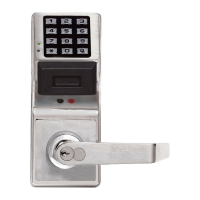
Do you have a question about the Alarm Lock Trilogy PL3000 and is the answer not in the manual?
Log of events with time and date, printable and uploadable.
Metal key override, non-volatile memory, real-time clock, programmable relay, battery status.
Automated unlock/lock, scheduled events, user/group management, real-time clock.
ProxCard and ProxKey fob, batch enrollment available.
1700 users, service card, lockout mode, group assignment.
Partial or full programming via DL-Windows software.
Enrolls ProxCards/Keyfobs into DL-Windows via serial cable.
Transfers data between PC and locks when computers are unavailable.
Prints audit trails without a PC connection via infrared.
Compatible proximity cards and keyfobs for lock access.
Connects PC serial port to AL-DTM or lock for communication.
Connects AL-DTM to lock for data transfer.
Connects AL-PRE to computer serial port for enrollment.
Explains software flexibility over hardware for lock programming and updates.
Outlines three methods for lock programming: PC, AL-DTM, or Function Cards.
Instructions and data for lock functions, including features, schedules, and audit trails.
Stored proximity card information allowing lock access.
Lock options and functions, configurable via DL-Windows software.
Specific times used to program events or schedules for lock operation.
Programmed operations based on time zones and events for automated lock control.
An individual authorized to use or modify lock settings.
Defines user access to programming tasks, determined by Function Card possession.
Unique identifier for a lock location where proximity card data is stored.
Organizes users for simultaneous control via schedules.
Special proximity cards used for specific programming functions and lock operations.
Special user numbers with unique programming and access capabilities.
Enables/resets Function Card #9 for one-time access.
Initiates PC communications for data transfer with DL-Windows.
Initiates AL-DTM communications for data transfer.
A one-time-only service card for temporary access.
Computer software for programming, managing users, and retrieving data.
Transferring data directly between PC and lock using AL-PCI2 cable and Function Card #1.
Transferring data via AL-DTM using AL-PCI2 and mini banana plug with Function Card #2.
Enrolling ProxCards via AL-PRE to lock using DB9 and mini banana plug with Function Card #2.
Printing audit logs using AL-IR1 infrared printer with Function Card #6.
Covers battery, external power, remote input, and relay connections.
Procedure for replacing AA batteries in the lock.
Steps for first-time power up and retaining programming after power loss.
Procedure to reset the lock to factory defaults and erase all data.
Step-by-step guide to enroll Function Cards for initial lock setup.
Procedure for enrolling user proximity cards into the lock.
Procedure for removing enrolled proximity cards using Function Card #4.
Steps to program the lock using DL-Windows without Function Cards.
Verifying access with programmed ProxCards or Keyfobs.
Initiates data transfer between PC and lock via DL-Windows.
Initiates data transfer between AL-DTM and lock.
Initiates entry of new proximity cards starting at User 301.
Initiates removal of the next presented proximity card.
Enables or disables indefinite free access for all users.
Initiates printing of time, date, version, and audit log via AL-IR1 printer.
Enables or disables all user card access for maximum security.
Enables or resets Function Card #9 for one-time access.
Provides one-time-only access for service personnel.
Details how Function Card #1 initiates PC communication for data transfer.
Steps to send data from PC to the PL3000 lock using Function Card #1.
Steps to receive data from the PL3000 lock to the PC using Function Card #1.
Explains how Function Card #2 starts AL-DTM data transfer.
Procedure to send lock program from AL-DTM to PL3000 lock.
Procedure to receive lock program from PL3000 lock to AL-DTM.
Guide to enrolling new proximity cards into the lock starting from User 301.
Procedure to delete a proximity card by presenting it after Function Card #4.
How to enable or disable indefinite free access for all users.
Steps to print lock data using the AL-IR1 infrared printer.
How to disable all user card access for maximum security.
Details how Function Card #8 activates Function Card #9 for one-time access.
Explains the use of Function Card #9 as a service card for single access.
Describes relay activation based on various lock events.
Features related to the remote input switch and its effects.
Feature enabling PC communication mode via remote input.
Various system settings like disabling sounder or delayed entry.
 General
| Brand | Alarm Lock |
|---|---|
| Model | Trilogy PL3000 |
| Category | Locks |
| Language | English |


 To Next Page