Getting to know your TV
You’ll be up and running in no time
Getting to know your TV
18
If you require any technical guidance or find that your TV is not operating as intended, a simple solution can often be found in the Troubleshooting section of these instructions,
For models with built in
DVD player
1
2
3
4
5
6
7
1
2
3
4
5
6
8
7
9
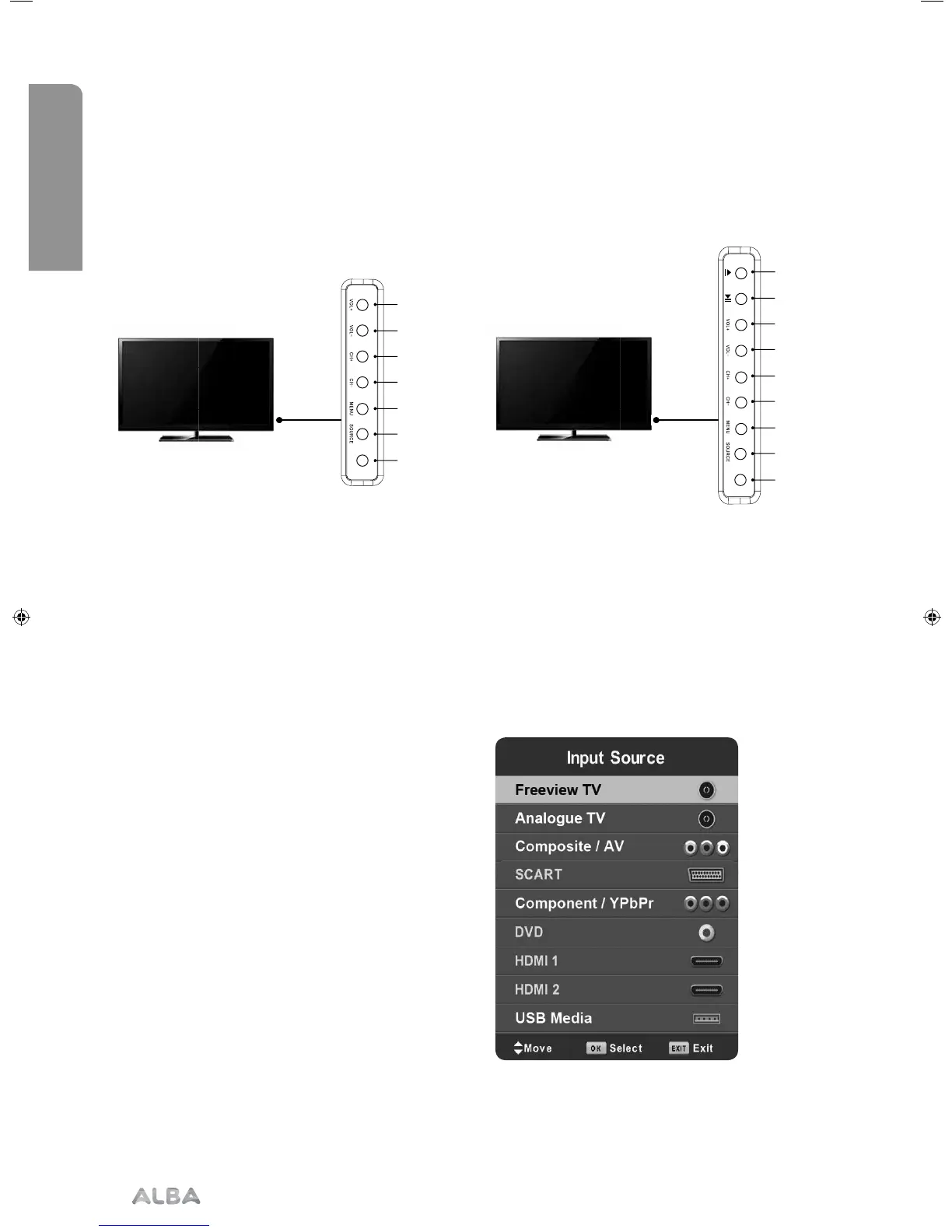
1) Volume up and menu right
2) Volume down and menu left
3) Programme/Channel up and menu up
4) Programme/Channel down and menu down
5) Displays Menu/OSD
6) Displays the input source menu
7) Standby Power On/Off
Choosing mode and input/source
To switch between the different input/connections.
A) Using the buttons on the remote control:
1) Press [SOURCE] - The source menu will appear.
2) Press [\/] or [/\] to select the input you require.
3) Press [OK].
B) Using the buttons on the Television:
1) Press [SOURCE].
2) Scroll up / down using CH+/ CH- buttons to the
input/source you require.
3) Press Vol+ to change input/source to the one
selected.
For further information on input/connections please
view ‘Connections’ pages.
TV buttons and input source
Example of Source menu depending on the TV model
1) Stop/Eject DVD
2) Play/Pause DVD
3) Volume up and menu right
4) Volume down and menu left
5) Programme/Channel up and menu up
6) Programme/Channel down and menu down
7) Displays Menu/OSD
8) Displays the input source menu
9) Standby Power On/Off
STANDBY
STANDBY
User Guide - ALB-MAN-0005 - Alba - 22-24-207 models.indd 18User Guide - ALB-MAN-0005 - Alba - 22-24-207 models.indd 18 06/01/2016 11:28:4706/01/2016 11:28:47


 To Next Page