USB media player
USB mode offers playback of various different types
of content that you have saved on your USB Memory
Stick.
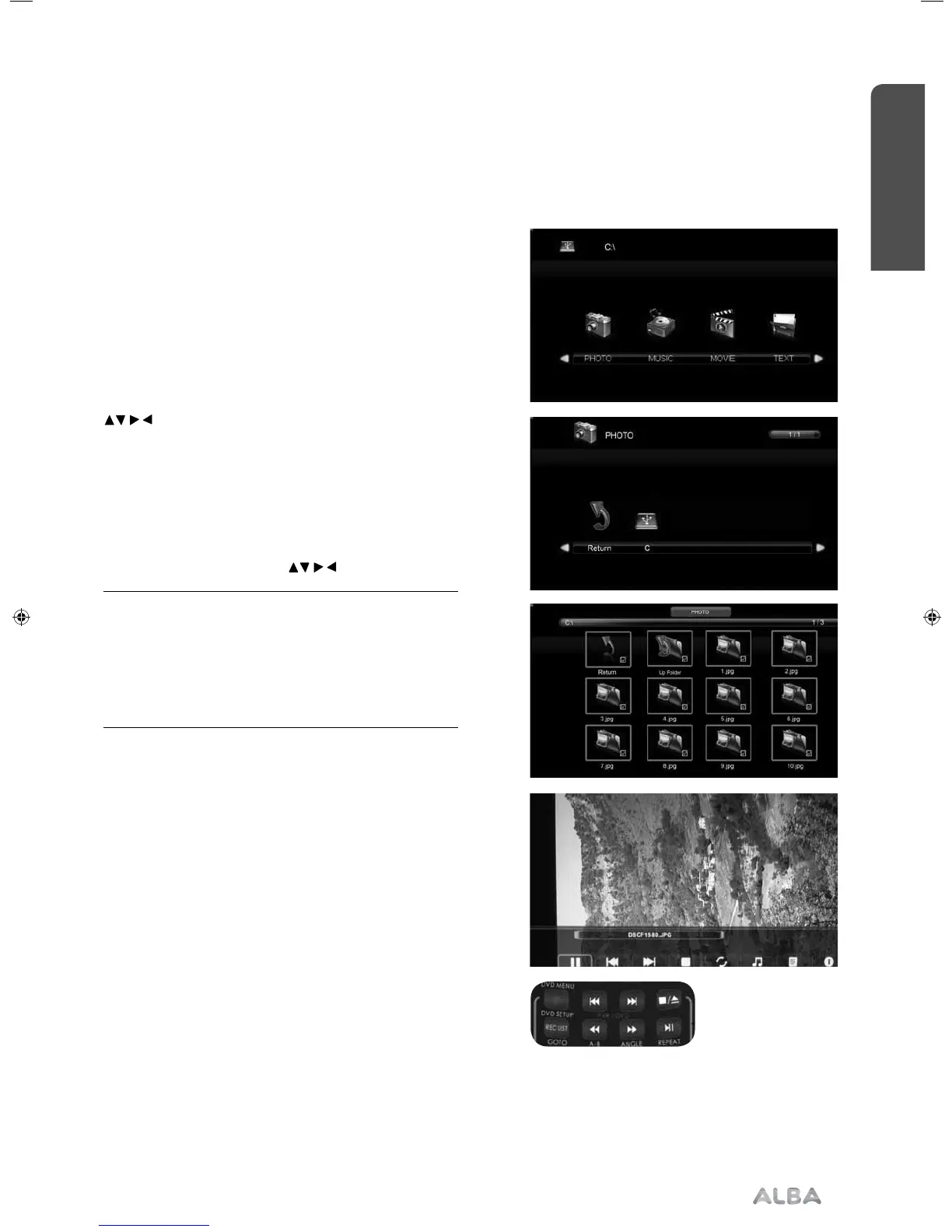
On switching to USB source the menu screen will
appear. The content will be divided into Photo, Music,
Movie and Text based on file type.
1) You can navigate through the menus using the scroll
buttons. To confirm the item you wish to play/
view press [OK] button.
2) Select the drive you require.(If your drive only has 1
partition you will only see 1 item).
3) You can now access the item. Press OK to view.
4) While viewing you control the item using (Fig A).
or by pressing ( i ) and using
and (OK).
Tip: If you experience a playback issue, please
ensure the files being used are the correct format
(example - the picture plays but no sound)
For the best performance, do not use USB
extension cable. See technical specifi cation page
for compatible fi le types.
Fig A
1)
2)
3)
4)
Advanced features
Getting the most from your TV
Advanced features 37
or online at www.argos-support.co.uk If you still require further assistance, call one of our experts on 0330 024 0805. (Calls are charged at the standard rate of your network provider).
User Guide - ALB-MAN-0005 - Alba - 22-24-207 models.indd 37User Guide - ALB-MAN-0005 - Alba - 22-24-207 models.indd 37 06/01/2016 11:28:5706/01/2016 11:28:57


 To Next Page