Standard features
Simple everyday use
Standard features 29
or online at www.argos-support.co.uk If you still require further assistance, call one of our experts on 0330 024 0805. (Calls are charged at the standard rate of your network provider).
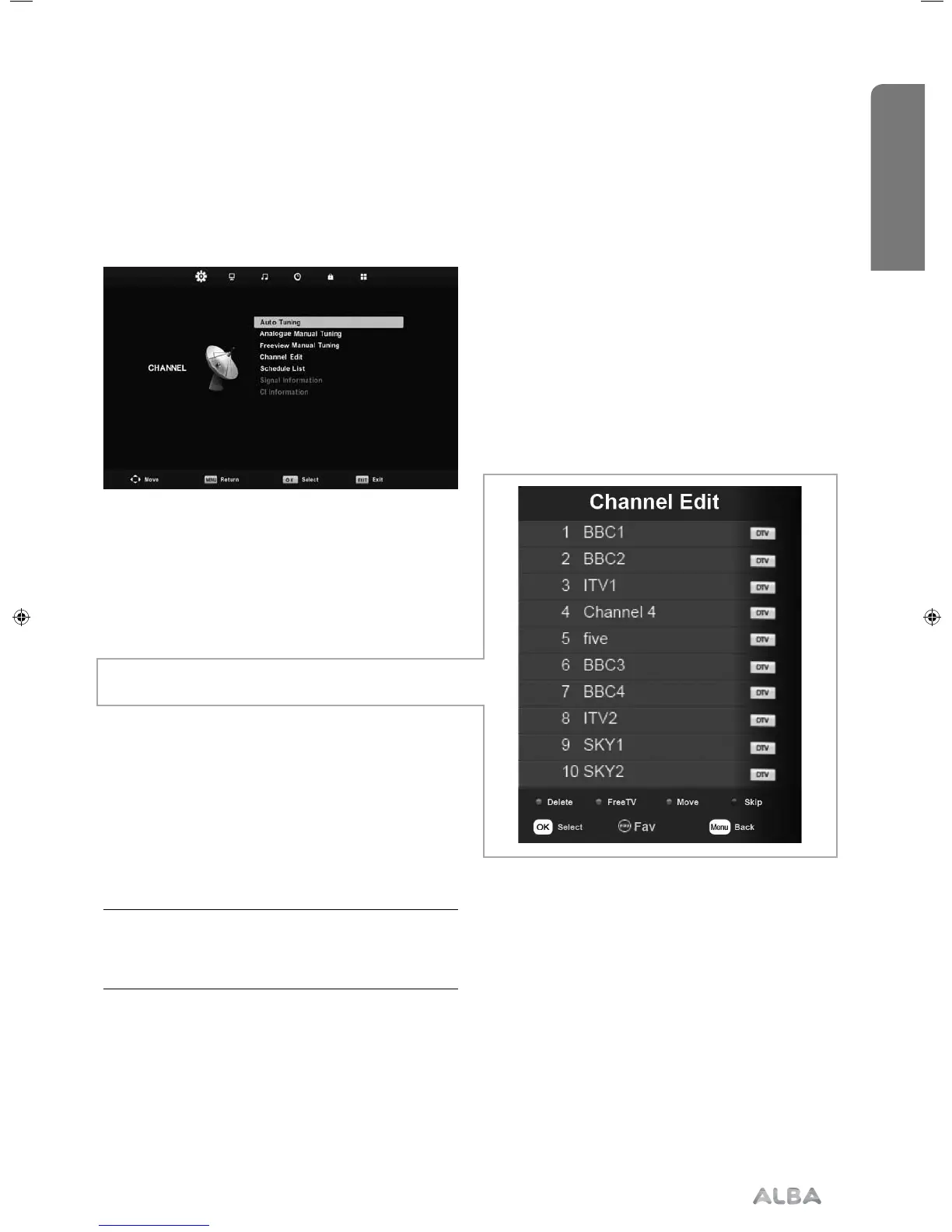
Channel menu
Auto Tuning - Allows you to retune the television
for all digital channels, digital radio stations and
analogue channels.
Analogue Manual Tuning - Allows you to manually
tune your analogue signal
Freeview Manual Tuning - Allows you to manually
tune your digital signal
Channel Edit - Allows you to delete, move, skip and
add favourite channels.
Schedule List - Lists your programme reminders
Signal Information - Displays signal strength
information
CI Information - Pay per view services require a
“smartcard” to be inserted into the TV. If you subscribe
to a pay per view service the provider will issue you
with a ‘CAM’ and a “smartcard”. The CAM can then
be inserted into the COMMON INTERFACE PORT
(CI Card In).
Tip: If you do not press any buttons for 30 seconds,
the menu will automatically exit. You can change the
length of time before the menu exits automatically -
see ‘OSD Timer’ in the Time Menu.
User Guide - ALB-MAN-0005 - Alba - 22-24-207 models.indd 29User Guide - ALB-MAN-0005 - Alba - 22-24-207 models.indd 29 06/01/2016 11:28:5606/01/2016 11:28:56


 To Next Page