Connections
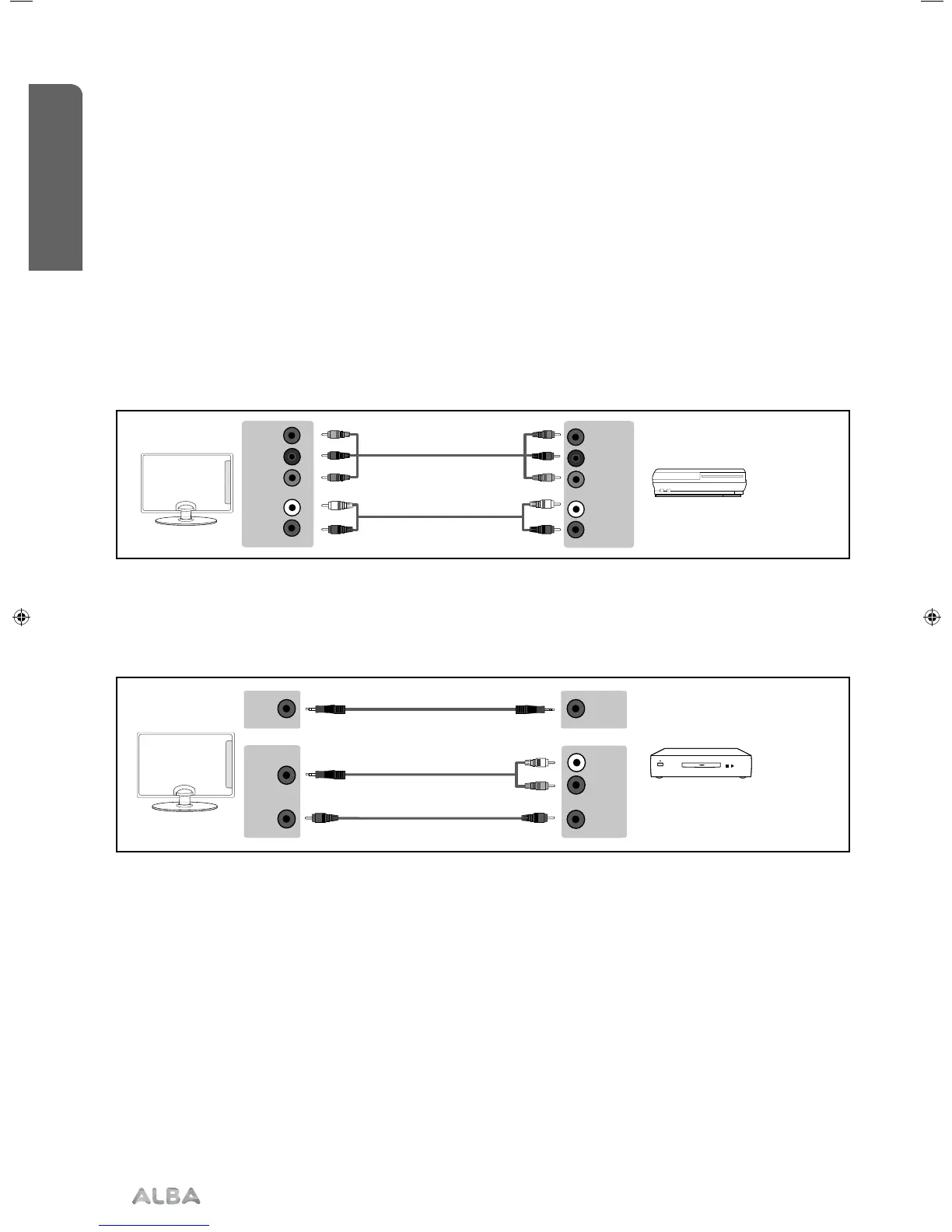
Connecting a High Definition (HD) Device Option 2 - via Component cable
If you are supplied with a cable from the device which has RED, GREEN, BLUE, RED & WHITE connectors you must
connect via Component (for picture) and by phono cable (for sound).
TV Source should be set to Component/YPbPr.
Y (green)
PB (blue)
PR (red)
R (red)
L (white)
Y (green)
PB (blue)
PR (red)
R (red)
L (white)
3.5mm
earphone
3.5mm
earphone
OPTION 1 for 3.5mm EARPHONE Output
OPTION 2 for 3.5mm EARPHONE Output
COAX
audio
out
COAX
audio
in
3.5mm
audio
in
L (white)
R (red)
Connecting to an external audio device (Amplifiers, Surround Sound, Sound Bars etc)
When connecting via the TV’s 3.5mm Earphone output, this will disable the TV speakers.
There are two options when connecting a device via the 3.5mm Earphone Output.
Connections
Bringing it all together
Connections24
If you require any technical guidance or find that your TV is not operating as intended, a simple solution can often be found in the Troubleshooting section of these instructions,
User Guide - ALB-MAN-0005 - Alba - 22-24-207 models.indd 24User Guide - ALB-MAN-0005 - Alba - 22-24-207 models.indd 24 06/01/2016 11:28:5606/01/2016 11:28:56


 To Next Page