5
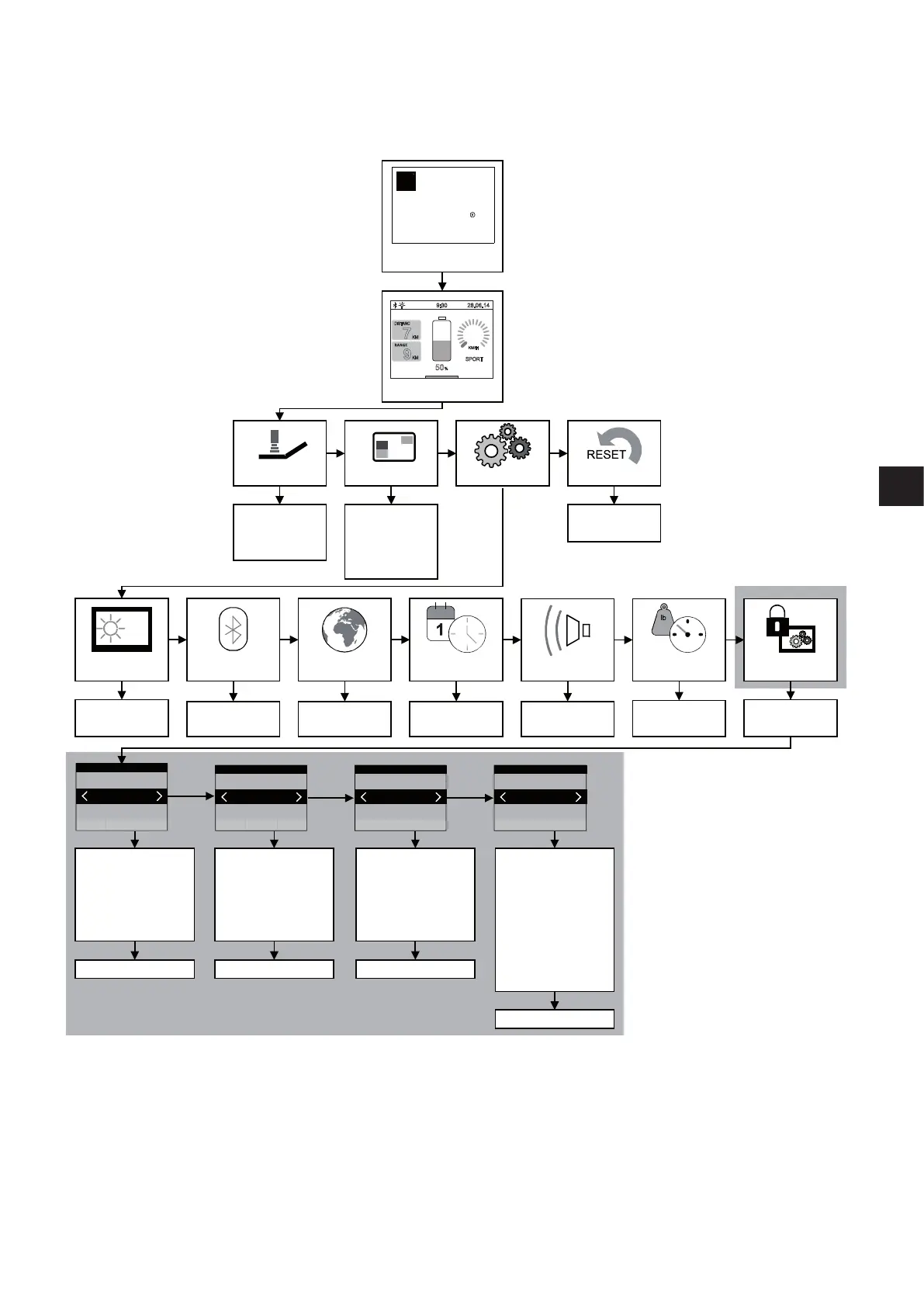
2.1 Overview of menu structure and associated buttons on the control unit
Alber
Jan
kg
km
mi
e-fix
R
e-fix
alber
KM/H
0
7
KM
9
KM
9:30
28.06.14
50
%
5
.
Start screen
(Optional)
User screen
Travel mode Display Setting KM counter
Daily kilometres
Range
Time
Date
Start screen
Reset
Daily kilometre
counter
Screen brightness
Bluetooth Lang.selection Date/time UnitsSignal tone
brighter – darker
Device name, e.g.
“e-fix - 1986”
Date and time
setting
On/off
Access for
specialist dealers
only
– Brake applied
– Automatic cut-off
– Menu function
– Joystick deflection
– Joystick
– Axle change
– Factory settings
Set parameters Set parameters Set parameters
Set parameters
– Max. speed forwards
– Max. speed backw.
– Acceleration
– Delay
– Turning speed
– Turning acceleration
– Max. speed forwards
– Max. speed backw.
– Acceleration
– Delay
– Turning speed
– Turning acceleration
– Sensor deflection
Programming
BackSelect BackSelect
User Mode Attendant control
BackSelect
Back
System
Select
Opti-Box
mi/lb/F
km/kg/C
de / gb / fr
Programming Programming Programming
Programming
DISTANCE
RANGE
SPORT
Tour
Eco
Sport
Custom
- Max. speed forwards
- Max. speed backw.
- Acceleration
- Delay
- Turning speed
- Turning acceleration
- Speed stop/speed limit
- Reduced speed
- 24V SC supply
- 24V external supply
- Set factory settings
The level highlighted in grey can only be accessed by the specialist dealer or therapist.
Access requires a programming key.



 To Next Page