31
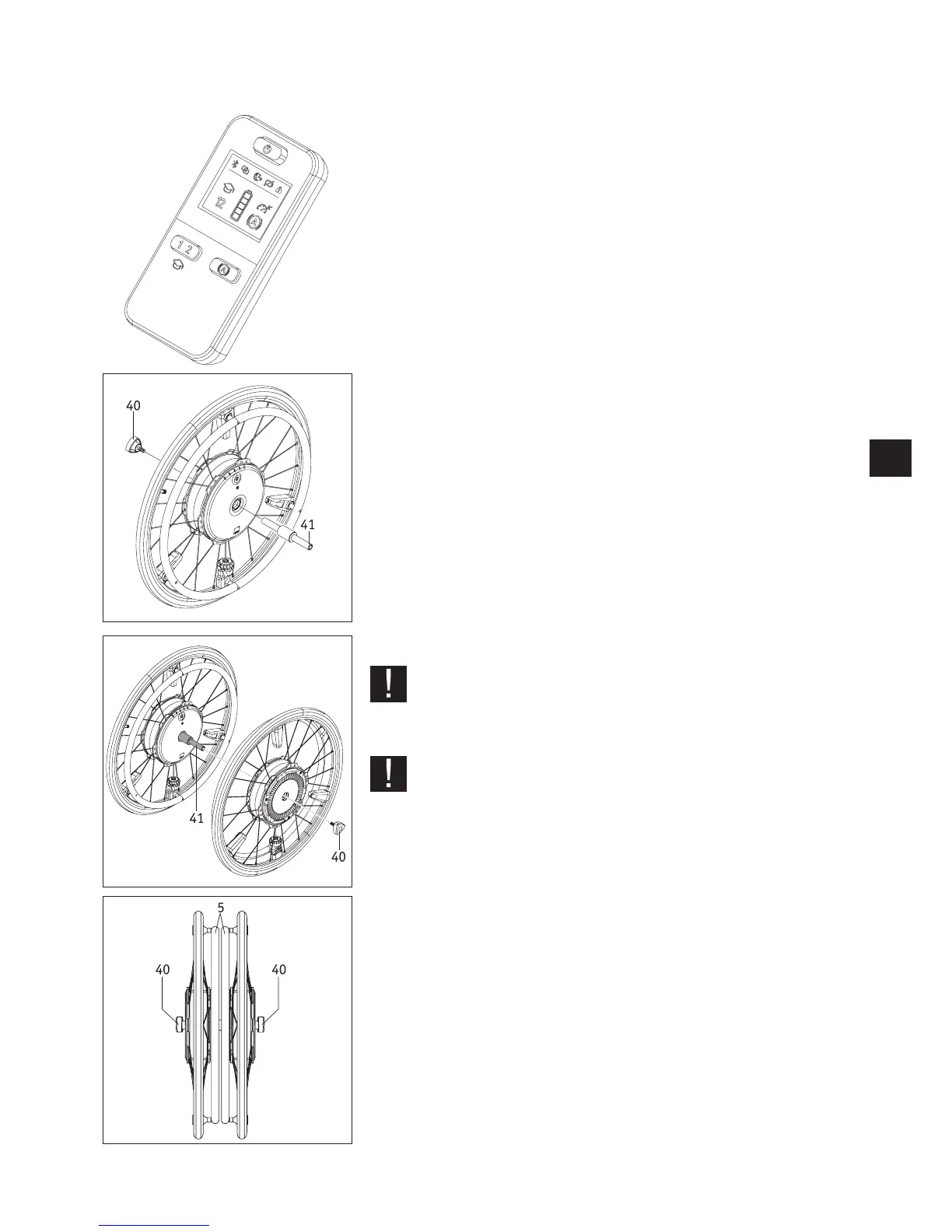
ECS remote control (art. no. 1592486)
As detailed in chapter 10, the e-motion has two assistance levels (which are set differ-
ently for each travel profile) and a hill-holder function.
These function are only available when using the optional ECS remote control or the
Mobility app with the Mobility Plus Package, which is available at an additional cost.
Stub axle for transport (1591362)
Connecting the e-motion wheels
• Switch off the e-motion wheels (see chapter 2.3).
• Take the wheels off the wheelchair and remove the stub axles [8].
• As shown in the diagram, push the axle [41] into the front of an e-motion wheel and
screw the wheel and axle together using the handle [40].
• Take the second e-motion wheel, push it onto the axle [41] front side first and screw
the wheel and the axle together using the second handle [40].
• Both wheels are now secured for transport.
After transport
• Unscrew the two handles [40] from the axle [41].
• Pull the axles [41] out of the two e-motion wheels.
• Screw the two handles [40] onto the axle [41] so that the three separate parts are
connected and cannot get lost.
Never hold an e-motion wheel by its push rims [5]. This could dam-
age the fitted sensor. Instead, hold the e-motion wheel by its tyre
or the wheel hub.
When connecting the wheels, take care not to switch them on inad-
vertently.
Both wheels must always remain switched off when transporting
them by plane.



 To Next Page