17
English
1. First steps
Thanks for purchasing the Albrecht DR 112 emergency radio.
Before you can start, you should fully charge the internal battery through the supplied
86%&FKDUJLQJFDEOH&RQQHFWLWWR DQ\VXI¿FLHQW SRZHUVRXUFH OLNHD ZDOODGDSWHU
PC, laptop or similar.
Before use, fully extend the antenna for the best DAB+/FM radio reception. Long press
the On/Off button XQWLOWKHUDGLRSRZHUVRQ,I\RXXVHWKHUDGLRIRUWKHYHU\¿UVWWLPH
the language selection menu will appear. Use the left and right buttons to select
DGLVSOD\ODQJXDJHDQGFRQ¿UPZLWKWKHOK button. The radio will then automatically
SHUIRUPDIXOOVFDQRIDOODYDLODEOH'$%VWDWLRQVDQGSOD\WKH¿UVWVWDWLRQDYDLODEOH
2. Basic functions
• Short press the On/Off button to switch between DAB, FM or Bluetooth mode.
• Save your favourite stations by long pressing the favourite button.
• Adjust the volume by using the and buttons.
• ,QHDFKPHQX\RXFDQFRQ¿UP\RXUVHOHFWLRQE\SUHVVLQJWKHOK button.
• Enter the menu by long pressing the EXWWRQ +HUH \RX FDQ ¿QG VHYHUDO
functions related to the current mode, as well as the main menu, where you can
set the alarm, select a language, adjust the backlight brightness and much more.
• USB-C headphones (or other headphones using an USB-C adapter, not all
models compatible) can be connected to the USB-C connector of the device.
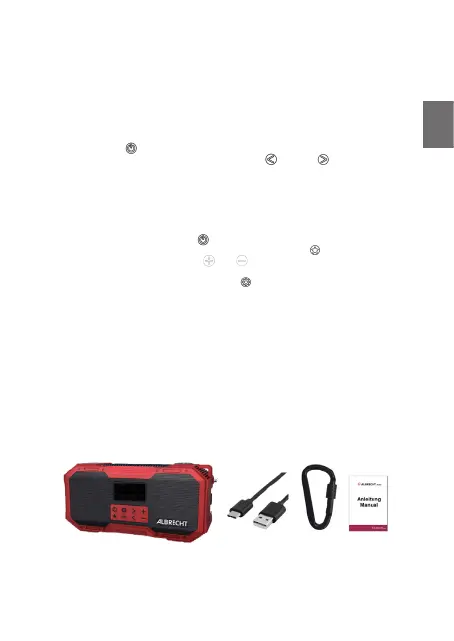
3. Scope of delivery
• ALBRECHT DR 112 emergency radio
• USB-C to USB-A charging cable
• Carabiner hook
• Instruction manual



 To Next Page