3
2. The Detachable Belt Clip is already attached to your Communicator and locates into the slot on
the back of the unit. If you want to remove the belt clip, press the locking lug at the top away
from the unit and slide the belt clip upwards to remove. To re-install, just slide the belt clip into
the slot and snap in place.
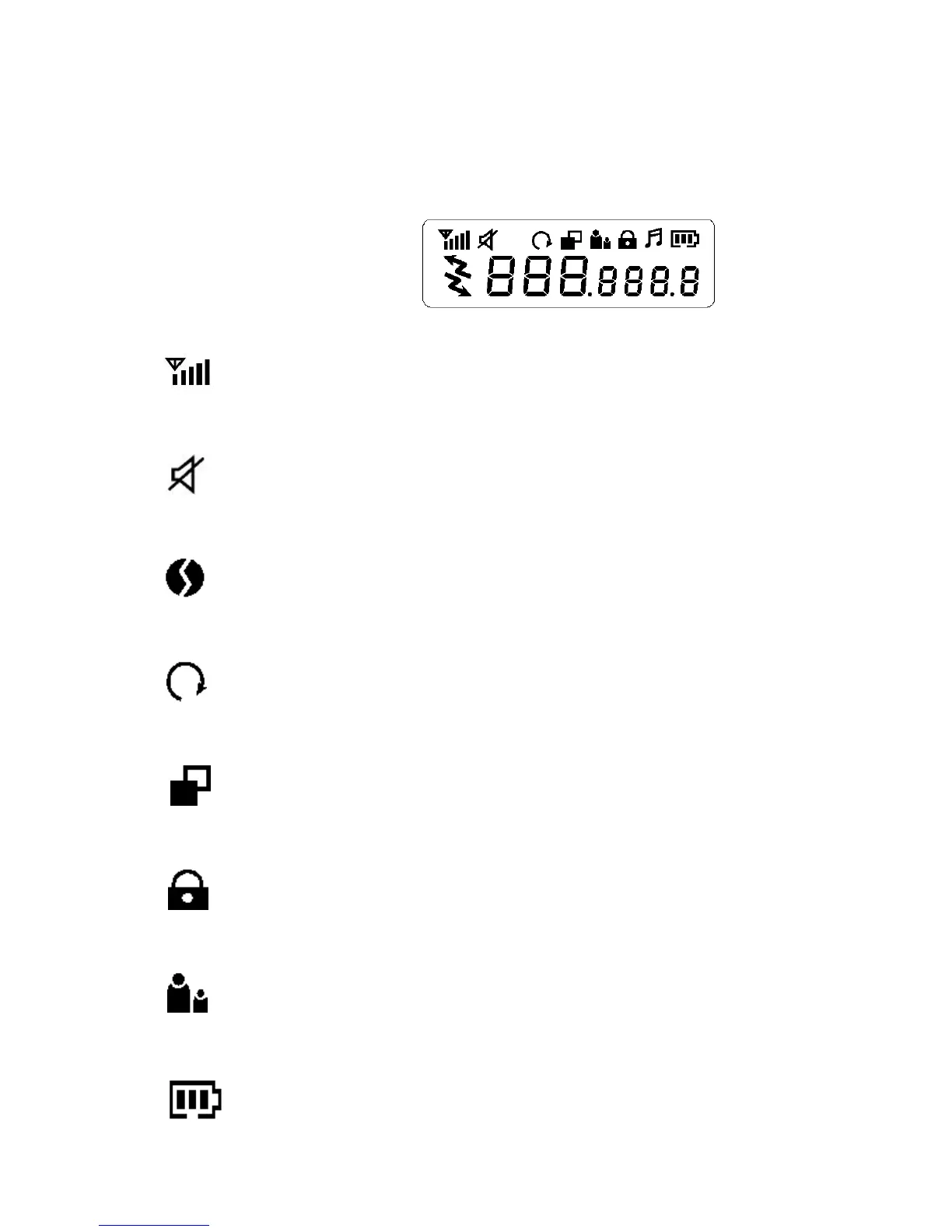
LCD PANEL ICON DESCRIPTIONS
1. RSSI (Receiving Signal Strength Indicator) or TX Bar Icon
Indicates the receiving signal strength and blinks during transmission.
2. Monitor Indicator
Appears when the monitor button is used.
3. CTCSS Indicator
Appears when the correct CTCSS tone is entered.
4. Auto Channel Scan Indicator
Appears in the auto scan mode or when the auto scan mode is activated.
5. Dual Watch Scan Indicator
Blinks in dual watch scan mode or Appears when the dual watch scan mode is activated.
6. Key Lock Indicator
Blinks in auto lock selection mode or Appears when the key lock is activated.
7. VOX Indicator
Blinks in VOX selection mode or appears when VOX is activated.
8. Battery Level Indicator









 To Next Page