User manual
8AL91434ENABed01 92 /113
5.3 ALE-150 SWB Corded Handset
5.3.1 Description
The ALE-150 SWB Corded Handset is a super wide band comfort wired handset.
5.3.2 Unboxing
• ALE-150 SWB Corded Handset.
• RJ11 cable.
• Safety and regulatory instructions.
5.3.3 Install a comfort wired handset
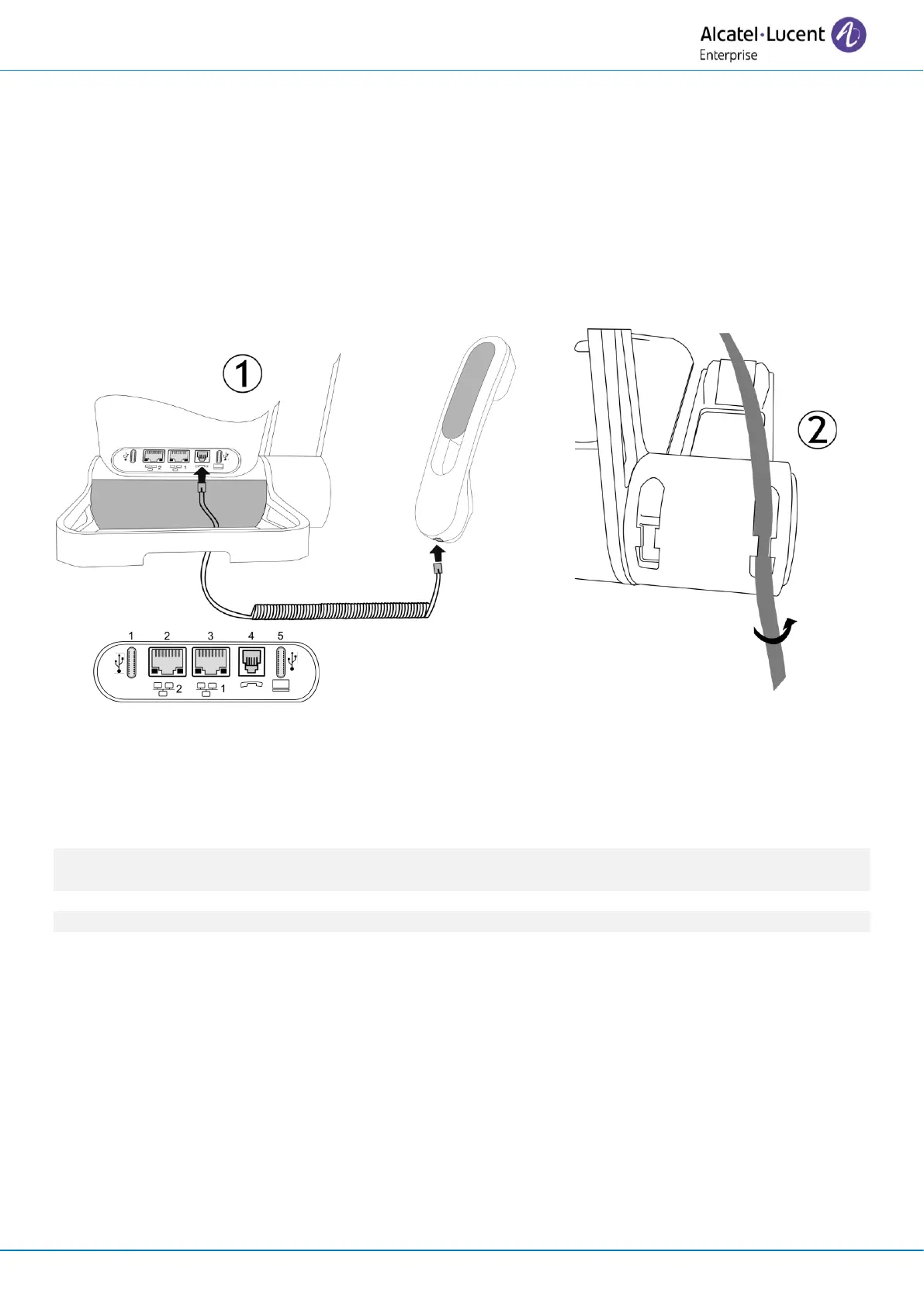
1. Plug-in the wired handset to the appropriate connector - connector number in the picture: 4.
Pay attention to the cable direction: the long side is on the back of the desk phone.
2. Put the cable in the notch under the handset's base of the desk phone as described in the picture
on the right. Twist the cable slightly against itself to help you to make it pass in the notch.
You can install a wired handset in place of the Bluetooth® Wireless Handset. To use a wired handset,
make sure the BT handset is unpaired or powered off.
To remove the cable, twist the cable slightly against itself to help you release it from the notch.



 To Next Page