User manual
8AL91434ENABed01 77 /113
4.11 Customize the color and the style of programmable softkeys
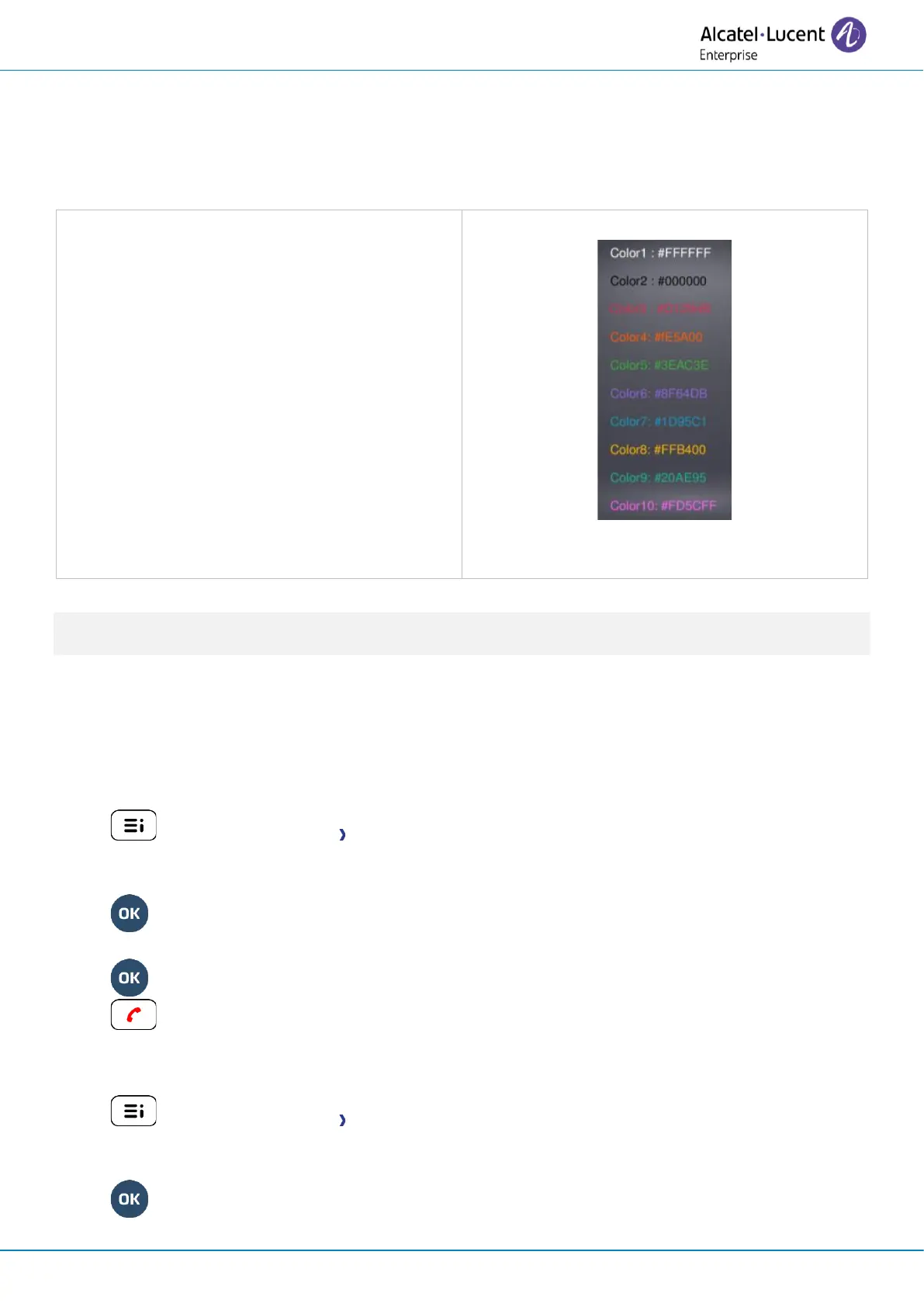
You can customize the color and style of the softkeys of the perso page and the add-on modules by
inserting a prefix in front of the label of the softkey.
When you program a softkey, add the prefix to the name of the softkey to customize it.
The prefix depends on the software version and
are defined as follow:
• \C: color
The prefix is followed by a number
between 1 and 10 which defines the color.
• \B: bold.
As a reminder, if you are using the alphanumeric keyboard: '\' is displayed by pressing '0' successively,
long press on '*' allows to display capital letters.
Use cases:
• SOS (Orange): \C4SOS
• SOS (Red, bold): \C3\BSOS
4.12 Modifying direct call keys
• long press (Or Settings Keys)
• Select the key to modify.
• Name: enter the name of the key.
•
• Number: enter the number to associate with the key.
•
•
4.13 Deleting direct call keys
• long press (Or Settings Keys)
• Select the key to delete.
• Clear
•



 To Next Page