The Configure Reports PanelConfiguring Reports
............................................................................................................................................................................................................................................................
365-360-001R6.0
Issue 1, December 2008
15-3
............................................................................................................................................................................................................................................................
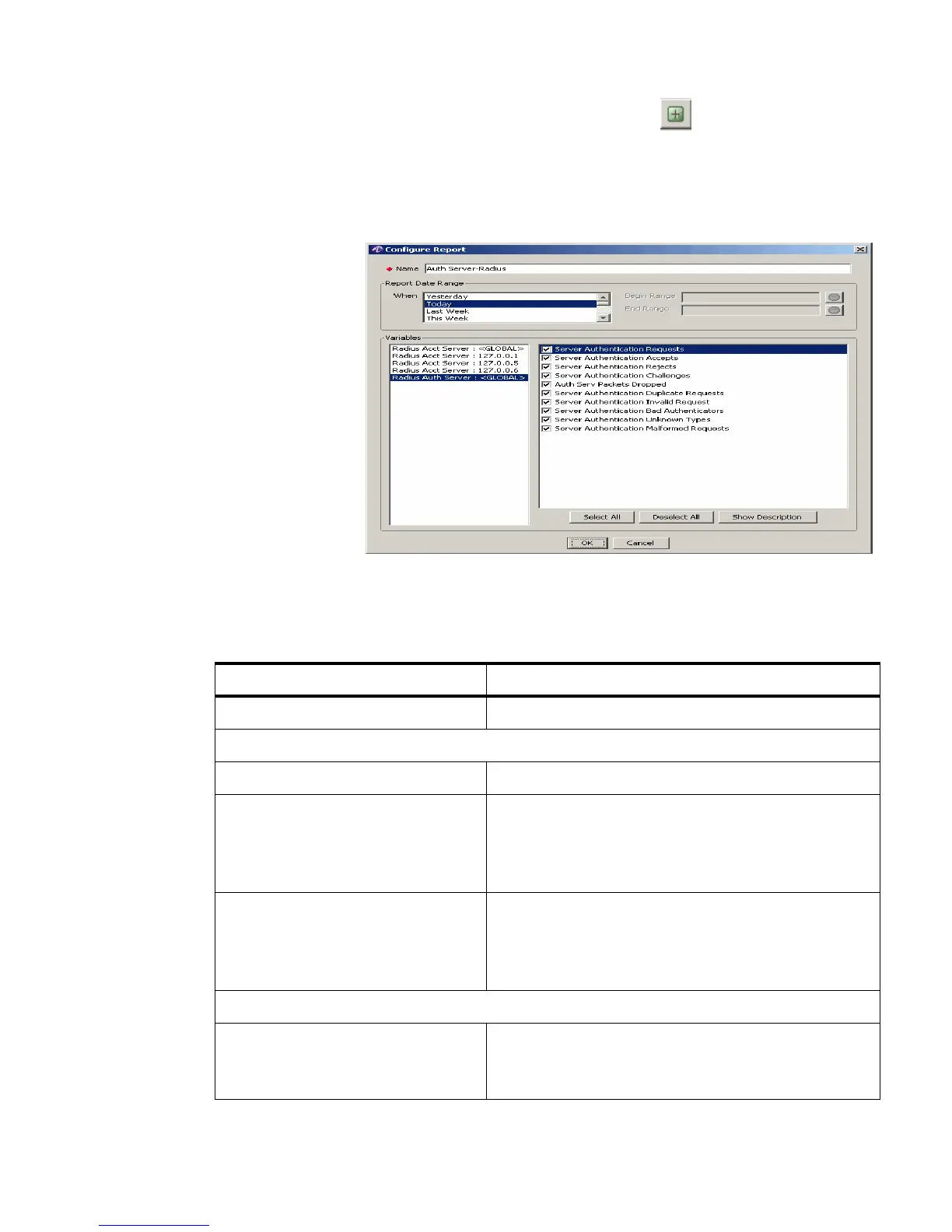
1. To Insert a record, click the Add a record action button, . The Configure Report
panel is displayed as shown in Figure 15-4. This panel allows you to add a
record/report and enter required information to configure a report as shown in
Figure 15-4.
Figure 15-4 Configure Reports Panel– Add record
Table 15-1 explains each of these fields and the field descriptions. There are two sets of
properties that you need to specify in this screen.
Table 15-1 Configure Reports Panel–Properties
Field Name Description
Name The name of the Report.
Report Date Range
When The day on which the report is created.
Begin Range The time/date range to begin the report.
Important!
This is taken by the system and
is not editable.
End Range The time/date range to end the report.
Important!
This is taken by the system and
is not editable.
Variables
Variables Displays a list of available groups on the left side. Also
displays a list of appropriate variables for the selected
group on the right side.



 To Next Page