2 Get Started
Get Started 3
Set Up Your Phone
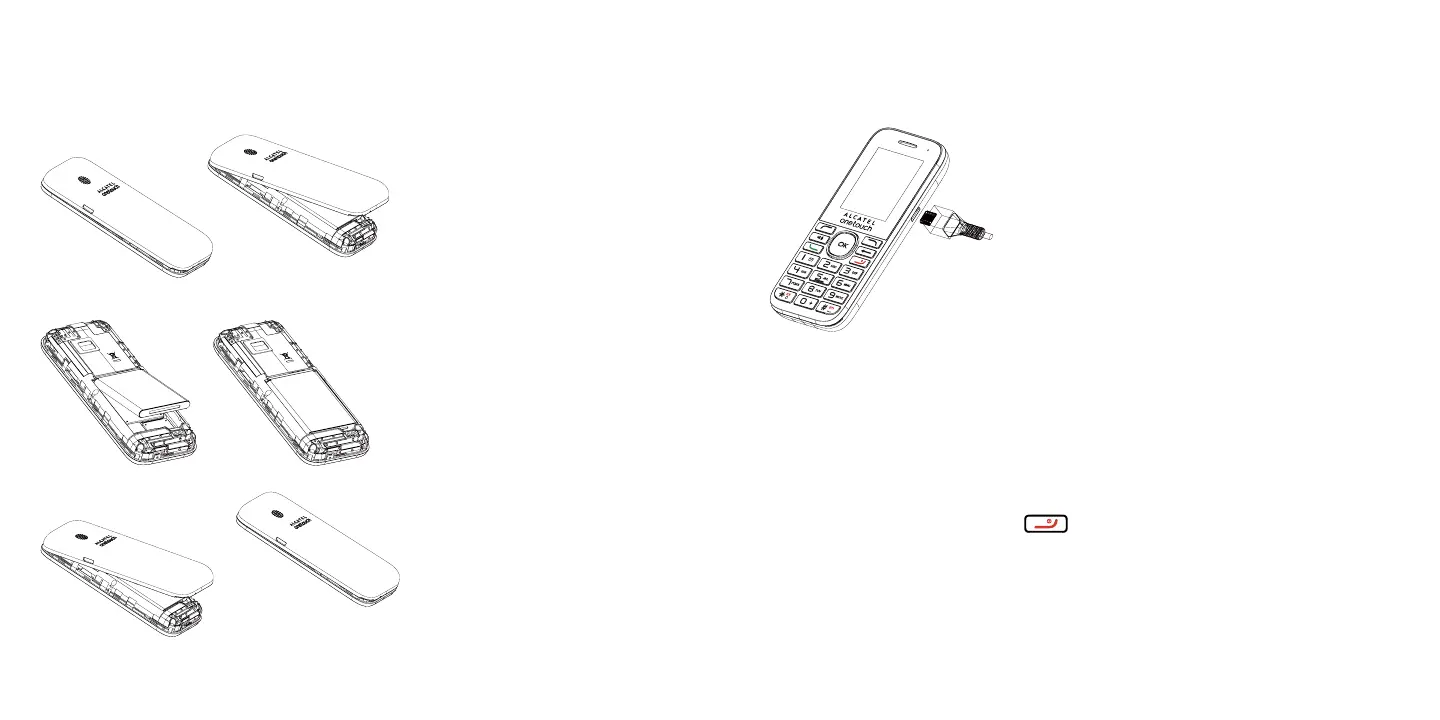
Insert the Battery
1. Remove the battery cover.
2. Insert the battery.
3. Attach the battery cover.
Note: Make sure all the tabs are secure and there are no gaps around the cover
Charge the Battery
1. Plug the USB connector into the charger/accessory jack on the right side of your phone.
2. Plug the other end of the USB cable into the AC adapter.
3. Plug the AC adapter into an electrical outlet.
4. After charging, disconnect the phone from the charger.
Note: You should fully charge the battery as soon as possible. Fully charging the battery may take up
to 2 hours.
Activate Your Service
Before using your phone, you need to activate your service with Assurance Wireless.
1. Press and hold the Power Button to turn your phone on.
ɒ Allow hands-free activation to connect the phone to our network and then allow the phone
to check for any updates.
ɒ The phone will power off.
2. After the phone turns back on, the device will ask you to complete the setup screens to
customize your phone. You will have to skip this step and complete Step 3 first.













 To Next Page