6 Phone Basics
Phone Basics 7
Phone Basics
Your phone is packed with features that simplify your life and expand your ability to stay
connected to the people and information that are important to you. The following topics will
introduce the basic functions and features of your phone.
Your Phone’s Layout
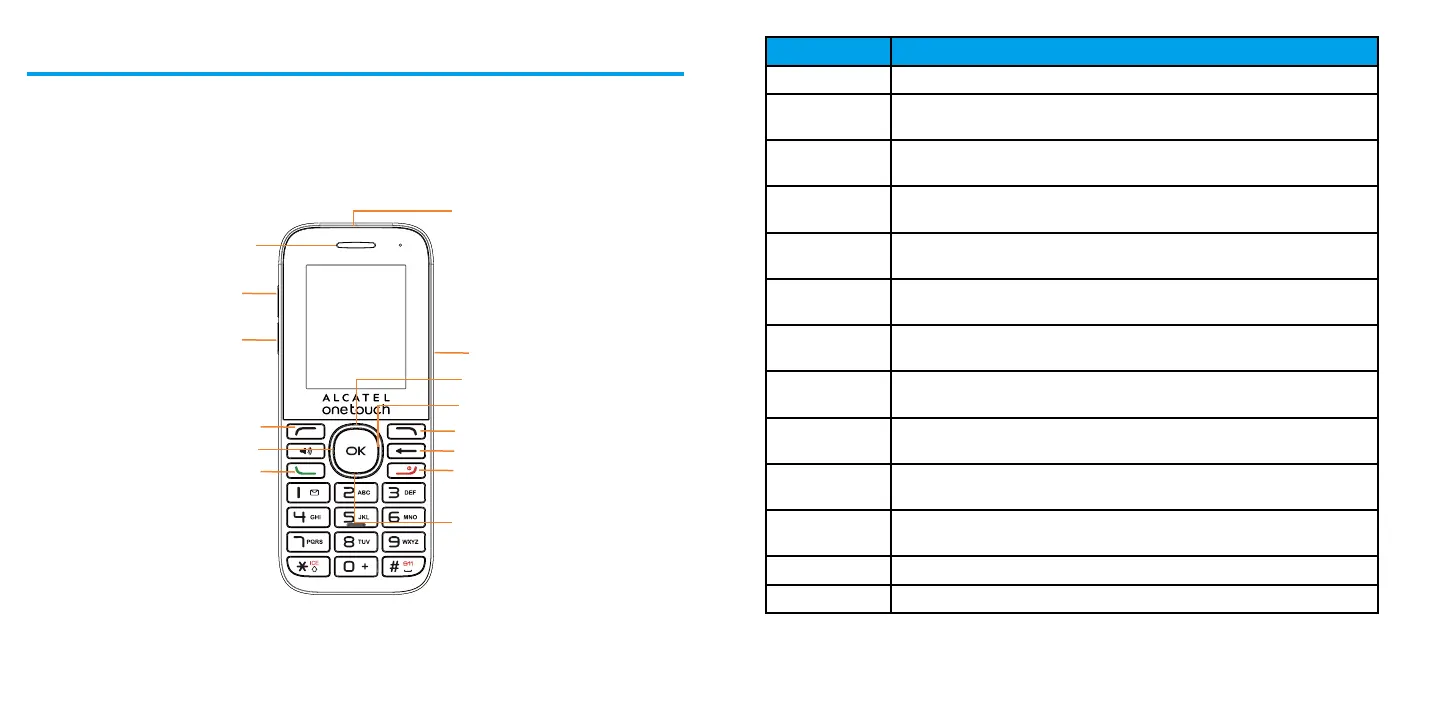
The illustrations and descriptions below outline your phone’s basic layout.
Item Function
Receiver Let you hear the caller and automated prompts.
Headset
connector
Allows you to plug in either a headset for convenient, hands-free
conversations.
Volume up key Allows you to increase the ringtone or media volume or adjust the voice
volume during a call.
Volume down
key
Allows you to reduce the ringtone or media volume or adjust the voice
volume during a call.
Micro-USB
Connector
Allows you to connect the phone charger or the USB cable.
Navigation up
key
Press to go up to view an item or confirm an option.
Navigation
down key
Press to go down to view an item or confirm an option.
Navigation left
key
Press to go left to view an item or confirm an option.
Navigation
right key
Press to go roght to view an item or confirm an option.
Left soft key Enter menu list from the Home screen, view an item or confirm an
option from other screen.
Right soft key Enter CONTACTS from the Home screen, view an item or confirm an
option from other screen.
Dial key View recent call history from the Home screen, dial the number.
Power/End key Turn on/off the phone, back to the Home screen.
CAUTION! Inserting an accessory into the incorrect jack may damage the phone.
Headset connector
Receiver
Volume up key
Volume down key
Micro-USB Connector
Navigation up key
Navigation right key
Right soft key
Back key
Power/End key
Navigation down key
Left soft key
Navigation left key
Dial key













 To Next Page