8 Phone Basics
Phone Basics 9
Turn Your Phone On and Off
♦ Press and hold the Power/End key .
Your screen remains blank while the phone is off (unless the battery is charging).
Navigate Through the Menus
The navigation keys on your phone lets you scroll through onscreen items. To navigate through a
menu, press up or down using the navigation keys.
Select Menu Items
As you navigate through the menu, menu options are highlighted. Select any option by
highlighting it and pressing OK key
. If the option is numbered, you can select it by pressing the
corresponding number on the phone’s keypad.
Back Up Within a Menu
♦ To go to the previous menu, press Back .
♦ To return to the home screen, press Home
.
Status Bar and Notification Panel
Your phone’s status and notifications are available at a glance at the top of the screen.
Status Bar
The status bar at the top of the home screen provides phone and service status information on
the right side and notification alerts on the left. To view the notification panel or access the quick
settings menu, pull down the status bar from the top of the screen.
Status Bar Layout
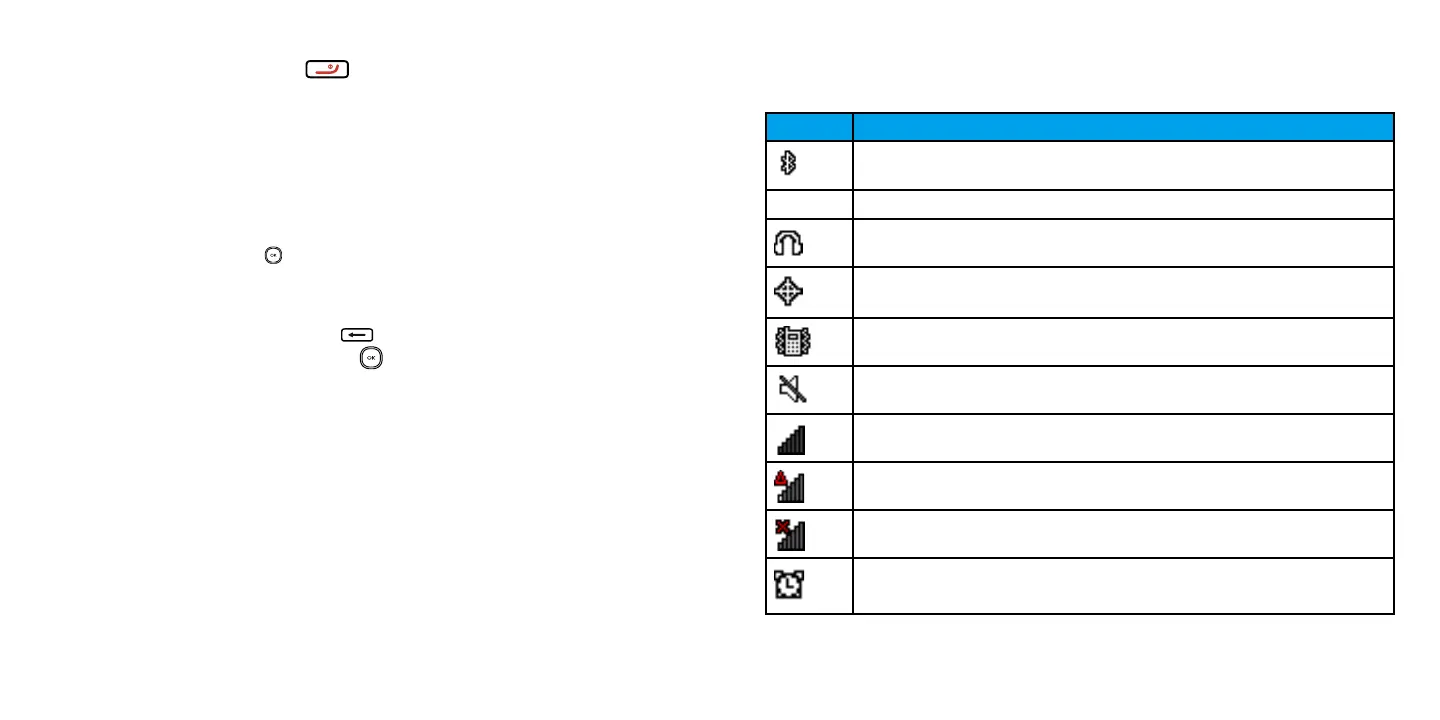
Main Status Icons
Icon Status
Bluetooth
Airplane Mode
Earphone
Location on
Vibrate
Silent
Network (full signal)
Network (no signal)
Network (roaming)
Alarm set














 To Next Page