19 20
1
4
2
8
5
6
7
9
3
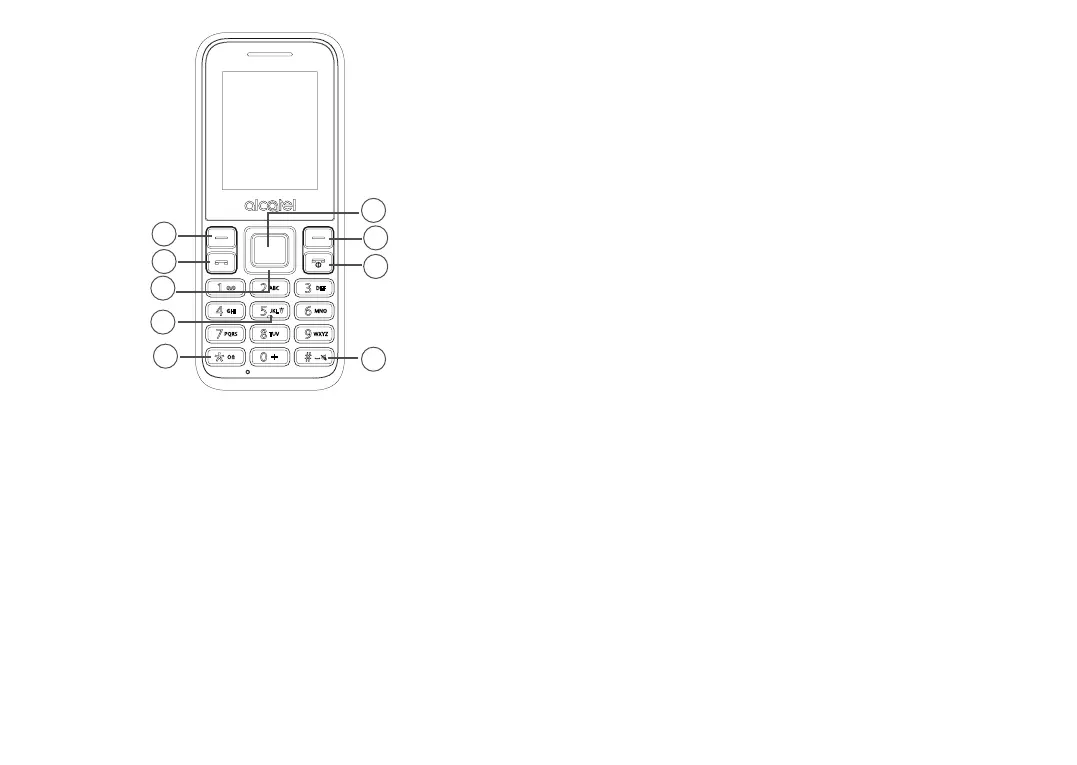
1. Centre soft key
• Confirm an option (press the middle of the key)
• Press: access to the app list (Home screen)
2. Left soft key
3. Call key
• Pick up/send a call
• Press: enter call log (from Idle screen)
4. Right soft key
5. End key
• Return to the previous screen, or close a dialog box or options
menu.
• Press: end a call
6. Navigation key
• Move to top, bottom, left or right menus.
Press (from Idle screen):
• Up/Down: to access volume adjustment
• Right: to access Alarm
• Left: to write a message
7. “5” key
In idle screen:
• Press: Input "5"
• Long press: switch on/off the torch
8. “*” key
In idle screen
• Press: Input “*”
• Long press: lock screen
In Edit mode:
• Press: change the input method
9. “#” key
Idle screen



 To Next Page