25 26
1.4.1 Status bar
(1)
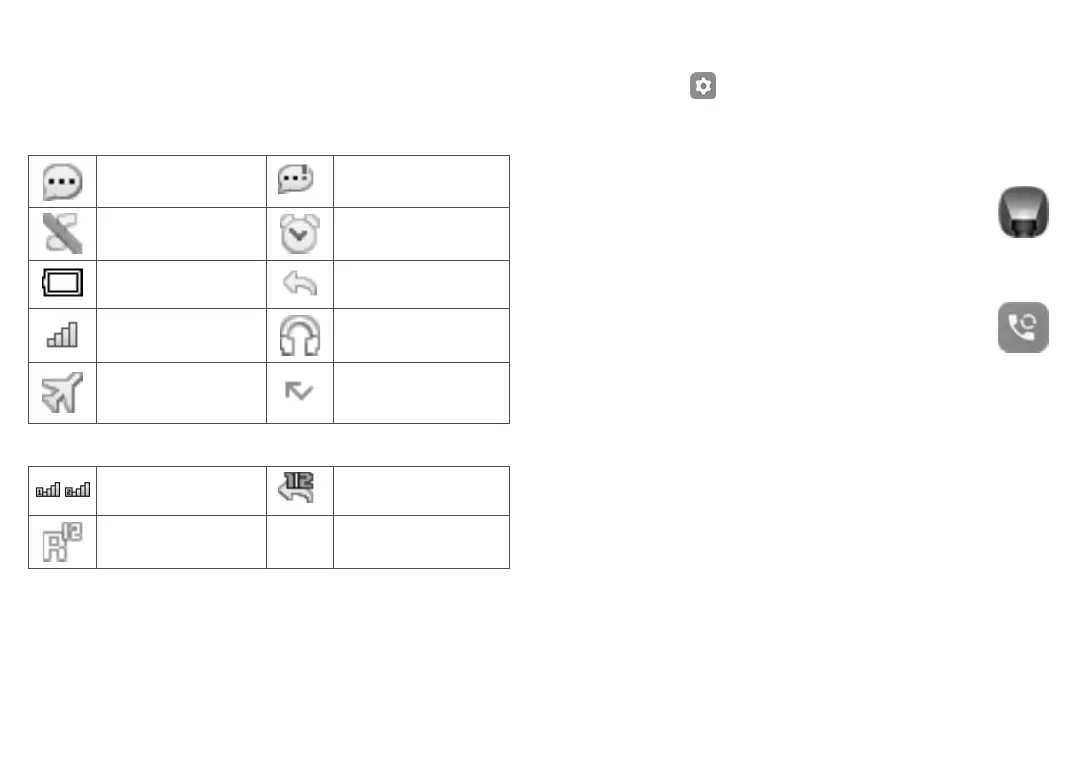
The Status bar appears at the top of your Home screen. Icons indicate
your phone’s status and new notification alerts appear in the Status
bar.
In 1068X
New message or
multimedia message
Message storage is full
Silent mode Alarm is set
Battery charge level Call divert
Level of network
reception
Headset connected
Aeroplane mode Missed calls
In 1068D
Level of network
reception
Call divert
Roaming
(1)
The icons and illustrations in this guide are provided for information
purposes only.
1.4.2 Change Home screen wallpaper
• From the Home screen, press the Centre soft key, select the
Settings icon , and then press the Navigation key to select
Phone settings > Display > Wallpaper > System or User defined.
• Select a new image and press the Left soft key to save. Exit and
the new image will then be displayed on your Home screen.
2
Torch ...................................
Access the application to turn On/Off the torch.
3
Call logs ..............................
3.1 Making a call
Dial the desired number, press the Call key to place the call, or press
the Right soft key to select a contact from Contacts. Use the up or
down action of the Navigation key to select the desired contact and
press the Call key. If you make a mistake, you can delete the incorrect
digits by pressing the Right soft key. To hang up the call, press the
End key.



 To Next Page