35 36
repeatedly until the next cursor is displayed.
• Press the key to switch between "abc--> ABC--> 123"
modes.
• To insert a punctuation mark or special character, press the
key.
• To enter a space, press the key.
• If you want to delete any previously typed letters or symbols,
press the Right soft key to delete them one by one.
An SMS message of more than a certain number of characters
(the number of characters depends on your language) will be
charged as several SMS. Specific letters (accented) will
increase the size of the SMS, this may cause multiple SMS to
be sent to your recipient.
6.3 SMS Settings
SIM Message setting
- SMSC address
You can view and edit your SMSC address.
- Validity period
You can set your message validity period as 1 hour, 6 hours, 12 hours,
1 day, 3 days, 1 week or Maximum.
Memory status
You can view the memory status of your SIM card and phone.
Save sent message
Select On/Off to save sent messages or not.
Preferred storage
Set the path for the location of your saved messages.
Character set
You can set the character code as Automatic or 7 bit.
7
Multimedia .......................
7.1 Image viewer
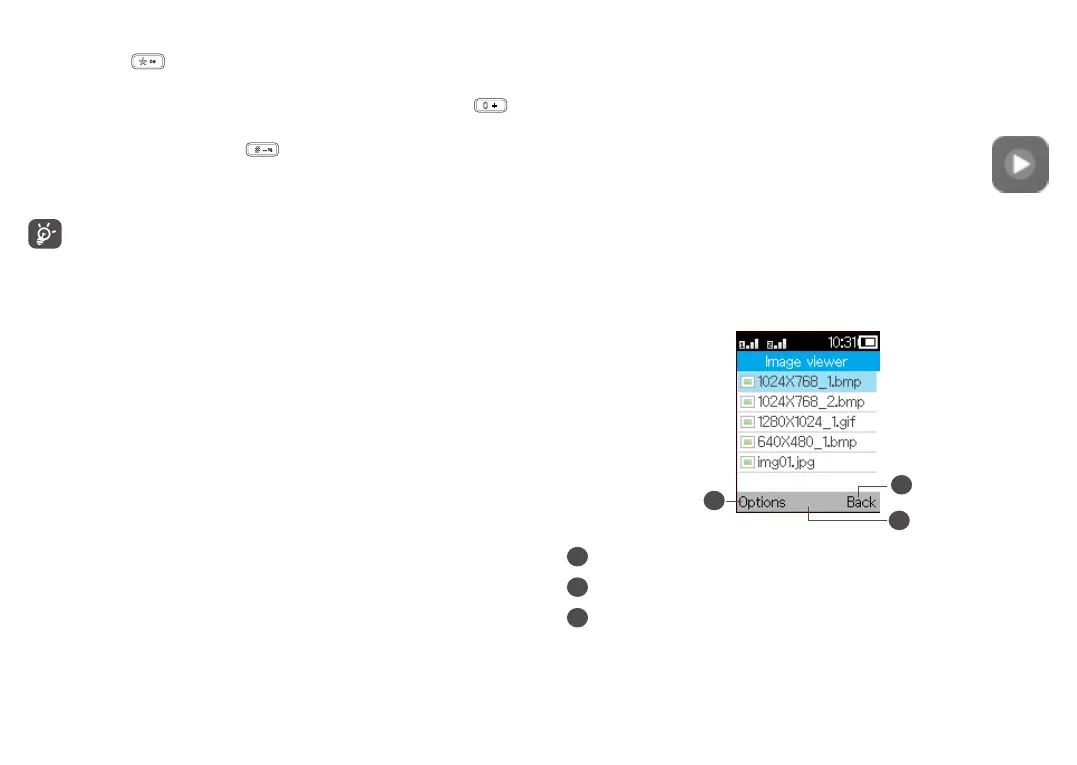
You can view images with this function.
To access this function, press the Centre soft key from the Home
screen and select Multimedia > Image viewer.
2
3
1
1
Press the Left soft key to access more options.
2
Press the Centre soft key to view the selected picture.
3
Press the Right soft key to return to Multimedia.



 To Next Page