21
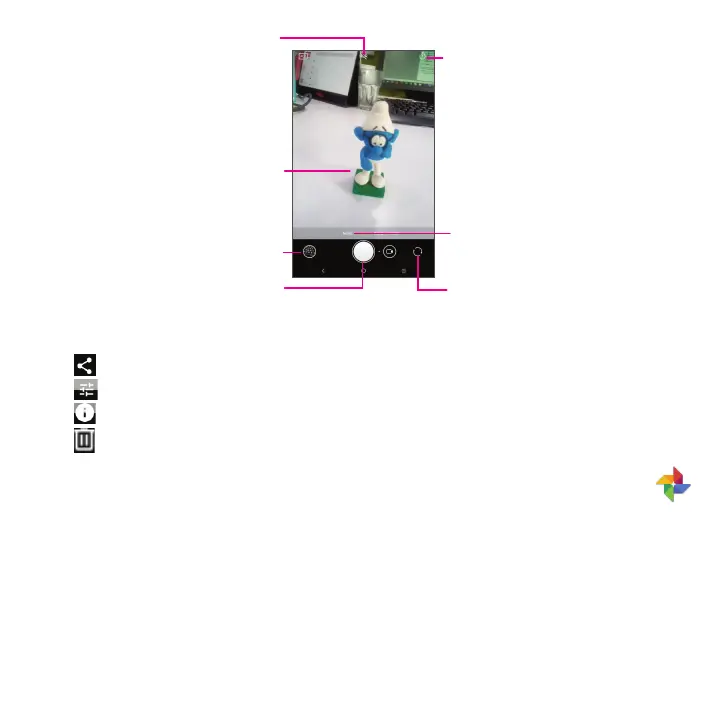
Pinch two fingers together to zoom
out and spread two fingers apart to
zoom in
Switch between front/
back camera
Take a picture
View the photos or videos you
have taken
Tap to change the camera
mode to Filter, Pano, Auto, etc.
Tap to turn on/off HDR
Tap to enable a countdown timer.
Further operations when viewing a picture/video you have taken
• Tap then Gmail, Bluetooth, MMS, etc. to share the photo or video.
• Tap
to edit.
• Tap
to get picture's detail information.
• Tap
to delete.
3.7 Photos .................................................................................................
All pictures and videos are stored in Photos for you to view, edit, share and more at your convenience.
To view the pictures and videos you have taken, tap Photos from the Home screen.
Working with photos
You can work with pictures by rotating or cropping them, sharing them with friends, setting them as a contact photo
or wallpaper, and more.
Tap on the picture or video you want to work on to view it full-screen.



 To Next Page