7
1.2 Setup
Inserting Nano SIM card and microSD
TM
card
The Nano SIM (Subscriber Identity Module) card identifies your device to the wireless network. A Nano SIM card or
Wi-Fi connection is required to browse the Internet. Your device includes a pre-inserted Nano SIM card.
Insert an optional microSD
TM
card to expand the storage on your device. Note: microSD
TM
cards are sold separately.
You don't need to power off your device before inserting or removing the Nano SIM or microSD
TM
cards.
Your device only supports Nano SIM cards. Do not attempt to insert other SIM types, otherwise you may
damage your device.
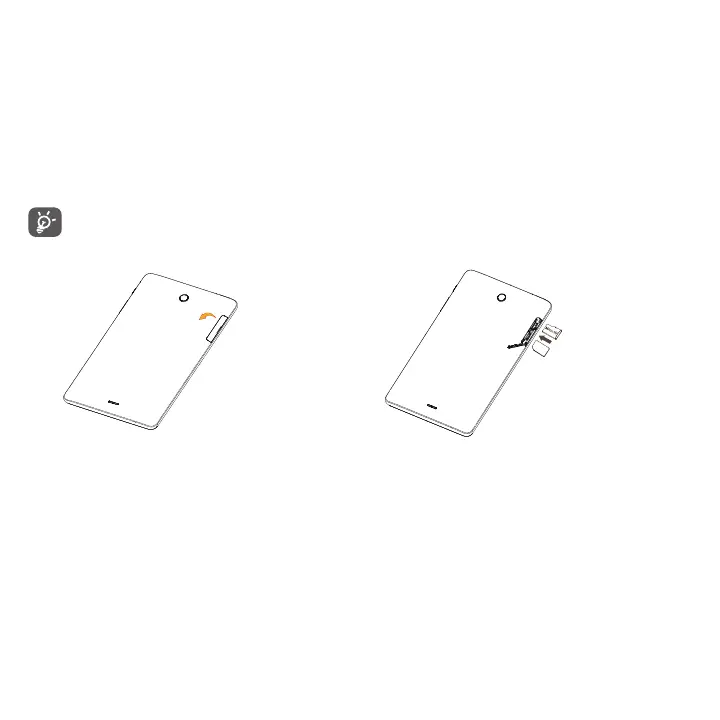
1. Open the slot on back of device. 2. Insert the Nano SIM or microSD
TM
cards with the gold contacts
facing down. The Nano SIM card goes in the lower slot.
Power on/off
Hold down the Power/Lock key until the screen lights up. If Lock screen settings are enabled, enter the unlock PIN,
password or pattern to access the Home screen.
If you don't know your PIN, password or pattern, or if you have forgotten it, contact your service provider. Do not
store your unlock PIN, password or pattern within your device, instead store it in a location that is accessible without
using device.



 To Next Page