47 48
My files
17
.........................
You will have access to all audio and visual files stored in phone or
Memory card in File manager.
17.1 Phone
An entry to access all files in all folders stored in phone.
17.1.1 My images
You can select an image or a photo as wallpaper, power on/off screen, or
assign it as incoming call image.
The images will be displayed in alphabetical order.
17.1.2 My videos
"My videos" album contains video clips recorded, received.
17.2 Memory card
You can access all files stored in the Memory card here.
When a Memory card is inserted for the first time, it will be
scanned and the default folders will be created.
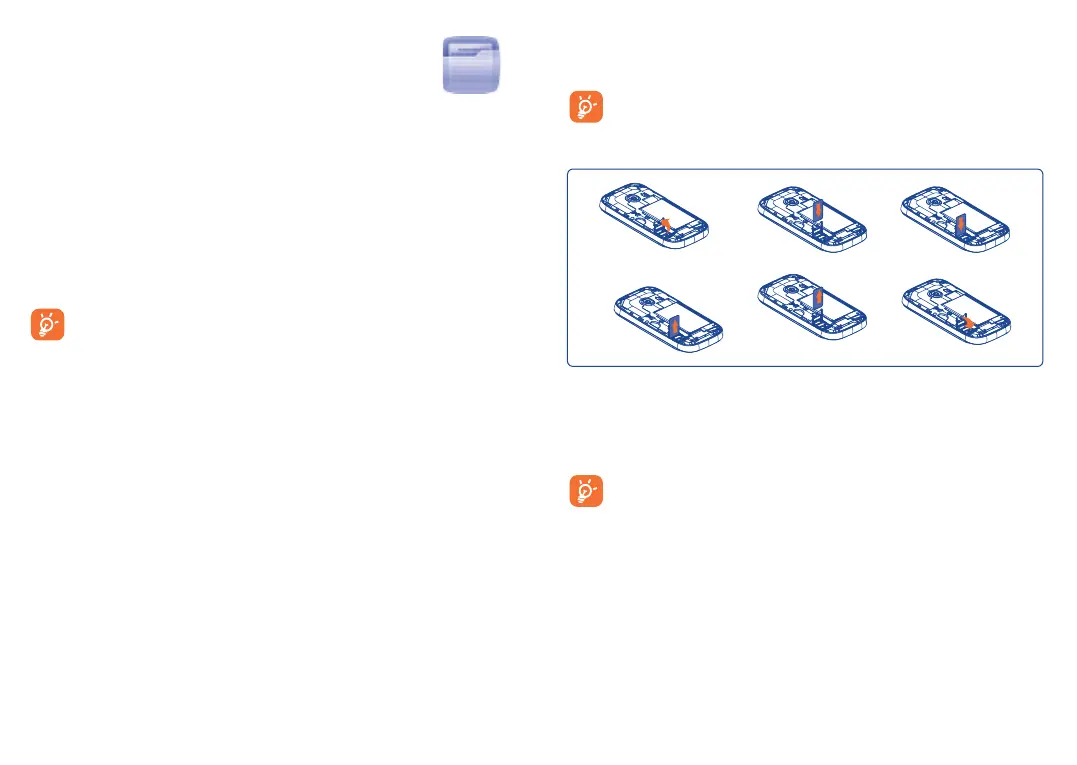
Inserting and removing the memory card:
To release the microSD card holder, slide it in the direction of the
arrow and lift it. Then insert the microSD card with the golden contact
downward. Finally, turn down the microSD holder and slide it in the
opposite direction to lock it.
Do not support hot plugging for microSD card.










 To Next Page