9. The tool menu (functions)
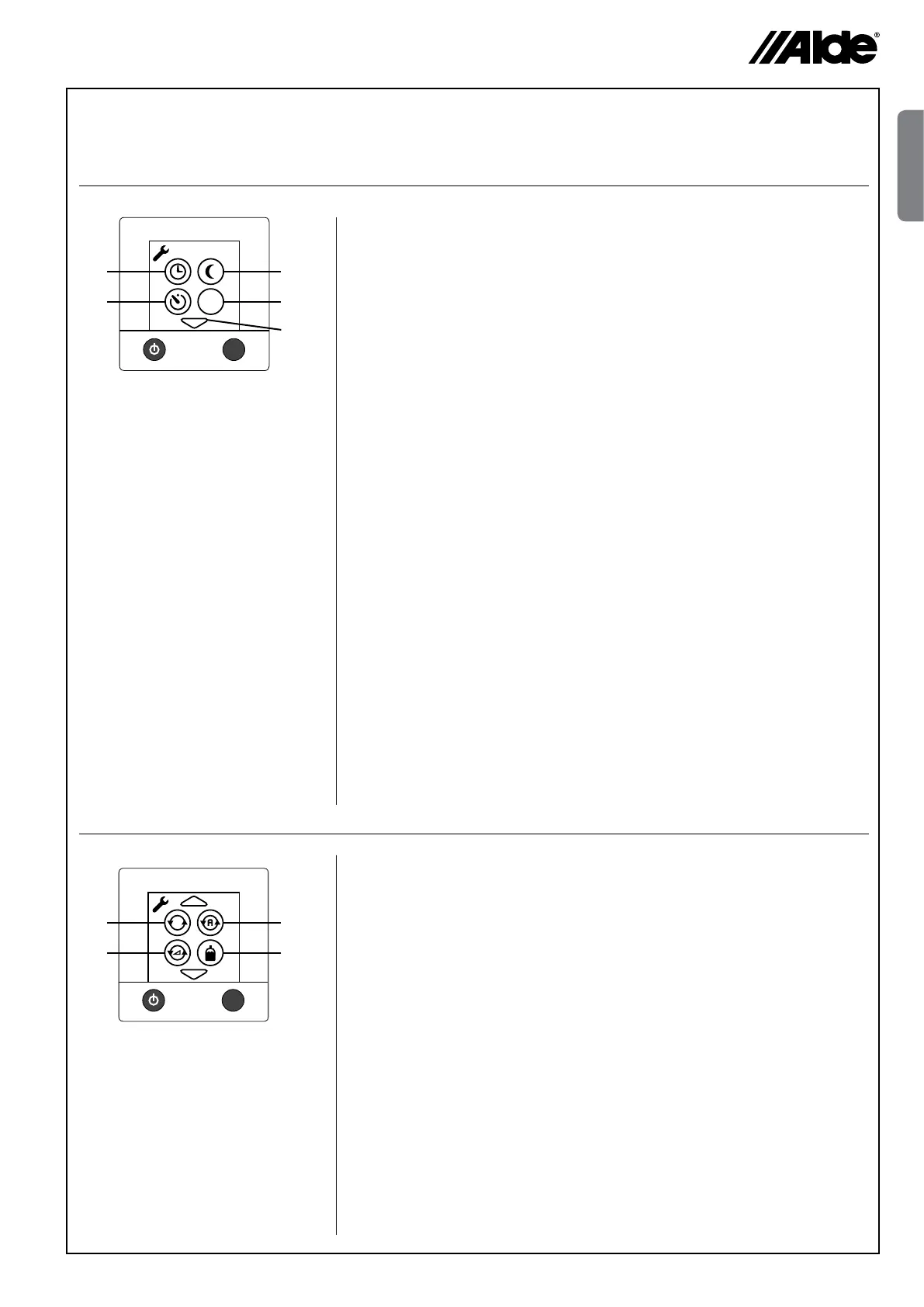
When you are in the tool menu (see section 8), you can use the tools described below. Step between the various
tool elds by pressing the up or down arrow symbols. You can always leave the tool menu with the MENU button.
1. Arrow symbols
Step between the various tool elds by pressing the up or
down arrow symbols. You can always leave the tool menu with
the MENU button.
2. Clock
The clock must be set if automatic temperature change or automatic
start is to be used. If 12V voltage is lost, the clock will stop and will
no longer be displayed. This is prevented with an optional mounted
battery backup.
3. Automatic temperature change
This function is used when you want to programme a timed
temperature change, for example, to have the heating temperature
raised in the morning and lower during the night.
4. Starting the boiler automatically
This function is used to start the boiler automatically at a later point
of time. With automatic start, the boiler works for 24 hours and
then stops. After that, it repeats the automatic start once a week;
at the same day and time, as long as the function is activated. For
automatic start to function, the On/Off button must be set in the OFF
position.
5. Load monitor
This function is used to prevent the 230V fuses being overloaded.
If the total power consumption of the vehicle, boat or building
exceeds the set value, the boiler’s power will be automatically
reduced. On account of voltage variations and tolerances, different
setting levels can be selected (for example, for 6A fuse, one can
choose 5, 6 or 7 Amp setting). If the fuse does not hold, choose a
lower set value. The function is disconnected in the factory setting.
The load monitor has to be installed for the function to be used (see
the vehicle, boat or building manual).
1. Constant pump operation
With this function, the selected pump is constantly operating.
The function is disconnected in the factory setting. This function limits
access to warm water, especially if not much heating is needed.
2. Pump Auto / 12V
In the Auto mode, the 230V pump operates, and when 230V is
disconnected, the 12V pump starts. In 12V mode, the 12V pump is
used even if 230V is connected. The Auto function is activated in the
factory setting.
3. Pump speed
The circulation pump’s capacity can be controlled from the panel. A
pump with this control must be installed in order that this function can
be used (see vehicle, boat or building manual). Available as from the
2010 model.
4. Cylinder indicator
This function is used in combination with a cylinder change over device
(Duocomfort) and indicates whether a LPG cylinder is empty.
The heating (Eis Ex) of the valve can also be controlled.
MENU
Amp
2
3
4
5
1
MENU
1
2
3
4
9.1
9.2
GB


 To Next Page